iceberg
 iceberg copied to clipboard
Published
20 hours ago •
 pharo-vcs
pharo-vcs
Improve discoverability of features in the UI
Using #1662 as an example, the UI could be improved.
As I understand, there are four principal kinds of windows:
- the list of
Repositories, the main Iceberg window fromMain menu>Sources>Ivcbergor Ctrl+O+I; - the
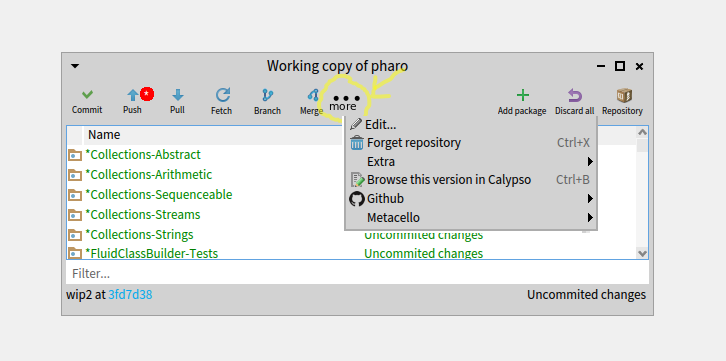
Working copy ofof a given repository. Accessible withPackages(Ctrl+P) or double-click; - the
Repository ofa given repository. Accessible withOpen Repository(Ctrl+R); - the
Commit ona given repository. Accessible withCommit(Ctrl+S).
Various operations are available in these windows trough toolbar buttons or context menu entries. Unfortunately, only a subset of operations in the context menu of Repositories is available in the other windows, especially the Working copy.
A possibility could be to have an extra 'Other' button that open popup with the missing operations.

@privat Not sure I understand what exactly is needed. You want the "Working copy" in the menu?
Feel free to propose the change as pull request (PR)