
pharo
 pharo copied to clipboard
 pharo-project
Ctrl+key combinations don't work on Linux since build 1029
Describe the bug Ctrl+key don't work
To Reproduce Steps to reproduce the behavior:
- Open a new Pharo 9.0 VM
- Use Ctrl+O+B
- nothing happens
Expected behavior This should open a new browser.
Version information:
- OS: Linux
- Version: 5.10.21
Expected development cost As you know nothing happens magically, so do you have an idea of the development effort required? No In addition, are you willing to help because after all Pharo is yours too? Yes

Thanks for opening your first issue! Please check the CONTRIBUTING documents for some tips about which information should be provided. You can find information of how to do a Pull Request here: https://github.com/pharo-project/pharo/wiki/Contribute-a-fix-to-Pharo
GitHub
Pharo is a dynamic reflective pure object-oriented language supporting live programming inspired by Smalltalk. - pharo-project/pharo
![welcome[bot] avatar](https://avatars.githubusercontent.com/in/4141?v=4 "Published by a pub.dev verified publisher")
Hi @ecocode, would you mind telling us how you downloaded Pharo?
I just took a ubuntu20.04 VM and did
$ wget -O - get.pharo.org/64/90+vm | bash
$ ./pharo-ui Pharo.image
Then Ctrl+O+W and a playground opened, then Ctrl+O+B and a browser opened.
Are you using the Pharo launcher? Could you share the VM version you're using (as it appears in the system reporter)?

I am using Pharo Launcher version 2.2. I click on New and in "Official distributions" I select Phar0 9.0-64bit(development version,latest) and create a new image. Then I Ctrl+O+W and nothing happens, with or without open playground.
In the "VM General" I have this mentioned:
Virtual Machine
/home/ec/Pharo/vms/90-x64/lib/pharo/5.0-202002121043/pharo CoInterpreter * VMMaker-CompatibleUserName.1580983506 uuid: 7aff73cb-5a2e-5002-a356-37de4e762a49 Feb 12 2020 StackToRegisterMappingCogit * VMMaker-CompatibleUserName.1580983506 uuid: 7aff73cb-5a2e-5002-a356-37de4e762a49 Feb 12 2020 VM: 202002121043 https://github.com/pharo-project/opensmalltalk-vm.git Date: Wed Feb 12 11:43:20 2020 CommitHash: 52202d8 Plugins: 202002121043 https://github.com/pharo-project/opensmalltalk-vm.git
Unix built on Feb 12 2020 11:06:28 Compiler: 5.4.0 20160609 VMMaker versionString VM: 202002121043 https://github.com/pharo-project/opensmalltalk-vm.git Date: Wed Feb 12 11:43:20 2020 CommitHash: 52202d8 Plugins: 202002121043 https://github.com/pharo-project/opensmalltalk-vm.git CoInterpreter * VMMaker-CompatibleUserName.1580983506 uuid: 7aff73cb-5a2e-5002-a356-37de4e762a49 Feb 12 2020 StackToRegisterMappingCogit * VMMaker-CompatibleUserName.1580983506 uuid: 7aff73cb-5a2e-5002-a356-37de4e762a49 Feb 12 2020
erik colson
I just took a ubuntu20.04 VM and did
$ wget -O - get.pharo.org/64/90+vm | bash
$ ./pharo-ui Pharo.image
I tried with exactly the same on my Fedora 33 system and still have the same issue.
just tried in a Fedora 33 VM and there it works. Still not on my Fedora 33 main system. Maybe it is linked to awesomewm which is my window manager
Hi Eric, I think what is happenning is related to this: https://github.com/pharo-project/pharo/commit/15f7c48a5446a6f0375aa7de070675c0f16493ad
I did misread your VM's log, you're using a 1 year old VM (2020, yes, not 2021. Sorry, I think confinement has messed up my time perception). You should update your VM to a newer one. Could you try that?
In the pharo launcher the is the VM manager button:
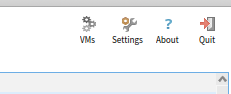
Then select the one for 90-x64 (assuming you're on a x64 linux), and click on update.
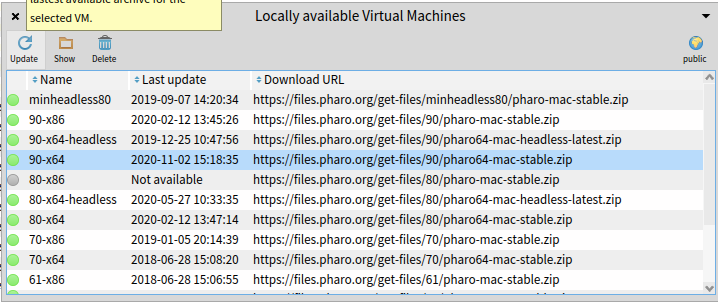
The date should show at least november 2020 (2020-11-02)
Hi @guillep
I tried what you said and it keeps giving me "2020-02-12". The only difference I can see with your screenshot is that on my system it says "pharo64-linux-stable.zip" instead of "pharo64-mac-stable.zip". Pushing Update does fetch something, but nothing changes in the list. I also deleted the VM and refetched it and nothing changed..
Also, I verified and am sure that the vm gets deleted from harddisk when I delete it in Pharo Launcher.
Hi @ecocode,
Do you still experience this bug? I am on linux (arch-based) and it works using the VMs 110-x64, 100-x64

the last question on this issue was from Sept7, 2022. No Answer, which means we can close this issue
