

 pgf-tikz
With libs bending and arrows.meta, arrow is beyond doubled path
Brief outline of the bug From https://tex.stackexchange.com/q/553050
When both bending and arrows.meta libraries are loaded, arrow added to doubled and curved path is put beyond the path. If an arrow tip from older arrow library is used, then the problem disappears.
Using the repo at latest commit 43b7d10a, problem reproduces.
Minimal working example (MWE)
\documentclass{article}
\usepackage{tikz}
\usetikzlibrary{bending}
\usetikzlibrary{arrows.meta}

\begin{document}
\begin{tikzpicture}
  \draw (90:1.5) -- (0,0) -- (0:1.5);
  \draw [double,->] (1, 0) .. controls (1, .7) and (.7, 1) .. (0, 1);
\end{tikzpicture}
\end{document}
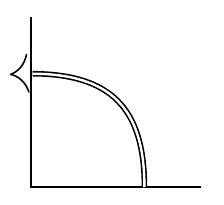


The problem is actually even worse. If you add multiple arrow heads, not only does one of them shifted but the others get ignored.
\documentclass{article}
\usepackage{tikz}
\usetikzlibrary{bending}
\usetikzlibrary{arrows.meta}

\begin{document}
\begin{tikzpicture}[>={Latex[bend]}]
  \draw (90:1.5) |- (0:1.5)  (3,1.5) |-(4.5,0);
  \draw [double,-{Latex[bend].Latex[bend]}] (1, 0) .. controls (1, .7) and (.7, 1) .. (0, 1);
  \draw [blue,-{Latex[bend].Latex[bend]}] (4, 0) .. controls (4, .7) and (3.7, 1) .. (3, 1);
\end{tikzpicture}
\end{document}

Use -{Latex[bend].Latex[bend,color=red,scale=.8]} and you can see the second arrow tip is just on top of the first one.
The arrow size is wrongly calculated. My previous investigation didn't give anything worth to share, but only a pgf example:
\documentclass{article}
\usepackage{pgf}
\usepgfmodule{bending}
\usepgflibrary{arrows.meta}

\begin{document}
\begin{pgfpicture}
  % help line
  \pgfpathmoveto{\pgfpointorigin}
  \pgfpathlineto{\pgfqpoint{90pt}{0cm}}
  \pgfusepath{stroke}

  % doubled line with a flexed arrow
  \pgfsetlinewidth{5pt}
  \pgfsetinnerlinewidth{1pt}  % comment this line or remove "flex" in next line,
  \pgfsetarrows{-Latex[flex]} % problem disappeared
  \pgfpathmoveto{\pgfpointorigin}
  \pgfpathcurveto
    {\pgfpoint{30pt}{30pt}}{\pgfpoint{60pt}{30pt}}{\pgfpoint{90pt}{0pt}}
  \pgfusepath{stroke}
\end{pgfpicture}
\end{document}

The file pgfcorearrows.code.tex is full of statements like
  \ifdim\pgfinnerlinewidth>0pt%
    \pgfmathsetlength\pgfutil@tempdimb{.6\pgflinewidth-.4*\pgfinnerlinewidth}%
  \fi%
(this one is from \pgfarrowsdeclare{stealth}{stealth}) but one does not find analogous statements in the arrows.meta pgf library (except for a few cases in which the arrows are reversed). However, the fact that the problem seems only to arise in connection with flexing seems to indicate that it is not just that the creators of arrows.meta did not think about double lines.