pgf-tikz
Order of 'line width' and 'dash pattern' arguments changes dash dot line appearance
Brief outline of the bug
Specifying the line with before or after the dash pattern of a drawn path changes its appearance.
The order of parameters is normally interchangeable without impact on the result.
Minimal working example (MWE)
\documentclass{standalone}

\usepackage{tikz}

\begin{document}
    \tikz{
        \useasboundingbox (-.5,-.5) -- (1.5,1);
        \draw[very thick, dash dot] (0,0) -- (1,0);
        \draw[dash dot, very thick] (0,.5) -- (1,.5);
    }
\end{document}

The order of parameters is normally interchangeable without impact on the result.
That's news to me. As far as I know there is no such thing as topological ordering for pgfkeys.

The order of parameters is normally interchangeable without impact on the result.
That very much depends. I can't speak for all of pgf, but the classic core LaTeX example is \includegraphics. Keys are applied as they are read, which means for example angle = 45, scale = 0.5 and scale = 0.5, angle = 45 have different results (and that scale = 0.5, scale = 0.5 results differently from just scale = 0.5).
Hmm some dash options having "dot" in their names, including the dash dot, make use of the (value of) current line width. I guess here line width is used to get a visually (squared) "dot".
The first portion of these options were introduced in 968ed27d (added opacity, 2005-09-21).
At least this behavior should be documented. (Actually from time to time I thought about the idea of showing definitions of simple style keys in their docs, not only when using pgf-tikz, but also tcolorbox.) https://github.com/pgf-tikz/pgf/blob/bbb8e8f5f79056ae9b62017796bdcaf262f8be32/generic/pgf/frontendlayer/tikz/tikz.code.tex#L1531-L1549
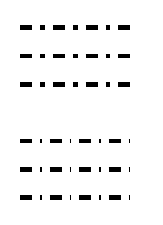
An example showing order dependent original use cases and order independent emulations
\documentclass{article}
\usepackage{tikz}

%% implementation in tikz.code.tex
% \tikzset{very thick/.style=              {line width=1.2pt}}%
% \tikzset{dash dot/.style=                {dash pattern=on 3pt off 2pt on \the\pgflinewidth off 2pt}}%

\begin{document}

\begin{tikzpicture}%[scale=3]
  \draw[very thick, dash dot] (0, 0) -- +(1, 0);
  % emulation, order independent
  \draw[line width=1.2pt, dash pattern=on 3pt off 2pt on 1.2pt off 2pt]
    (0, -.25) -- +(1, 0);
  \draw[dash pattern=on 3pt off 2pt on 1.2pt off 2pt, line width=1.2pt]
    (0, -.5) -- +(1, 0);

  \begin{scope}[yshift=-1cm]
    \draw[dash dot, very thick] (0, 0) -- +(1, 0);
    % emulation, order independent; initially line width is 0.4pt
    \draw[dash pattern=on 3pt off 2pt on .4pt off 2pt, line width=1.2pt]
      (0, -.25) -- +(1, 0);
    \draw[line width=1.2pt, dash pattern=on 3pt off 2pt on .4pt off 2pt]
      (0, -.5) -- +(1, 0);
  \end{scope}
\end{tikzpicture}
\end{document}

With the key value system, unless you are going to order them you can't fix this problem. It's actually quite common to have ordering affecting things.
In this case we might have chosen to have line width going into /.prefix style or something that injects in the earlier stage. But I think that ship has sailed. If you are going to touch these please get rid of the tikzstyle stuff and convert to \tikzset.

With the key value system, unless you are going to order them you can't fix this problem. It's actually quite common to have ordering affecting things.
You can do it by documenting that the keys are evaluated in some fixed order, and then implementing the same (keys are properties): I do that with siunitx for example. But it does require thought.
There are cases of delayed expansion that would trigger someone's OCD. Decorations are always weird for example. No promise is the right way about this in my opinion but not very strongly.
An attempt which provides dash pattern lazy and dash dot lazy (lazy versions of other dash styles based on dash pattern and the basic dash phase and dash options could be similarly defined):
\documentclass{article}
\usepackage{tikz}

\makeatletter
\tikzset{
  % lazy evaluation version of "dash pattern"
  % syntax: on 2pt off 3pt on 4pt ...
  dash pattern lazy/.code={%
    \def\tikz@temp{#1}%
    \ifx\tikz@temp\pgfutil@empty%
      \def\tikz@dashpattern{}%
      \tikz@addoption{\pgfsetdash{}{0pt}}%
    \else
      % option "line width" sets \pgflinewidth eagerly, thus inside
      % \tikz@addoption the \pgflinewidth is ensured finalized and updated
      \tikz@addoption{%
        \def\tikz@dashpattern{}%
        \expandafter\tikz@scandashon\pgfutil@gobble#1o\@nil%
        \expandafter\pgfsetdash\expandafter{\tikz@dashpattern}{\tikz@dashphase}%
      }%
    \fi
  },
  dash dot lazy/.style=
    {dash pattern lazy=on 3pt off 2pt on \the\pgflinewidth off 2pt}
}
\makeatother

\begin{document}
\begin{tikzpicture}
  \draw[very thick, dash dot] (0, 0) -- +(1, 0);
  \draw[dash dot, very thick] (0, -.25) -- +(1, 0);

  \begin{scope}[yshift=-1cm]
    \draw[very thick, dash dot lazy] (0, 0) -- +(1, 0);
    \draw[dash dot lazy, very thick] (0, -.25) -- +(1, 0);
  \end{scope}
\end{tikzpicture}
\end{document}

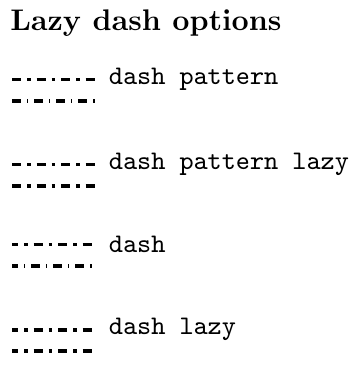
Previous attempt extended to dash lazy:
Full example
\documentclass{article}
\usepackage{tikz}

\makeatletter
\tikzset{
  % lazy evaluation version of "dash pattern"
  % syntax: on 2pt off 3pt on 4pt ...
  dash pattern lazy/.code={%
    \def\tikz@temp{#1}%
    \ifx\tikz@temp\pgfutil@empty%
      \def\tikz@dashpattern{}%
      \tikz@addoption{\pgfsetdash{}{0pt}}%
    \else
      \tikz@addoption@lazydash{#1}%
    \fi
  },
  dash lazy/.code={%
    \tikz@parse@full@dash@lazy#1\pgf@stop
  }
}

\def\tikz@parse@full@dash@lazy#1phase#2\pgf@stop{%
  \def\tikz@dashphase{#2}%
  \def\tikz@temp{#1}%
  \ifx\tikz@temp\pgfutil@empty%
    \def\tikz@dashpattern{}%
    \tikz@addoption{\pgfsetdash{}{0pt}}%
  \else%
    \tikz@addoption@lazydash{#1}%
  \fi%
}%

\def\tikz@addoption@lazydash#1{%
  % option "line width" sets \pgflinewidth eagerly, thus inside
  % \tikz@addoption the \pgflinewidth is ensured finalized and updated
  \tikz@addoption{%
    \def\tikz@dashpattern{}%
    \expandafter\tikz@scandashon\pgfutil@gobble#1o\@nil%
    \expandafter\pgfsetdash\expandafter{\tikz@dashpattern}{\tikz@dashphase}%
  }%
}
\makeatother

\tikzset{nodes={font=\ttfamily\small}}
\parindent=0pt
\begin{document}

\subsubsection*{Lazy dash options}
\tikzset{
  emulated dash dot/.style 2 args=
    {#1=on 3pt off 2pt on \the\pgflinewidth off 2pt #2}
}

\begin{tikzpicture}
  \draw[very thick, emulated dash dot={dash pattern}{}]
    (0, 0) -- +(1, 0) node[right] {dash pattern};
  \draw[emulated dash dot={dash pattern}{}, very thick]
    (0, -.25) -- +(1, 0);

  \begin{scope}[yshift=-1cm]
    \draw[very thick, emulated dash dot={dash pattern lazy}{}]
      (0, 0) -- +(1, 0) node[right] {dash pattern lazy};
    \draw[emulated dash dot={dash pattern lazy}{}, very thick]
      (0, -.25) -- +(1, 0);
  \end{scope}
\end{tikzpicture}
\bigskip

\begin{tikzpicture}
  \draw[very thick, emulated dash dot={dash}{phase 1pt}]
    (0, 0) -- +(1, 0) node[right] {dash};
  \draw[emulated dash dot={dash}{phase 1pt}, very thick]
    (0, -.25) -- +(1, 0);

  \begin{scope}[yshift=-1cm]
    \draw[very thick, emulated dash dot={dash lazy}{phase 1pt}]
      (0, 0) -- +(1, 0) node[right] {dash lazy};
    \draw[emulated dash dot={dash lazy}{phase 1pt}, very thick]
      (0, -.25) -- +(1, 0);
  \end{scope}
\end{tikzpicture}
\end{document}