pgf
 pgf copied to clipboard
 pgf-tikz
Wrong position of a point using the "scale" option
The problem
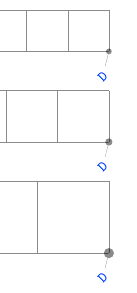
Without the use of scale=1.25 the searched point D has coordinates (18,0) but with scale=1.25 the displayed point is not exactly at the right place. The position of the point is correct if I use the option transform canvas ={scale=1.25} but this causes complications on the bounding box. Is there a way to get around this?
Minimal working example (MWE)
\documentclass[landscape]{article}
\usepackage{tikz,fullpage}
 \usetikzlibrary{calc}
\begin{document}

\begin{tikzpicture}[scale=1.25]
  \draw[help lines](0,0) grid (18,1);
  \coordinate(A) at (0,0);
  \coordinate(C) at (10,0);
  \coordinate(B) at (6,0);
  \path (A) -- (B) coordinate[pos=.5](E);
  \path (B) -- (C) coordinate[pos=.5](F);
  \path[coordinate] let
    \p1 = ($ (B) - (E) $),
    \n1={veclen(\x1,\y1)},
    \p2 = ($ (B) - (F) $),
    \n2={veclen(\x2,\y2)},
     in (barycentric cs:E={-\n2/1cm},F={\n1/1cm}) coordinate (D);
  \foreach \point in {A,B,C,D,E,F}
     \fill [black,opacity=.5] (\point) circle (2pt);
\end{tikzpicture}

\end{document}

It's the result of accumulated rounding errors. With scale=1 (the default) and scale=1.25, the coordinate B is at (170.71646pt, 0.0pt) and (170.74771pt, 0.0pt), respectively. Almost in-distinguishable difference. But after some computation, coordinate D is at (512.14938pt, 0.0pt) and (513.18889pt, 0.0pt), respectively. Not in-distinguishable anymore.
Loading tikz library fpu then adding /pgf/fpu/install only={reciprocal} to the tikzpicture env seems to work. Coordinate computations involving nodes (and coordinates) use reciprocal internally and fpu increases its accuracy.
Full example
\documentclass[landscape]{article}
\usepackage[margin=1cm, paperwidth=50cm]{geometry}
\usepackage{tikz}
\usetikzlibrary{calc, fpu}

% add pins to named nodes
% code: https://github.com/muzimuzhi/latex-examples/blob/master/utilities/tikz-auto-mark-nodes.tex
% doc: https://github.com/muzimuzhi/latex-examples#utilitiestikz-auto-mark-nodestex
\InputIfFileExists{tikz-auto-mark-nodes.tex}{}{}

\makeatletter
% helper
\def\shownodecenter#1{%
  \pgf@process{\pgfpointanchor{#1}{center}}%
  \pgferror{point #1: (\the\pgf@x, \the\pgf@y)}%
}
\makeatother

\begin{document}
\raggedleft

\def\test#1{%
  \begin{tikzpicture}[#1]
    \draw[help lines](0,0) grid (18,1);
    \coordinate(A) at (0,0);
    \coordinate(C) at (10,0);
    \coordinate(B) at (6,0);
    \path (A) -- (B) coordinate[pos=.5](E);
    \path (B) -- (C) coordinate[pos=.5](F);
    \path[coordinate] let
      \p1 = ($ (B) - (E) $),
      \n1={veclen(\x1,\y1)},
      \p2 = ($ (B) - (F) $),
      \n2={veclen(\x2,\y2)},
       in (barycentric cs:E={-\n2/1cm},F={\n1/1cm}) coordinate (D);
    %%% begin debug
    \shownodecenter B
    \shownodecenter D
    %%% end debug
    \foreach \point in {A,B,C,D,E,F}
       \fill [black,opacity=.5] (\point) circle (2pt);
  \end{tikzpicture}\par}

\test{auto mark/.try}
\test{auto mark/.try, scale=1.25, /pgf/fpu/install only={reciprocal}}
\test{auto mark/.try, scale=1.75, /pgf/fpu/install only={reciprocal}}
\end{document}

I agree with you about accumulated rounding errors, nevertheless I wonder about two points I noticed.
First, if we use a scale that is a power of 2 there is no error, e.g. scale=2. Then why transform canvas={scale=1.25} also makes the error disappear.
In my example the error is minimal but with complex figures obtained with tkz-euclide, they become annoying. I had already tried to use fpu but not with the install only option which indeed seems to work.
Can you try this patch? It reduces (but not totally avoids) the inaccuracy introduced by four consecutive multiplied-by-0.1. It seems to solve the problem with scale=1.25, but i'm sure it won't work for all cases.
\usepackage{xpatch}
\makeatletter
\xpatchcmd\pgfmathreciprocal@@
  {\[email protected]\pgfmath@y\[email protected]\pgfmath@y\[email protected]\pgfmath@y\[email protected]\pgfmath@y}
  {\pgfmath@y\dimexpr\pgfmath@y/10000\relax}
  {}{\PatchFailed}
\makeatother
diff --git a/tex/generic/pgf/math/pgfmathfunctions.basic.code.tex b/tex/generic/pgf/math/pgfmathfunctions.basic.code.tex
index 1607c386..8aa03888 100644
--- a/tex/generic/pgf/math/pgfmathfunctions.basic.code.tex
+++ b/tex/generic/pgf/math/pgfmathfunctions.basic.code.tex
@@ -238,10 +238,7 @@
                 \multiply\c@pgfmath@counta-10000\relax%
                 \advance\c@pgfmath@countb\c@pgfmath@counta%
                 \pgfmath@y\c@pgfmath@countb pt\relax%
-                \[email protected]\pgfmath@y% Yes! This way is more accurate. Go figure...
-                \[email protected]\pgfmath@y%
-                \[email protected]\pgfmath@y%
-                \[email protected]\pgfmath@y%
+                \pgfmath@y\dimexpr\pgfmath@y/10000\relax
                 \advance\pgfmath@x\pgfmath@y%
             \fi%
         \fi%
@muzimuzhi I have a similar idea some time ago https://github.com/hmenke/pgf/commit/50778951982497e0999aae8aff419cccc75fd334 (which you are already aware of because you commented on it).
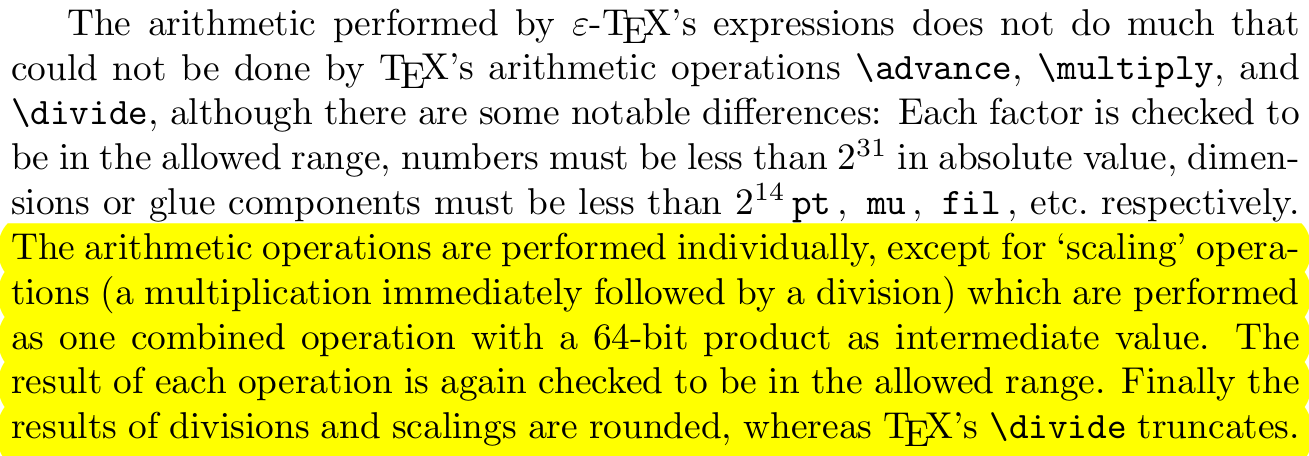
Note that \dimexpr a*b and \dimexpr a/b will use TeX's fixed point arithmetic whereas \dimexpr a*b/c will use double precision floating point for the intermediates and then truncate (or round?) and convert back to fixed point. Depending on the case that could produce a decent accuracy improvement.
Demo
\documentclass{article}
\usepackage{tikz}
\begin{document}
\makeatletter
\newdimen\a
\newdimen\b
\foreach \x in {0.0001, 0.001, 0.01, 0.1, 1.0, 10.0, 100.0, 1000.0} {
  \a=\x pt
  \b=1.2345 pt
  \makebox[3.5cm][l]{%
    dimexpr = \strip@pt\dimexpr 1pt * \a / \b\relax
  }
  \makebox[3.5cm][l]{%
    \pgfmathdivide{\x}{1.2345}
    PGF = \pgfmathresult
  }
  \makebox[3.5cm][l]{%
    LUA = \directlua{tex.sprint(tostring(\strip@pt\a / \strip@pt\b))}
  }
  \par
}
\end{document}

Excerpt from the e-TeX manual
Emphasis mine.

@muzimuzhi The patch is very interesting, it gives good results for the few figures that I had problems with!
@hmenke Thanks for the demo file, your comment about dimexpr is very interesting
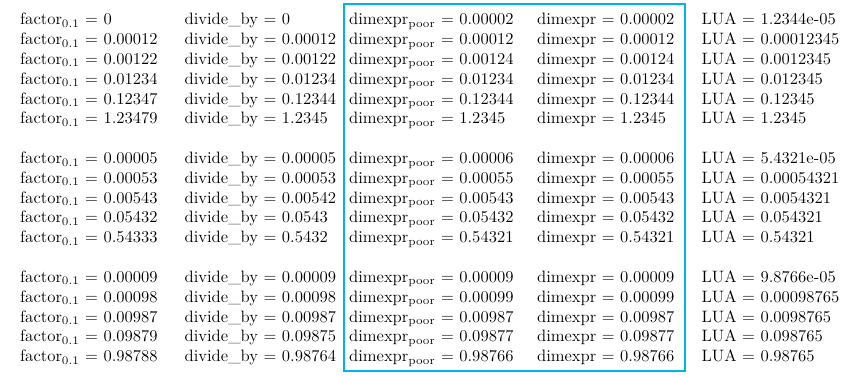
Sorry for late comment. Just for being divided by 10000, it seems the poor \dimexpr a/b is as accurate as \dimexpr a*b/c.
Tests using
\foreach \x in {0.12345, 1.2345, 12.345, 123.45, 1234.5, 12345,
                0.54321, 5.4321, 54.321, 543.21, 5432.1,
                0.98765, 9.8765, 98.765, 987.65, 9876.5}
{ compute \x/10000 in different ways }
\foreach \x in {0.12345, 1.2345, 12.345, 123.45, 1234.5, 12345,
0.54321, 5.4321, 54.321, 543.21, 5432.1,
0.98765, 9.8765, 98.765, 987.65, 9876.5}
{ compute \x/10000 in different ways }
% !TeX TS-program = lualatex
\documentclass[landscape]{article}
\usepackage{tikz}
\begin{document}
\newcommand\mybox[2][3.5cm]{\hbox to #1{#2\hss}\ignorespaces}

\makeatletter
\newdimen\a
\newdimen\b

\foreach \x in {0.12345, 1.2345, 12.345, 123.45, 1234.5, 12345,
                0.54321, 5.4321, 54.321, 543.21, 5432.1,
                0.98765, 9.8765, 98.765, 987.65, 9876.5}
{
  \a=\x pt
  \b=10000pt
  \ifdim\a<1pt \bigskip\fi\leavevmode
  \mybox{\a=.1\a \a=.1\a \a=.1\a \a=.1\a factor\textsubscript{0.1} = \strip@pt\a}
  \mybox{\divide\a by 10000 divide\_by = \strip@pt\a}
  \mybox[4cm]{dimexpr\textsubscript{poor} = \strip@pt\dimexpr \a / 10000\relax}
  \mybox{dimexpr = \strip@pt\dimexpr 1pt * \a / \b\relax}
  \mybox{LUA = \directlua{tex.sprint(tostring(\strip@pt\a / \strip@pt\b))}}
  \par
}
\end{document}