

 pester
Validating preference parameters in a parameter filter fails
Checklist
- [X] Issue has a meaningful title
- [X] I have searched the existing issues. See all issues
- [X] I have tested using the latest version of Pester. See Installation and update guide.
What is the issue?
We have tests from Pester 4 that mock a function call and check that it's called with -ErrorAction Stop. In Pester 5, however, this check no longer works because the $ErrorActionPreference value doesn't change.
Expected Behavior
I would expect that if I've used a common preference parameter on a function (i.e. -ErrorAction, -WarningAction, -InformationAction, -Verbose, -Debug, -WhatIf), that the corresponding preference variables in my parameter filter and mock implementation would be set to match
Steps To Reproduce
BeforeAll {
    function Invoke-Something
    {
        [CmdletBinding()]
        param(
        )
    }
}

Describe 'Assert-MockCalled' {
    It 'should allow checking ErrorActionPreference' {
        Mock -CommandName 'Invoke-Something'
        Invoke-Something -ErrorAction Stop
        Assert-MockCalled -CommandName 'Invoke-Something' `
                          -ParameterFilter {
                            Write-Information "ErrorActionPreference  expected  Stop"
                            Write-Information "                       actual    $($ErrorActionPreference)"
                            $ErrorActionPreference | Should -Be ([Management.Automation.ActionPreference]::Stop)
                            $true
                         }
    }
    It 'should allow checking WarningPreference' {
        Mock -CommandName 'Invoke-Something'
        Invoke-Something -WarningAction Stop
        Assert-MockCalled -CommandName 'Invoke-Something' `
                          -ParameterFilter {
                            Write-Information "WarningPreference      expected  Stop"
                            Write-Information "                       actual    $($WarningPreference)"
                            $WarningPreference | Should -Be ([Management.Automation.ActionPreference]::Stop)
                            $true
                         }
    }
    It 'should allow checking InformationPreference' {
        Mock -CommandName 'Invoke-Something'
        Invoke-Something -InformationAction Stop
        Assert-MockCalled -CommandName 'Invoke-Something' `
                          -ParameterFilter {
                            Write-Information "InformationPreference  expected  Stop"
                            Write-Information "                       actual    $($InformationPreference)"
                            $InformationPreference | Should -Be ([Management.Automation.ActionPreference]::Stop)
                            $true
                         }
    }
    It 'should allow checking DebugPreference' {
        Mock -CommandName 'Invoke-Something'
        Invoke-Something -Debug
        Assert-MockCalled -CommandName 'Invoke-Something' `
                          -ParameterFilter {
                            Write-Information "DebugPreference        expected  Continue"
                            Write-Information "                       actual    $($DebugPreference)"
                            $DebugPreference | Should -Be ([Management.Automation.ActionPreference]::Continue)
                            $true
                         }
    }

    It 'should allow checking VerbosePreference' {
        Mock -CommandName 'Invoke-Something'
        Invoke-Something -Verbose
        Assert-MockCalled -CommandName 'Invoke-Something' `
                          -ParameterFilter {
                            Write-Information "VerbosePreference      expected  Continue"
                            Write-Information "                       actual    $($VerbosePreference)"
                            $VerbosePreference | Should -Be ([Management.Automation.ActionPreference]::Continue)
                            $true
                         }
    }

    It 'should allow checking WhatIf' {
        Mock -CommandName 'Invoke-Something'
        Invoke-Something -Verbose
        Assert-MockCalled -CommandName 'Invoke-Something' `
                          -ParameterFilter {
                            Write-Information "WhatIfPreference       expected  $($true.ToString())"
                            Write-Information "                       actual    $($WhatIfPreference)"
                            $WhatIfPreference | Should -BeTrue
                            $true
                         }
    }
}
Describe your environment
Pester version     : 5.3.3 ~\Documents\WindowsPowerShell\Modules\Pester\5.3.3\Pester.psm1
PowerShell version : 7.2.6
OS version         : Microsoft Windows NT 10.0.19044.0
Possible Solution?
No response

This is because in 5 we no longer detach ParameterFilter and MockBody from their session state, so you can debug them, and they run exactly where you defined them. In this case in your test script.
We do insert for you all the variables from parameters though, which is about the only state we can safely capture, and that is not available to you in other way. We also pass $PesterBoundParameters, which has the original $PSBoundParameters.
So in your test you are testing if $ErrorActionPreference is set to 'Stop' in your test, rather than in your function. A better way is to check $ErrorAction value.
You can also run your test with -Output Diagnostic (or just click Debug test in VSCode), and you will see it saying:
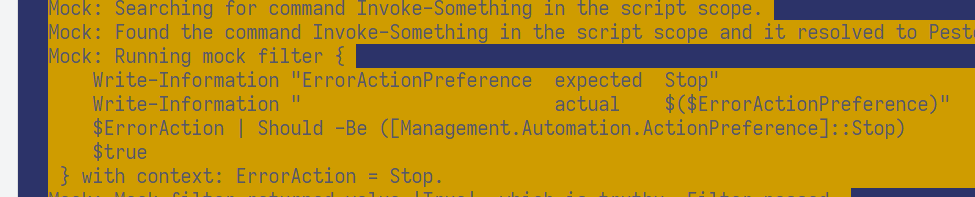
running mock filter { your filter } with context --your provided parameters--.
