

 pencil2d
Line when drawing on hidden layer
Issue Summary
Drawing on a hidden bitmap layer sometimes draws a straight line.
Actual Results
When drawing on a hidden bitmap layer with the pencil, pen, eraser, or brush tools sometimes produces a straight line that becomes visible when the layer is shown again. It appears to be generally along the path you are drawing. This stroke is not applied to the frame however so it will persist until you start to draw something else, at which time in may become part of the drawing or may get cleared depending on the tool.
Expected Results
Attempting to draw on a bitmap layer while it is hidden should result in absolutely nothing being drawn.
Steps to reproduce
- Select a bitmap layer and make sure you are on a frame.
- Hide the bitmap layer.
- Attempt to draw on the frame. I think it works best with a quick stroke.
- The warning dialog will come up. Dismiss it.
- You can repeat steps 3-4 a few times just to make it more likely that you actually triggered the bug (it does not happen every time).
- Show the layer. Hopefully you should now see one or more straight lines, if not, repeat steps 1-5.
System Information
-
Pencil2D Version: v0.6.5, e552f42e0fa073270c907a1e0f68defb1e6b0e6e
-
Operating System: Ubuntu 20.04.1
-
RAM Size: 16 GB
-
Graphics Tablet: N/A

I've done some debugging. What I did was first to put this debug message in scribblearea:
void ScribbleArea::pointerPressEvent(PointerEvent* event)
{
    bool isCameraLayer = mEditor->layers()->currentLayer()->type() == Layer::CAMERA;
    if ((currentTool()->type() != HAND || isCameraLayer) && (event->button() != Qt::RightButton) && (event->button() != Qt::MidButton || isCameraLayer))
    {
        Layer* layer = mEditor->layers()->currentLayer();
        if (!layer->visible())
        {
            qDebug() << "not visible..." << event->pos();
            event->ignore();
            // This needs to be async so that mTabletInUse is set to false before
            // further events are created (modal dialogs do not currently block tablet events)
            QTimer::singleShot(0, this, &ScribbleArea::showLayerNotVisibleWarning);
            return;
        }
    }
The debug messages looked like this:
not visible... QPoint(264,269)
not visible... QPoint(224,192)
not visible... QPoint(795,135)
not visible... QPoint(366,264)
not visible... QPoint(795,288)
not visible... QPoint(1341,121)
not visible... QPoint(1289,380)
not visible... QPoint(1305,483)
not visible... QPoint(1241,440)
not visible... QPoint(1126,442)
not visible... QPoint(476,429)
not visible... QPoint(399,579)
not visible... QPoint(399,579)
not visible... QPoint(443,159)
not visible... QPoint(350,161)
not visible... QPoint(314,169)
not visible... QPoint(319,184)
not visible... QPoint(319,184)
not visible... QPoint(1020,226)
not visible... QPoint(1029,206)
not visible... QPoint(969,206)
not visible... QPoint(969,206)
And the screen looked like this:
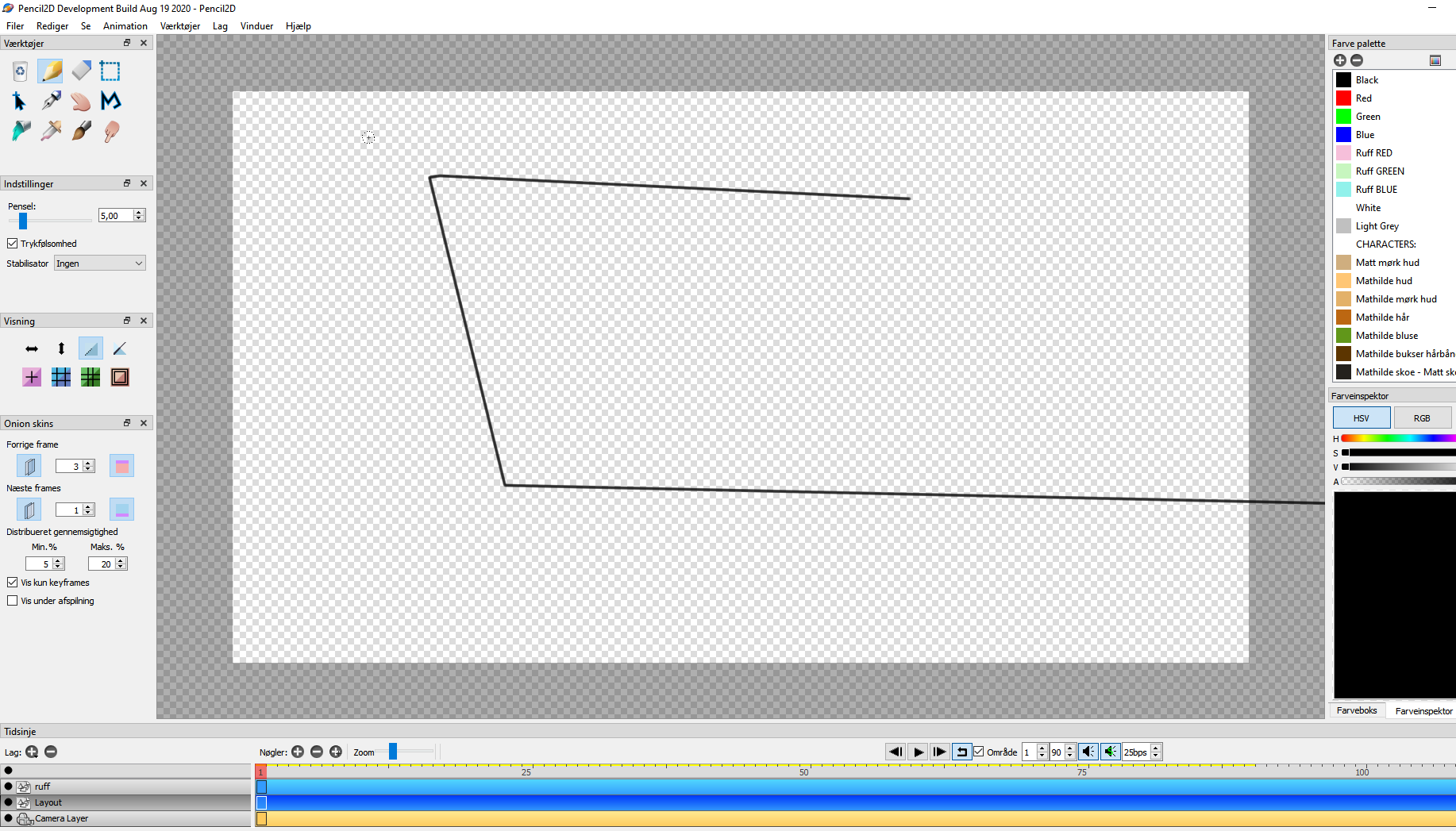 so...
It made three lines, and it made the lines the three times that the event.pos() are identical.
It must there the bug is hidden/born. Unfortunately, I have no idea on how to solve it. I'm afraid it's up to you @scribblemaniac , or some of the other, more brighter heads in the team.
so...
It made three lines, and it made the lines the three times that the event.pos() are identical.
It must there the bug is hidden/born. Unfortunately, I have no idea on how to solve it. I'm afraid it's up to you @scribblemaniac , or some of the other, more brighter heads in the team.

I cannot reproduce this in latest master.
edit: alright it's still there, just not easy to reproduce with a trackpad.

I actually managed to do this under Windows 10, but you have to be ruthless. I was pressing ESC and clicking like a madman and i got a single straight line from the last point on the previous stroke i made while the layer was visible.
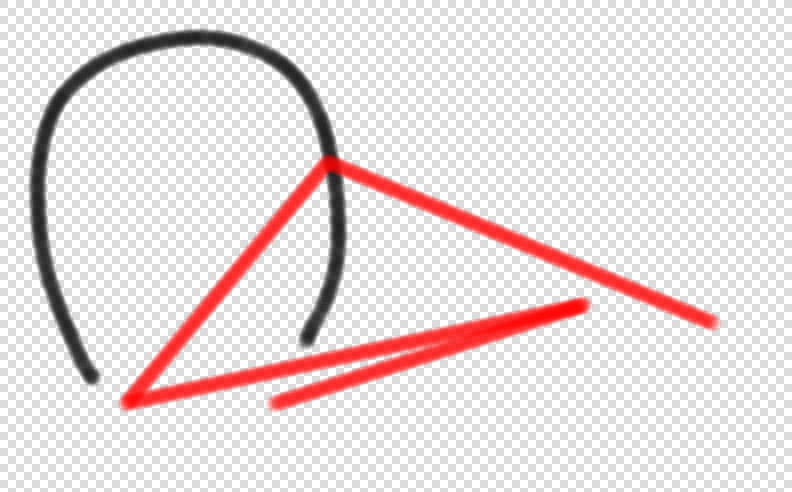
The first time I tried to undo the strokes, it would only undo the original stroke i did, not the one that was made while the layer was invisible. It seemed like it was a buffer cache issue since using the eraser completely got rid of the stroke, however zooming in / out wouldn't remove it unlike other instances of that particular issue.
That said when i clicked with the eraser, for some reason the original stroke had actually become affected by the second stroke made, as such you can see a hole in the original stroke where the red one was put. Weird.

On a second try i couldn't even have the lines appear, but barely dots. Black is stroke made for reference. Red are the pixels made while the layer was invisible. In this attempt the red dots were properly put into the undo stack and i can undo them.
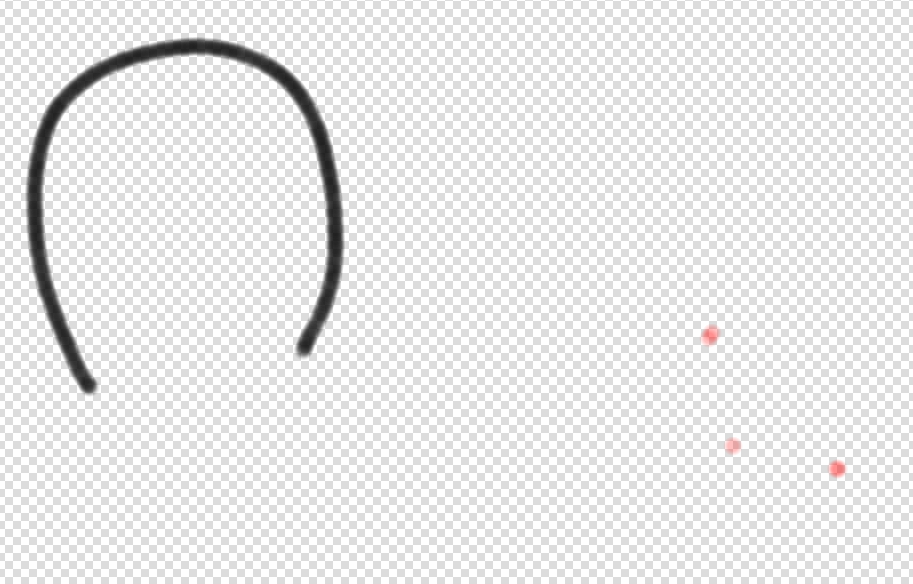
It seems that to get the line behavior you have to actively try to create lines, and in that way it will chain the lines from the last point of the last visible stroke.
EDIT: The first image set was actually the third time i tried to reproduce this, this is why the red line seems to start form the right part of the screen, because the red dots below were the second attempt. My note at the end is still accurate, the last invisible strokes are created chained to each other from the last created stroke for some reason 🤔
