

 pencil2d
Incorrectly overlapped panel layout contents on interface resizing
Issue Summary
On the past 2 days we've had two different user reports that evidence an issue with how the panels minimum size react unexpectedly to sudden changes in their environment. Coincidentially I managed to see this issue myself the first time I opened Pencil2D 0.6.5 barely after restoring the "factory settings" of Pencil2D in the Windows registry.
Expected Results
While it's true that most panels should have a minimum size to preserve most of their characteristics, this sometimes constraint the users to properly rearrange the interface of Pencil2D so it matches their screen resolution. We must not forget that not everyone work using Desktop computers, but usually they work with laptops and even then sometimes these come with limited non-standard resolutions.
The expected result is to allow people to resize, move, stack and close the panels without other panels overflowing their information.
It would be worth looking at this PR which implemented FlowLayout https://github.com/pencil2d/pencil/pull/1317 As well as this open PR which was meant to solve the minimum size issues on the onion skin panel (however it could be possible to apply this to other panels as well) https://github.com/pencil2d/pencil/pull/1369
Video or Image Reference

Courtesy of user Krijart
https://www.youtube.com/watch?v=5c7_QLa2Yfs Courtesy of user aymanugod https://discuss.pencil2d.org/t/timeline-keeps-disappearing-whenever-i-press-alt/4743
Steps to reproduce
It seems 100% of the current reports come from Windows 10 users (why doesn't that surprise me anymore...) However I'd like to ask other OS users to test this as well. Also the users seem to have approximate resolution of 1366 x 768 which is known as Wide XGA or WXGA.
In my case I have a 1920 x 1080 resolution, so it is more difficult to reproduce. For testers you can consider changing your resolution to the aforementioned resolution or something with similar aspect ratio for testing, but it is not required.
Since it's difficult to reproduce this with the timeline itself, we're going to use a different panel.
- Open Pencil2D
- Detach the tools panel
- Attach it horizontally and reduce the vertical size until it fits and can't go beyond.

- Make sure there is at least one panel below the tools panel to see this effect.
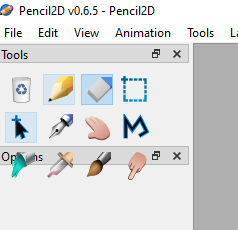
- Now detach and reattach the tools panel to the left side pane and you'll obtain this:
System Information
Version: 0.6.5
commit: 50a0c7c318f38988af85d34e955a5a78d3953474 date: 2020-08-01_01:32:15
Operating System: Windows 10 (10.0) CPU Architecture: x86_64 Qt Version: 5.12.9


Ah wait... no sorry, the comment above was only regarding one of the issues, the onion skin widget being too tall.
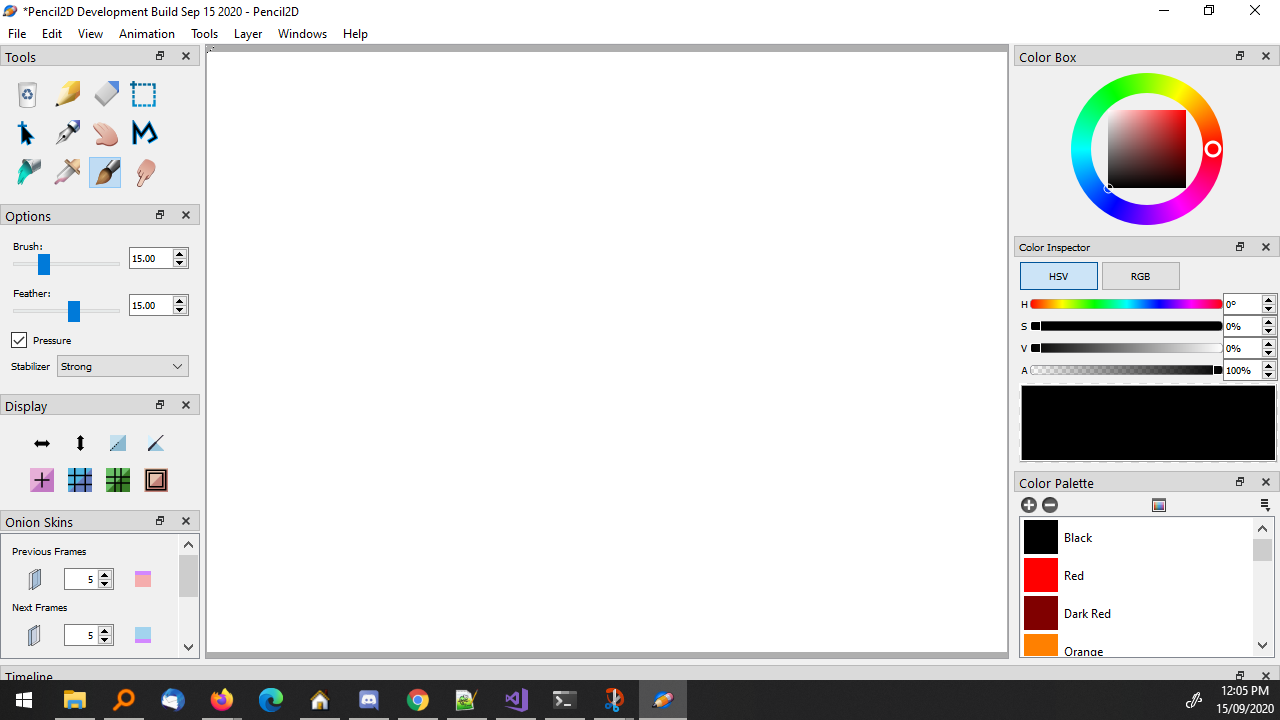
Took two screenshots about how Pencil2D looks like with low display resolutions.
- 1366x768
- 1280x720
In both cases, Pencil2D is in its minimal size. It can't be smaller any further unless undock some panels.
1366x768
Left side is full. Tools panel overflows. Timeline barely usable.

1280x720
Timeline completely gone.
What I observed:
- Onion skins' scrollbar is good. We should add it to Tool options panel, too.
- Onions skins panel definitely needs a layout rearrange.
- Consider moving the buttons of Display options to a Toolbar (I am planning to make one)

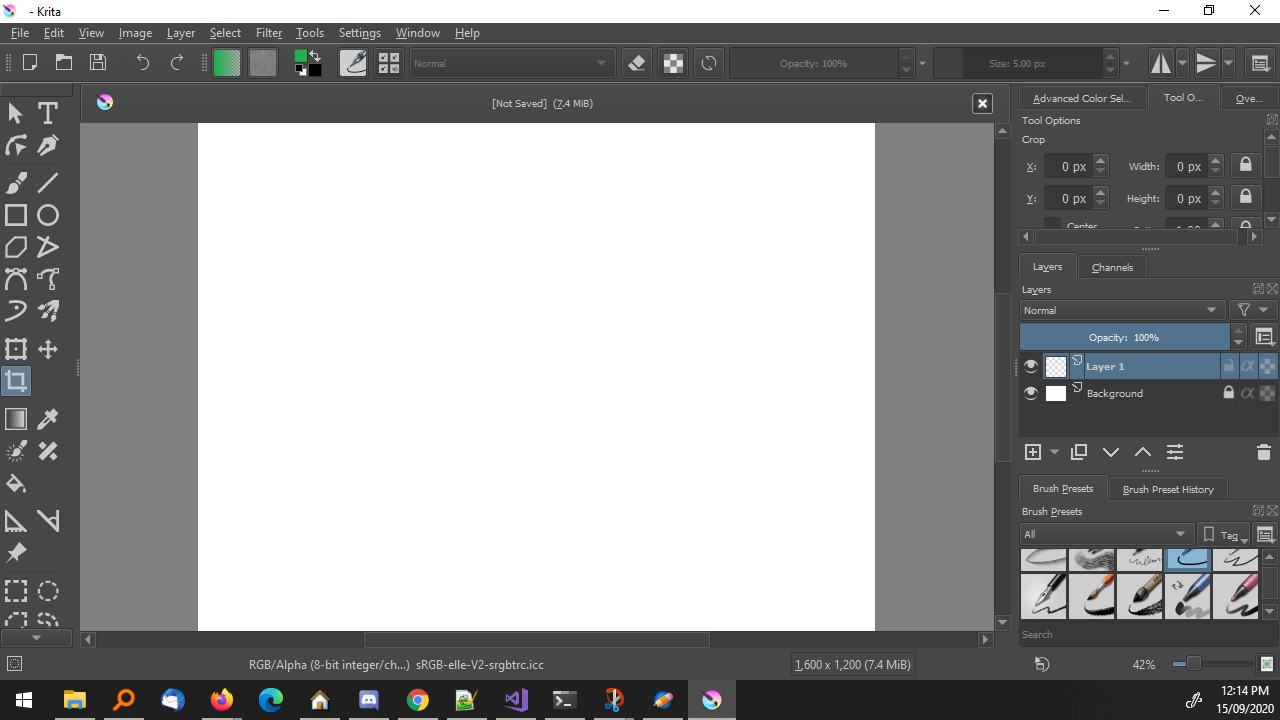
A Krita screenshot under low resolutions (1280x720)
Krita doesn't have Timeline, so they have more vertical space.
@chchwy
Krita doesn't have Timeline, so they have more vertical space.
... by default. Go to Window > Dockers > Timeline to enable it. Vertical space management is unfortunately atrocious when animating in Krita. Even if they don't have the same problem of FlowLayout, in practice you normally have to disable or stack most panels to make room to work with, and this when using 1080p resolutions 😖
What I observed:
- Onion skins' scrollbar is good. We should add it to Tool options panel, too.
- Onions skins panel definitely needs a layout rearrange.
- Consider moving the buttons of Display options to a Toolbar (I am planning to make one)
I agree with these observations. The tool options panel tends to be very variable in size, so the constant pushing between changing tools can have the same adverse effect.
I made a comment with similar observations in discord last week and I think that at least:
- the toolbox and the display panel could become a toolbar to minimize space. It would be excellent if they could be docked both vertically or horiontally as the user desires.
- The tool options could also be made to work as a toolbar, like in Opentoonz. Having this laid out horizontally and the actual tools as a vertical toolbar is a very common layout. That said this might be more of a user preference so if possible it would be best to have an improved panel layout (with scrollbars) and if the user wants, allow them to turn it into a toolbar (restart required)
- The color box and color selector should be defaulted to their minimal possible height. sometimes it's ridiculous that they occupy more space than other panels just because they can
- As per my own comment and your observations, the onion skin panel definitely needs an improved layout.

@scribblemaniac I'm not entirely sure about that. I posted a few days ago a new screenshot in #bug-discussions https://discord.com/channels/342369662710972417/395346048727515137/784618445719207947 last time which was of a user using the latest nightly build and it still had problems with the text bleeding, even though the panels had the vertical scrollbars.
The user answered later that they were indeed using Windows 7, but the dev build was quite recent: I'd need to investigate this a bit more, and If I can't find a way to reproduce the issue then we can close it.
Edit: I forgot to add that the user resolution is 1024x600
I agree, it still happens.. probably because the colorinspector is not in a scrollview... I was hoping we could have avoided that one since all its components are often something you want to modify but I think we need to put it into a scrollview too.
I don't recall seeing it previously but I have experienced it quite a lot recently, it seems to be caused by the window frame being too small for all the widgets to be there when launched.
Have we talked about the window layout yet? Qt’s dock layout system has a lot more flexibility than we’re currently making use of. Take this for example:
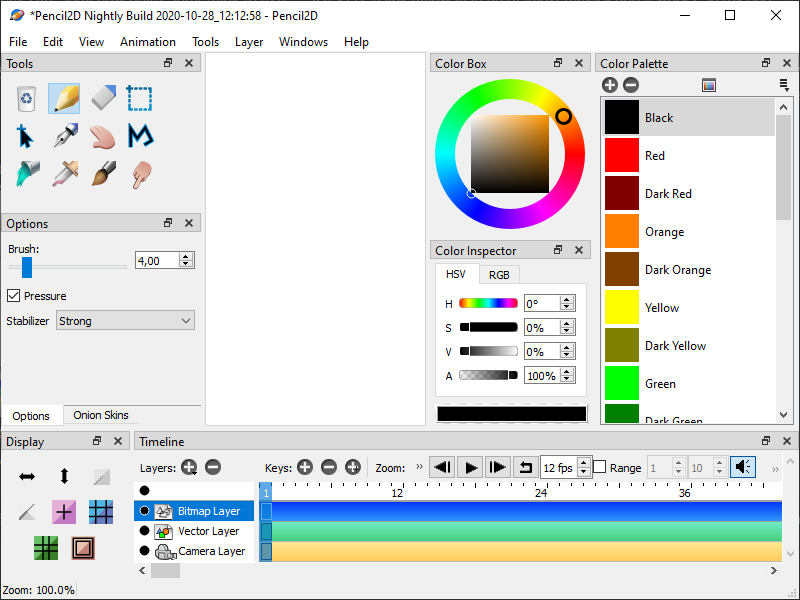
This is 800×600 with absolutely no bleeding, and you don’t even need to touch the code to make this. Don’t pay too much attention to the specific arrangement (I know the canvas is tiny), this is only something I made up on a whim – just to see what the system can do.

I too have played around with laying out the views differently but even so the current layout should be supported. The problem only shows when the application is launched and it tries to lay out its views but doesn't calculate the height properly.. Maybe it's a simple issue of wrong min height and base height values.
As soon as you adjust the height, the widget will resize and you can't make it bleed into each other anymore, at least that's my experience on mac os