pencil2d
exporting doesn't get the audio out
Issue Summary
i wanted to export a test animation, so i could get used to the animator
Actual Results
the audio did not go out
Expected Results
i wanted the audio of the animation to get out with the video
Video or Image Reference
Steps to reproduce
well, i exported as video mp4
System Information
-
Pencil2D Version: 0.6.4
-
Operating System:
Windows 10 64x intel celeron 1.60GHz
-
RAM Size: 4GB (3,75 utilizable)
-
Graphics Tablet:
Celeron CPU B815

@SamuzMBlast Please try restarting Pencil2D and then exporting again. If that fails, you can try using the latest nightly build available by scrolling down on our downloads page. It might work right away, or you may have to reimport any sounds that came from mp3 files.

@SamuzMBlast Additionally while testing both your current version of Pencil2D and the "nightly builds" scribblemaniac suggested, please consider trying out the movie export while using WAV files instead of MP3 files as well.

@SamuzMBlast even with the suggested development build? Please try that one out as well with both MP3's and WAV's. The latest one is from 3 days ago (May 7th) and you can find them on this Google Drive folder: https://drive.google.com/drive/folders/0BxdcdOiOmg-CSVlqc3JNQV9hVGs
Also I see you have Windows 10, just in case make sure to follow this guide to avoid other potentially unwanted issues that Windows 10 brings into the table when dealing with third party apps (not only Pencil2D)
https://discuss.pencil2d.org/t/guide-how-to-train-your-pencil2d-windows/4106
well, i tried the development build, but it still did'nt work. and the screen is not adjustable anymore, i try to resize down and i have to go up to do it, but it just teleports down instead.
@SamuzMBlast Hmm. Let's deal with the screen problem afterwards, although that should not happen.
Can you please share with us the actual project file (PCLX) that you're trying to export? I have Windows 10 64bits, so I should be able to have the same problems you do.
As an additional thought, I'm thinking the audio could be having processing issues due to the speed of your CPU as it is a dual core cpu with 1.6ghz.
I personally have a 6-core cpu with 2.81 ghz so if it works for me, it's the only explanation I can think of right now.
Just in case however, can you tell me if you have any dedicated sound card for your computer? or are you using a video graphics card HDMI sound port? Does exporting sound with a video editor works as expected? If you have additional time, can you try using shotcut or kdenlive (free video editors) to test this? (Both have portable versions, so no need to install anything extra)
i don't think i have a dedicated sound card for my notebook, and yes, video editors do get audio out normally, i do not have problem with them. and here is the animation MinhaAnimação.zip
I used the latest nightly build from may 7th and exported the file as you provided.
Can you hear the sound on your video player(s)?
- If you can't then it could be a rare problem with the video player and the sound codec support.
- If you can hear sound then it must be something else related to your specific environment.
Extra troubleshooting
-
Can you try changing the interface language from Portuguese to English and then try to export?
-
Can you go to the Pencil2D folder and take a screenshot of both the audio and mediaservice folder contents?
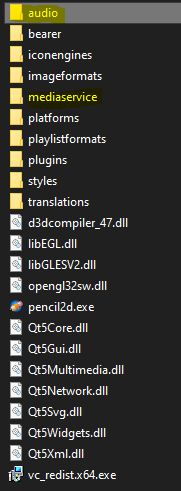
-
I have Windows 10 Pro 64bits but this one is version 1909 and it worked under this. What is your version of Windows 10 and the Release build? You can find that info by right clicking on the windows start icon
 and selecting system from the pop-up menu
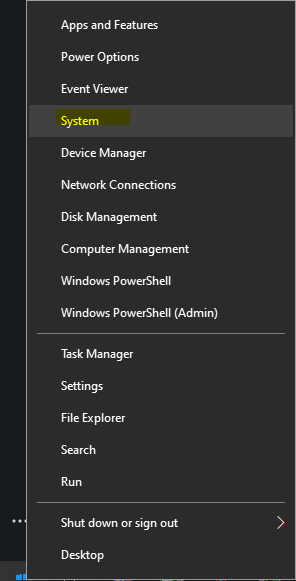 The information should be down below in the Windows Specifications section
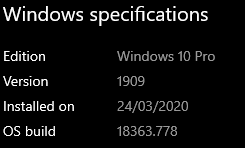
-
Please also try changing the Windows compatibility for the Pencil2d.exe application from Windows 10 to Windows 7 and try exporting again. I don't have this enabled, but if it works if could help the devs understand the problem better. If you don't know how to do this please follow this guide https://support.microsoft.com/en-us/help/15078/windows-10-make-older-apps-or-programs-compatible
my windows is version 1909 build 18363.778. here is the screenshots that you requested.

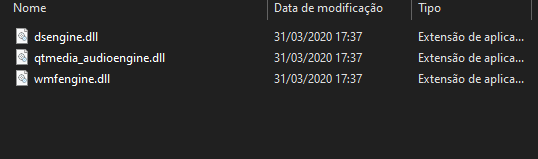
also tried compatibility mode but did'nt change anything. nor the english mode
@SamuzMBlast Thanks. Sorry to hear none of those recommendations worked and It seems the .dll's are all there so it shouldn't be a problem with missing libraries 😩
My last recommendation would be to actually try out the 32bits development version of Pencil2D instead.
The key difference with that version will be on how Windows will allocate resources for Pencil2D and use less of them due to the architecture constraint as 32bits apps can only use up to 4 GB RAM and this will hopefully affect who the CPU handles the export as well.
https://drive.google.com/drive/folders/0BxdcdOiOmg-CcUEwS1R0WFhwM0E
If this doesn't work, we'll leave this issue open until we find a way to reproduce your problem and fix it, but for now I might have to ask you to only use sound in Pencil2D as a rough guide and then use a video editor to finalize the video with all the sounds you plan to use 😔
@SamuzMBlast With the development build, when the export completes, are you seeing an error dialog, are you seeing a dialog asking you if you want to open the video now, or are you seeing no dialog?
Edit: I just pushed some code to log errors better. When the build is finished, please download the version "pencil2d-win64-2020-05-10.zip" from here and use that for testing: https://drive.google.com/drive/folders/0BxdcdOiOmg-CSVlqc3JNQV9hVGs
it asks if i want to open the video now. and ok, is it for me to download that now?
Unfortunately, if that is the dialog which comes up, then my changes won't make any difference. Let me think about this for a bit and I'll let you know when I think of something else you can test. Thank you for your help so far. We're close to making a new release, and it would be wonderful if we can figure out what is causing this issue for some people and fix it before that release. It has been hard to test however since none of our team have been able to reproduce this.
i see. thanks for been really listening to me, i apreciate devs like you
@SamuzMBlast Okay I have something for you to do to narrow down where the issue is occurring:
- Follow steps 1, 2, 3, and 4 under "RECOVERY STEPS" here: https://discuss.pencil2d.org/t/pencil2d-project-file-corruption-prevention-partial-recovery-guide/3105. You should now have the temporary directory where you can see a Pencil2D directory, however do not open the Pencil2D directory.
- Start the Pencil2D application (the development build you used earlier is fine) and open your project.
- Export the project like you normally would.
- When the export completes and it asks if you want to open the video now, do not press any of the options. Instead, go to the temporary directory you opened up earlier and there should be a new folder with a name that starts with "Pencil2D-" followed by a bunch or random characters. Open that up.
- Tell me if you see a file named "tmpaudio.wav".
- If there is a tmpaudio.wav file, play it and tell me if it has the sound from your animation. Also please upload it here.
- You can close the dialog when you are done. The directory will be automatically deleted when you do this.
sorry, i don't understand english fully so these recovery steps are kinda complicated for me to do. i aint that good with those things too
I understand. I have made a video showing the process which you should be able to follow along much more easily:
https://youtu.be/m6yoQbLltZw
Notes:
- Do not press either button in the "Finished. Open movie now?" dialog, until you are done testing.
- The folder
Pencil2D-CcOxejwill have different letters at the end for you.
There is one main question I am looking for an answer to:
Is there a file named tmpaudio or tmpaudio.wav like in the video? If your answer is yes, please upload that file here.
i just checked it, and no, it doesn't have the audio file in the folder.
Can you try removing accented characters from your project file name? Ie. MinhaAnimação.pclx -> MinhaAnimacao.pclx
oh sorry for not giving an anwnser earlier. got somewhat busy. but no... that did not work either i also tried other animations but none did still
@SamuzMBlast Hey. In case you're still using Pencil2D, could you test the latest version that is available for download on the website? https://github.com/pencil2d/pencil/releases/download/v0.6.5/pencil2d-win64-0.6.5.zip
But before you do please follow this other guide to handle setup windows so it won't mess up with your Pencil2D work as much: https://discuss.pencil2d.org/t/guide-how-to-train-your-pencil2d-windows/4106
Once Pencil2D is running, please re-test if you can export a movie with sound or not, because the file you originally provided works with this new version. If you have a problem with VCRUNTIME140.dll just install the vc_redist.exe file inside the Pencil2D folder.
@SamuzMBlast Hi again. It's been a year since our last message. Did the previous version finally worked for you to export audio? If not can you try the most recent version in the official website? https://www.pencil2d.org/download/ there were many fixes applied to sound import and export this time as well.
This will probably be the last time we try to probe this issue since no one has reported a similar problem in the past months. I'll wait a bit more before closing this ticket. Let us know if it works for you and thanks again for your time. Cheers.
Since we haven’t heard back I’m closing this issue now. If you still have this problem after all, please let us know.