

 pencil2d
Implement transparency channel export for Animated GIF
Issue Summary
I'm not sure if this is possible, but recently I was providing support over an animation discord channel for someone that required a transparent GIF. I happily recommended Pencil2D as I recalled this used to work, but after trying out the animated GIF feature I noticed the transparency check was gone, so I'm not sure if this was working before or not. If it did I'd like to ask for it to be reinstated, if it wasn't I want to ask if it's possible to implement this?

I attempted to implement this but came upon a big roadblock. Gifs have two main ways of displaying a new frame: clear the image and then display the new frame, or put the new frame over top of the old frame(s). Unfortunately ffmpeg has frame disposal hard-coded to the cumulative method for optimization purposes, which causes results like this when exporting in Pencil2D:
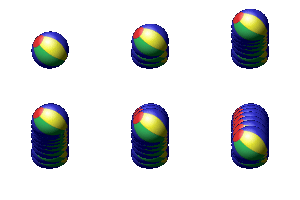 instead of
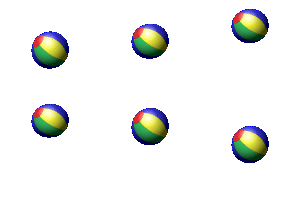
There is good news however, I have already created a patch for ffmpeg which allows this behavior to be modified with a flag. We just have to get it into ffmpeg. They have a very archaic contribution system of emailing patches to a mailing list, which I really don't like. If someone here wants to submit these patches on my behalf I would be eternally grateful. Otherwise, I'll figure out how to set up a mail server and get that submitted eventually.

@Jose-Moreno Still haven't submitted it. Will try again soon hopefully.
GIF transparency is properly supported in FFmpeg 4.2+: https://trac.ffmpeg.org/ticket/6813 So at this point it’s a matter of updating the version of FFmpeg used in our AppImages.

It's more complicated than that as not all releases will be able to use 4.2+ (namely the legacy versions). So the ffmpeg version will have to be detected and the option disabled or enabled based off of that.