nextcloud-drawio
 nextcloud-drawio copied to clipboard
 pawelrojek
draw.io code is not working for drawing.xml files in shared-by-link-folders
The draw app is perfectly working for logged-in users, but is not working when a folder with draw.io.xml files is shared via a link.
Also, the xml icons are not shown.
I suppose that the javascript is not or incorrectly delivered in these cases.
Remark: ONLYOFFICE is working for files in shared-by-link folders.
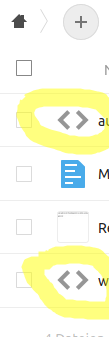


Just installed Draw.io on our Nextcloud instance today and can confirm the same issue: incorrect icon and Nextcloud displays the XML contents instead of loading Draw.io when viewing via share link
OS: Ubuntu 20.04 Webserver: Nginx

Same problem for me with Nextcloud 20.04 and apache. Would be great beeing able to view drawings shared by just a link. let me know if I can help testing... or debugging? thanks Chris

Another project seems to have managed to get a similar issue to work: MindMap: https://github.com/ACTom/files_mindmap

Please following steps:
- Rename all
*.xmlto*.drawio - Go to "Admin settings > Additional settings" ( /index.php/settings/admin/additional ) and click the "Save" button to register MIME types
Ref:
- https://github.com/pawelrojek/nextcloud-drawio#installation
- https://github.com/pawelrojek/nextcloud-drawio#mimetype-detection