
react-native-leaflet
 react-native-leaflet copied to clipboard
 pavel-corsaghin
Basic example : issue loading basic map
Hello,
I'm having a hard time setting up a basic map in a react-native project. I don't know what to do from the basic example in README.md to get a functional map.
import { LatLng, LeafletView } from 'react-native-leaflet-view';

<LeafletView
    // The rest of your props, see the list below
/>
I get the following error :
Encountered an error loading page, Object {
  "canGoBack": false,
  "canGoForward": false,
  "code": -1,
  "description": "net::ERR_FILE_NOT_FOUND",
  "loading": false,
  "target": 95,
  "title": "",
  "url": "file:///android_asset/leaflet.html",
}
I tried to use the example code as in example\src\App.tsx (with map marker and mapCenterPosition props) but gets the same error.
I found in .\src\LeafletView\index.tsx that the app was looking for 'file:///android_asset/leaflet.html', which doesn't exist in my app (this repo, the leaflet.html is located at .\src\LeafletView\index.tsx).
I thought I would try to use the example folder as described in CONTRIBUTE.md but I don't have the correct environment configured (I'm using npm and the expo go App + android device).
How can I go around this problem ? (Is there something I missed ?)
Thank you for your help

Hey, Its because you are using expo. Let me find a way to deal with that! Currently I think the simplest way to make it work is copy source code here https://github.com/pavel-corsaghin/react-native-leaflet/tree/main/src to your project and also copy leaflet.html file then you can customize the path to file as you want to make it work

@pavel-corsaghin Is there a reason, why on Android the requiring of the leaflet.html is different from the iOS approach? With the latter, I think one could also get rid of the npm run android to get it initially working.
In a few weeks or so, the project my company is working on will hopefully be a bit calmer and we can upstream a few of the patches we created in our fork (but they have to be cleaned up and documented first) 🙂

Thanks for the workaround I'll go for that !... though I still can't display a map :sweat_smile:. Will continue to investigate
@miallo it seems that iOS and Android use different default directories, which explains that you need the leaflet.html in two places. See a tutorial here for more info : https://aboutreact.com/load-local-html-file-url-using-react-native-webview/
I get a problem with WebView even using the example given in the tutorial above (so out of scope of this repo)... somehow there seems to be a mess in the directories when requesting the uri { uri: 'file:///android_asset/leaflet.html' }:
I saved a Google.html page in the folders they indicate, and using their code sample :
...
    if (isAndroid) {
      return (
        <WebView
          style={{flex: 1}}
          originWhitelist={['*']}
          source={{
            uri: 'file:///android_asset/Google.html'
          }}
          style={{marginTop: 20}}
          javaScriptEnabled={true}
          domStorageEnabled={true}
        />
      );
...
I get the following error :
Encountered an error loading page, Object {
  "canGoBack": true,
  "canGoForward": false,
  "code": -1,
  "description": "net::ERR_FILE_NOT_FOUND",
  "loading": false,
  "target": 25,
  "title": "about:blank",
  "url": "file:///android_asset/Google.html",
}
Changing the "asset" folder to "android_asset" (never know 😄 ) did not work... Will check on the react-native-webview repo and keep you informed if of interest for you.
Hey guys, sorry for later answer. I was a little bit busy last days @miallo : The reason why we need define differently uri for android and iOS is in production mode, react native webview can only load static html from assets folder with path "file://android_asset... You can read here for more detail https://github.com/react-native-webview/react-native-webview/blob/master/docs/Guide.md#loading-local-html-files @BPich : From my experience the android/ios folder in React Native project are auto generated when you create project using React-Native CLI not Expo CLI. This is reason why follow the tutorial not works for you
The solution will works for both React Native CLI and Expo CLI is that we will not load html file as uri. Instead we should read content of html file using some file reading library and use it as input of Webview. I will try with this approach weekend.
Hello again,
Stumbled uppon this issue in react-native-webview repo, where people propose several horrible (yet functional ?) workarounds. I implemented the one proposed by reubert22 and it "worked", i.e. I managed to load Google.html (in fact Google.js) using the example of this repo :partying_face:
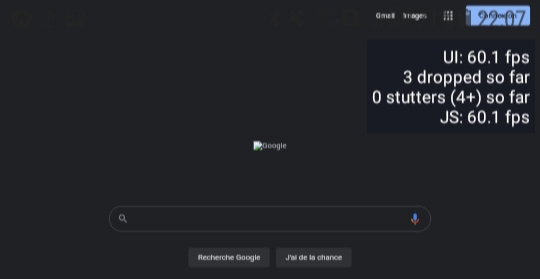
However I didn't manage to make it work with leaflet.html. Something seems to be wrong in leaflet.html file. The screen displays part of the HTML code, but no idea what can be happenning here :cry:

I managed to make it reproducible on snack so you can see exactly what's going on : leaflet-test
To change between Google (kind of working) and leaflet, change line 211 of src\LeafletView\index.tsx from Google.js to leaflet.js.
Note : for the workaround to work, I had to remove two " ` " signs that were around "prop-types" in the leaflet.html because they are used by javascript to delimit the function return.

Hey @lincolngondin, Sadly I didn't 😔 and turned to react-native-maps instead to avoid going too deep that rabbit hole, though I would still prefer to use Leaflet for my app.
hello friends did find solution to the problem ? i think the problem how to call the leaflet.html file from both android and ios https://github.com/pavel-corsaghin/react-native-leaflet/blob/main/android/src/main/assets/leaflet.html ios: require('../../android/src/main/assets/leaflet.html'), android: { uri: 'file:///android_asset/leaflet.html' }, there is no file?

I also use expo to build my app and tried to fix the expo preview mode. Building an APK has always worked fine. So I used expo-asset to load the leaflet.html and that gets rid of the error, but I only get a white, blank page in expo preview now. 😢 https://github.com/lichtmetzger/react-native-leaflet-expo/commit/c9994d5a56524b9f49c1ef4bab05fd4c439d4139
Building my app into an APK still works. So...I don't know.
Also there were a lot of build errors and I don't know any TypeScript, so maybe I effed it up by trying to fix them. https://github.com/pavel-corsaghin/react-native-leaflet/commit/863d3e1ce6b41d2635646a03fca92829672057ce

Finally got it running.
To summarize:
- I added expo-asset and expo-filesystem to the package.json:
"devDependencies": {
    "expo-asset": "^8.7.0",
    "expo-file-system": "^15.1.1",
}
- Edited /src/LeafletView/index.tsx so LEAFLET_HTML_SOURCE is run through expo:
import { readAsStringAsync } from 'expo-file-system';
import { useAssets } from 'expo-asset';

[...]

const LEAFLET_HTML_SOURCE = () => {
  const [index] = useAssets(
    require('../../android/src/main/assets/leaflet.html')
  );

  const [html, setHtml] = useState('');

  if (index) {
    readAsStringAsync(index[0].localUri as string).then((data) => {
      setHtml(data);
    });
  }

  return html;
};
- Adjusted the WebView component so it returns the function result as a html source:
return (
    <WebView
      source={{ html: LEAFLET_HTML_SOURCE() }}
    />
);
In the package.json of my app I specified my own fork of this project as a source and it works! :) I have only tested Expo preview and APK builds, no iOS yet.
"dependencies": {
    "react-native-leaflet-view": "git://github.com/lichtmetzger/react-native-leaflet-expo.git"
  },
Hi @lichtmetzger , i use your :
"dependencies": { "react-native-leaflet-view": "git://github.com/lichtmetzger/react-native-leaflet-expo.git" }
It works nicely with npx expo start But i am stuck making : eas build -p android --profile preview working. Maybe it is "Kotlin Gradle plugin version issue for Android or something like this. It is possible you update your fork ? if i can help i use in my project :
"expo": "~47.0.12", "react": "18.1.0", "react-dom": "18.1.0", "react-native": "0.70.8", "react-native-leaflet-view": "github:lichtmetzger/react-native-leaflet-expo", "react-native-webview": "11.23.1"
