
DIY-Multiprotocol-TX-Module
 DIY-Multiprotocol-TX-Module copied to clipboard
 pascallanger
DSM Forward Programming
When Spektrum brought out 'Forward Programming' it was a convienient way of setting up a Rx from your Tx. Unfortunatley, with their latest Rx (the AR637T), it is now the ONLY way to configure the Rx. This means it is not possible to fully utilise all the features of such a Rx using a 4-in-1 and OPEN Tx. Would it be possible that the protocol used for 'Forward Programming' could be implemented?

Wow that's a 100€ RX... Do you know of a RX using this 'Forward Programming' that could be cheaper?

Only the AS3000 Flight Stabilization Module which I think is about the same price. I'll try to find something. Maybe a satelite Rx.
I've spent a couple of hours browsing with dissapointing results. Plenty that are even more expensive! I did find the SPM4651T which when plugged into a FC6250HX flybarless flight controller claims the flight controller can be configured using 'Forward Programming'. Not sure if the just the Rx without the controller would be much use. (nothing to configure!). I'm guessing that it is done over SRXL2. So, perhaps any Rx that supports SRXL2? Sorry I couldn't help any more but an obvious reason for taking the OPEN Tx / 4-in-1 route is to avoid these high prices. Having said that, there is a lot inside the AR637T, including 6-axis gyro, AS3X stabilisation, barometer and full range telemetry. Such a shame they locked it out from anything not Spektrum.
Thank you for considering this issue. I'll wait to see if you can get anywhere with it.
I've finally got hold of a TX and RX. I'm not far into it but I know how the communication is done between the TX and RX which is the first step. On the TX side they use a virtual channel 14 to transmit the commands. The RX responds using telemetry (of course) and the ID 0x09. For example: TX sends this command:
| 0x70 | 0x11 | 0x71 | 0x06 | 0x72 | 0x00 | 0x73 | 0x14 | 0x74 | 0x00 | 0x75 | 0x00 |
|---|
No idea what it means yet...
RX reply:
| 0x09 | 0x01 | 0x00 | 0x15 | 0x02 | 0x22 | 0x01 | 0x00 | 0x14 | 0x00 | 0x00 | 0x00 | 0x00 | 0x00 | 0x00 | 0x00 |
|---|
RX version: 0x02 0x22 0x01 -> 2.34.01 0x15 or 0x14 might be the RX type...
There is a lot of other things being exchanged but I have no idea what it means (yet)...
I've made some progress. I think at this stage and despite all the unknowns I could get the menu navigation working (page change). I'm starting to see how the values are being managed but far from something usefull.
That's great news and excellent work. If there's anything I can do to help (with my limited knowledge and resources) then please let me know.
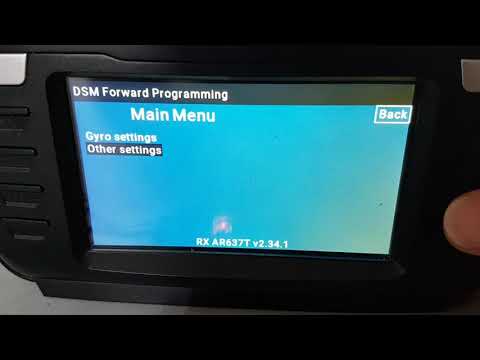
Video of the current code in action: https://photos.google.com/share/AF1QipPLJS6sBmVoEQcbom6krMbLFjrCV_8HZYfilmk-SuwarWG8Aov0H8YF26ArhYb0BA/photo/AF1QipNGD-tldSHYwsv4YJ78RcUqERllNsD_jSPUHAKC?key=cWlTTXE1aG9DWjlzdHR4cHFHMWRYWV9BRG1URUR3 Only the menu and its structure is currently implemented.
For the values I need to do more researches. While I know how to get the values, I don't know yet how the type of values=list, percentage,... are being sent yet.
It's not fully working yet but I've pushed my changes on GitHub so you can test it:
- Need the latest OpenTX nightly
- Need to compile by yourself Multi v1.3.1.64
- Put the LUA script https://github.com/pascallanger/DIY-Multiprotocol-TX-Module/blob/master/Lua_scripts/DSM%20FwdPrg.lua in the radio SD card under \SCRIPTS\TOOLS On the AR637T that I have, everything under the menu "Other Settings" is working at the exception of putting the RX in bind mode. Changing the failsafe values for example work. If you navigate and you see Unknown_XXX, please report the XXX and what's the exact text should be when you do the same on a genuine radio.
https://github.com/pascallanger/DIY-Multiprotocol-TX-Module/tree/master/Lua_scripts#dsm-forward-programming
Really sorry I have not done any testing. I won't bore you with my issues except to say it was due to health and a change of medication that made things worse. I hope to be in a possition to download/compile & test later this weekend. Thanks for all your efforts. It's looking really great.
I just flashed 2.3.10 OTx stable to my Radiomaster TX16S and have 1.3.1.69 Multi Module firmware. I can open the DSM forward programming Lua and connect to a Spektrum HX6250FC flybarless contoller with an SPM4651T Rx, but I get an "RX unknown_18 v5.3.0" message. I know that this is a work in progress but thought I would share what I am seeing on my end. I'm really excited to have the forward programming feature functioning.


@wbmitchell138 Do you have access to a spektrum radio? If yes, everywhere you see Unknown_XXX, please write down the XXX and the exact text which appears on the spektrum radio when you do the same. You could also post a picture of both screens side by side. From there I can add the missing texts in the script and you will see them after you update it. The menu should work, meaning that you have a lot of "Unknown" but if it's a menu entry, you should be able to get in and probably see other unknowns. Therefore just repeat the previous and write them down or a picture.
If you look at this sequence on youtube: https://youtu.be/VJ0m2S42QPI?t=135
You'll see that the menu is similar (line positions including spacing) compared to your picture:
 So most likely:
Unknwon_D3 = Swashplate
Unknown_DD = Tail rotor
Unknown_DA = SAFE
Unknown_DE = Setup
Unknown_86 = System Setup
Unknown_18 = FC6250HX
Updating the code with this would allow you to see the first page. The other pages have to be built the same way. This is why having an original tx at hand is easier.
So most likely:
Unknwon_D3 = Swashplate
Unknown_DD = Tail rotor
Unknown_DA = SAFE
Unknown_DE = Setup
Unknown_86 = System Setup
Unknown_18 = FC6250HX
Updating the code with this would allow you to see the first page. The other pages have to be built the same way. This is why having an original tx at hand is easier.
If you want to get going yourself at adding the text which is easy to do, open the lua script at this line: https://github.com/pascallanger/DIY-Multiprotocol-TX-Module/blob/baf9a0f978f184e36f34a83ca516447836dbb597/Lua_scripts/DSM%20FwdPrg.lua#L459 Then add the lines Text[0xXXXX]="YYYYY" where XXXX is what you have behind Unknown_XXXX and YYYY the text to be displayed. Example: Unknwon_D3 = Swashplate -> Text[0x00D3]="Swashplate"
Don't forget to share your updated lua file ;-)
I'll see if i can get some pictures of the various menus for the 6250 FBL. Also will try to put together a flow chart of the menus, submenus and setting and values for each.
Hi Pascal, I have an AR637T Receiver (V2.37.7) and an iX12 (V1.13.08), and I have added some texts that showed as "Unknown" before.
Here comes the modified section "Text to be displayed" of the lua file with my addidions/changes:
--Text to be displayed -> need to use a file instead? --RX names-- Text[0x0014]="SPM4651T" Text[0x0015]="AR637T" --Lists-- Text[0x0036]="Throttle" Text[0x0037]="Aileron" Text[0x0038]="Elevator" Text[0x0039]="Rudder" Text[0x003A]="Gear" -- for i=1,7 do -- 3B..41 -- Text[0x003A+i]="Aux"..i -- end -- for i=1,8 do -- 41..49 -- Text[0x0041+i]="XPlus-"..i -- end Text[0x0040]="Roll" Text[0x0041]="Pitch" Text[0x0042]="Yaw" Text[0x0046]="Priority" Text[0x004A]="Failsafe" Text[0x004B]="Main Menu" Text[0x004E]="Position" Text[0x0050]="Outputs" Text[0x0051]="Output Channel 1" Text[0x0052]="Output Channel 2" Text[0x0053]="Output Channel 3" Text[0x0054]="Output Channel 4" Text[0x0055]="Output Channel 5" Text[0x0056]="Output Channel 6" --Text[0x005E]="Inhibit" Text[0x005F]="Hold Last" Text[0x0060]="Preset" --Text[0x0061]="Custom" --Messages-- Text[0x0078]="FM Channel" Text[0x0080]="Orientation" Text[0x0085]="Frame Rate" Text[0x0086]="System Setup" Text[0x0087]="F-Mode Setup" Text[0x0088]="Enabled F-Modes" Text[0x008A]="Gain Sensitivity" Text[0x0090]="Apply" Text[0x0093]="Complete" Text[0x0094]="Done" Text[0x0097]="Factory Reset" Text[0x009A]="Capture Failsafe Positions" Text[0x009C]="Custom Failsafe" Text[0x00A5]="First Time Setup" Text[0x00AD]="Gain Channel Select" Text[0x00B6]="FM1" Text[0x00B7]="FM2" Text[0x00B8]="FM3" Text[0x00B9]="FM4" Text[0x00BA]="FM5" Text[0x00BB]="FM6" Text[0x00BC]="FM7" Text[0x00BD]="FM8" Text[0x00BE]="FM9" Text[0x00BF]="FM10" Text[0x00F9]="Gyro settings" Text[0x00FE]="Stick Priority" Text[0x0100]="Make sure the model has been" Text[0x0101]="configured, including wing type," Text[0x0102]="reversing, travel, trimmed, etc." Text[0x0103]="before continuing setup." Text[0x0104]="0104" Text[0x0105]="0105" Text[0x0106]="Any wing type, channel assignment," Text[0x0107]="subtrim, or servo reversing changes" Text[0x0108]="require running through initial" Text[0x0109]="setup again." Text[0x010A]="010A" Text[0x010B]="010B" Text[0x0190]="Relearn Servo Settings" Text[0x019C]="Enter Receiver Bind Mode" Text[0x01DC]="AS3X" Text[0x01DD]="AS3X Settings" Text[0x01DE]="AS3X Gains" Text[0x01E0]="Rate Gains" Text[0x020A]="Restore from Backup" Text[0x0209]="Save to Backup" Text[0x020D]="First Time SAFE Setup" Text[0x021A]="Set the model level," Text[0x021B]="and press Continue." Text[0x021C]="021C" Text[0x021D]="021D"
Text[0x021F]="Set the model on its nose," Text[0x0220]="and press Continue. If the" Text[0x0221]="orientation on the next" Text[0x0222]="screen is wrong go back" Text[0x0223]="and try again." Text[0x0224]="Continue" Text[0x0229]="Set Orientation Manually"
Text[0x0227]="Other settings" Text[0x022B]="WARNING!" Text[0x022C]="This will reset the" Text[0x022D]="configuration to factory" Text[0x022E]="defaults. This does not" Text[0x022F]="affect the backup config." Text[0x0230]="0230" Text[0x0231]="This will overwrite the" Text[0x0232]="backup memory with your" Text[0x0233]="current configuartion." Text[0x0234]="0234" Text[0x0235]="0235" Text[0x0236]="This will overwrite the" Text[0x0237]="current config with" Text[0x0238]="that which is in" Text[0x0239]="the backup memory." Text[0x023A]="023A" Text[0x023D]="Copy Flight Mode Settings" Text[0x0240]="Utilities" Text[0x8001]="Flight Mode 1" Text[0x8002]="Flight Mode 2" Text[0x8003]="Flight Mode 3"
-- Kind regards Peter

@FOTO-PETE Thanks for the unknowns. Does it mean the script works well for you?
The unkown text ist solved now, but unfortunately some menues doesn't show correctly (for example fields with parameters are not at the correct position).
TX16S on OpenTX 2.3.11 with Multi-Module on 1.3.2.12. AR8360T receiver bound as dsm x 2f 22ms. DSM Forward Programing script seems to work with regards to other settings, but gyro settings shows only blank page with nonfunctional back and next buttons. RX Unknown_1A 2.27.4 at bottom of screen. Gyro needed for setting up AS3X and SAFE. OpenTX 2.3.10 stated support for basic forward programming. Is it talking about your LUA script or is that functionality somewhere else in latest OpenTX? Thanks for your efforts!

I am also experiencing the same with the AR630. Unknown RX V.... Same blank screen on gyro setup and also unknown_85... Would like to see what I can do to contribute or confirm with others the same issues.. I am guessing that we need some diagrams uploaded to show which direction the RX is facing for the setup to work along with coding the orientation of the RX with Forward Programming setup.

any updates on this? I just got an ar637t and no way to program it without buying a NX6, 8 or 10

I have the same issue now where I have two spektrum receivers (the AR637T and the AR630) where I can use neither AS3X nor safe select. I really wanna see this moving forward and I'd love to try my best to help. That being said I don't own a spectrum TX to demonstrate the menu states

can't wait on this to happen, NX8 is back in stock today and have ordered one let me know how I can help fix this to make it work, I can always sell the NX8 if this gets to working
Here is an update to the LUA script TEXT portion. I have added some place holders for newer recievers. Work on getting formatting to look better and First Time Setup to function (at least on my AR637TA) is underway. If anyone finds some unknown texts please take a screenshot and send it to me. @FOTO-PETE , have you made any further progress?
--Text to be displayed -> need to use a file instead? --RX names-- Text[0x0014]="SPM4651T" Text[0x0015]="AR637T" Text[0x0016]="AR637TA" Text[0x0017]="0x0017" Text[0x0018]="0x0018" Text[0x0019]="0x0019" Text[0x001A]="AR8360A" Text[0x001B]="0x001B" Text[0x001C]="0x001C" Text[0x001D]="0x001D" Text[0x001E]="0x001E" Text[0x001F]="0x001F" --Lists-- Text[0x0036]="Throttle" Text[0x0037]="Aileron" Text[0x0038]="Elevator" Text[0x0039]="Rudder" Text[0x003A]="Gear"
--****** --This part is strange since the AR637T needs for i=1,7 do -- 3B..41 Text[0x003A+i]="Aux"..i end for i=1,8 do -- 41..49 Text[0x0041+i]="XPlus-"..i end --But FOTO-PETE reports that it should be: Text[0x0040]="Roll" Text[0x0041]="Pitch" Text[0x0042]="Yaw" Text[0x0046]="Priority" --******
Text[0x004A]="Failsafe" Text[0x004B]="Main Menu" Text[0x004E]="Position" Text[0x0050]="Outputs" Text[0x0051]="Output Channel 1" Text[0x0052]="Output Channel 2" Text[0x0053]="Output Channel 3" Text[0x0054]="Output Channel 4" Text[0x0055]="Output Channel 5" Text[0x0056]="Output Channel 6" --Text[0x005E]="Inhibit" Text[0x005F]="Hold Last" Text[0x0060]="Preset" --Text[0x0061]="Custom" --Messages-- Text[0x0078]="FM Channel" Text[0x0080]="Orientation" Text[0x0082]="Heading" Text[0x0085]="Frame Rate" Text[0x0086]="System Setup" Text[0x0087]="F-Mode Setup" Text[0x0088]="Enabled F-Modes" Text[0x008A]="Gain Sensitivity" Text[0x008B]="Panic Mode" Text[0x008E]="Delay" Text[0x0090]="Apply" Text[0x0093]="Complete" Text[0x0094]="Done" Text[0x0097]="Factory Reset" Text[0x009A]="Capture Failsafe Positions" Text[0x009C]="Custom Failsafe" Text[0x00A5]="First Time Setup" Text[0x00AA]="Capture Gyro Gains" Text[0x00AD]="Gain Channel Select" Text[0x00B6]="FM1" Text[0x00B7]="FM2" Text[0x00B8]="FM3" Text[0x00B9]="FM4" Text[0x00BA]="FM5" Text[0x00BB]="FM6" Text[0x00BC]="FM7" Text[0x00BD]="FM8" Text[0x00BE]="FM9" Text[0x00BF]="FM10" Text[0x00CA]="SAFE/Panic Mode Setup" Text[0x00CD]="Level model and capture attitude" Text[0x00D2]="Panic/SAFE Channel" Text[0x00DA]="SAFE Select Enabled" Text[0x00F2]="Fixed" Text[0x00F3]="Adjustable" Text[0x00F9]="Gyro settings" Text[0x00FE]="Stick Priority" Text[0x0100]="Make sure the model has been" Text[0x0101]="configured, including wing type," Text[0x0102]="reversing, travel, trimmed, etc." Text[0x0103]="before continuing setup." Text[0x0104]="0104" Text[0x0105]="0105" Text[0x0106]="Any wing type, channel assignment," Text[0x0107]="subtrim, or servo reversing changes" Text[0x0108]="require running through initial" Text[0x0109]="setup again." Text[0x010A]="010A" Text[0x010B]="010B" Text[0x0190]="Relearn Servo Settings" Text[0x019C]="Enter Receiver Bind Mode" Text[0x01D7]="SAFE Select Channel" Text[0x01DC]="AS3X" Text[0x01DD]="AS3X Settings" Text[0x01DE]="AS3X Gains" Text[0x01E0]="Rate Gains" Text[0x01E2]="SAFE Settings" Text[0x01E3]="SAFE Gains" Text[0x01E6]="Attitude Trim" Text[0x01E9]="Roll Right" Text[0x01EA]="Roll Left" Text[0x01EB]="Pitch Down" Text[0x01EC]="Pitch Up" Text[0x01EE]="Throttle to Pitch" Text[0x01EF]="Low Thr to Pitch" Text[0x01F0]="High Thr to Pitch" Text[0x01F3]="Threshold" Text[0x01F4]="Angle" Text[0x01F6]="Failsafe Angles" Text[0x01F8]="SAFE Mode"
Text[0x01F9]="SAFE Select"
Text[0x01FC]="Panic F Mode"
Text[0x01FD]="SAFE Failsafe FMode"
Text[0x020A]="Restore from Backup"
Text[0x0209]="Save to Backup"
Text[0x020D]="First Time SAFE Setup"
Text[0x021A]="Set the model level,"
Text[0x021B]="and press Continue."
Text[0x021C]="021C"
Text[0x021D]="021D"
Text[0x021F]="Set the model on its nose," Text[0x0220]="and press Continue. If the" Text[0x0221]="orientation on the next" Text[0x0222]="screen is wrong go back" Text[0x0223]="and try again." Text[0x0224]="Continue" Text[0x0226]="Angle Limits" Text[0x0227]="Other settings" Text[0x0229]="Set Orientation Manually" Text[0x022B]="WARNING!" Text[0x022C]="This will reset the" Text[0x022D]="configuration to factory" Text[0x022E]="defaults. This does not" Text[0x022F]="affect the backup config." Text[0x0230]="0230" Text[0x0231]="This will overwrite the" Text[0x0232]="backup memory with your" Text[0x0233]="current configuartion." Text[0x0234]="" Text[0x0235]="" Text[0x0236]="This will overwrite the" Text[0x0237]="current config with" Text[0x0238]="that which is in" Text[0x0239]="the backup memory." Text[0x023A]="023A" Text[0x023D]="Copy Flight Mode Settings" Text[0x023E]="Source Flight Mode" Text[0x023F]="Target Flight Mode" Text[0x0240]="Utilities" Text[0x024C]="Gains will be captured on" Text[0x024D]="Captured gains will be" Text[0x0254]="Positive = Up, Negative = Down" Text[0x0260]="WARNING: 'TARGET'" Text[0x0261]="flight mode will be overwritten" Text[0x0262]="by the 'SOURCE'" Text[0x0263]="Fixed/Adjustable Gain" Text[0x0266]="Heading Gain" Text[0x0267]="Positive = Nose Up/Roll Right" Text[0x0268]="Negative = Nose Down/Roll Left" Text[0x0269]="SAFE - Throttle to Pitch" Text[0x026A]="Use CAUTION for YAW gain!" Text[0x8001]="Flight Mode 1" Text[0x8002]="Flight Mode 2" Text[0x8003]="Flight Mode 3" end

Thanks everyone for all your work on this. Tested on an AR6610T and works fine setting failsafes and triggering bind mode.
Text[0x0017]="AR6610T" Text[0x00F8]="0x00F8" - I would guess this should be something like "System Settings" but do not have a Spektrum TX to verify

Thanks everyone for all your work on this. Tested on an AR6610T and works fine setting failsafes and triggering bind mode.
Text[0x0017]="AR6610T" Text[0x00F8]="0x00F8" - I would guess this should be something like "System Settings" but do not have a Spektrum TX to verify
@johnnym007 , I have a more updated file now with move text fields and also deals with some of the formatting issues. I will add those two text fields and repost entire file after lunch (GMT-7) Testing and feedback is appreciated.
local toolName = "TNS|DSM Forward Programming|TNE"
---- ######################################################################### ---- # # ---- # Copyright (C) OpenTX # -----# # ---- # License GPLv2: http://www.gnu.org/licenses/gpl-2.0.html # ---- # # ---- # This program is free software; you can redistribute it and/or modify # ---- # it under the terms of the GNU General Public License version 2 as # ---- # published by the Free Software Foundation. # ---- # # ---- # This program is distributed in the hope that it will be useful # ---- # but WITHOUT ANY WARRANTY; without even the implied warranty of # ---- # MERCHANTABILITY or FITNESS FOR A PARTICULAR PURPOSE. See the # ---- # GNU General Public License for more details. # ---- # # ---- #########################################################################
--############################################################################### -- Multi buffer for DSM description -- Multi_Buffer[0..2]=="DSM" -> Lua script is running -- Multi_Buffer[3]==0x70+len -> TX to RX data ready to be sent -- Multi_Buffer[4..9]=6 bytes of TX to RX data -- Multi_Buffer[10..25]=16 bytes of RX to TX data
-- To start operation: -- Write 0x00 at address 3 -- Write 0x00 at address 10 -- Write "DSM" at address 0..2 --###############################################################################
local RX_VERSION, WAIT_CMD, MENU_TITLE, MENU_LINES, MENU_VALUES, VALUE_CHANGING, VALUE_CHANGING_WAIT, VALUE_CHANGED, FIRST_TIME_SETUP = 0, 1, 2, 3, 4, 5, 6, 7, 8 local MENU, LIST_MENU_NOCHANGING, LIST_MENU2, PERCENTAGE_VALUE = 0x1C, 0x6C, 0x4C, 0xC0 local Phase = RX_VERSION local Waiting_RX = 0 local Text = {} local Retry=100 local Blink = 0 local Value_Changed=0
local Menu = { Cur=nil, Id=nil, Title="", Prev=nil, PrevId=nil, Next=nil, NextId=nil, Back=nil, BackId=nil, CurLine=nil, SelLine=nil, EditLine=nil } local ValueTable = {} local Line = {} local RX = { Name="", Version="" }
local function conv_int16(number) if number >= 0x8000 then return number - 0x10000 end return number end
local function Get_Text(index) out = Text[index] if out == nil then -- unknown... out = "Unknown_"..string.format("%X",index) end return out end
local function DSM_Release() multiBuffer( 0, 0 ) end
local function DSM_Send(...) local arg = {...} for i = 1 , #arg do multiBuffer( 3+i, arg[i]) end multiBuffer( 3, 0x70+#arg) end
local function Value_Add(dir) local line=Line[Menu.SelLine] Speed = getRotEncSpeed() if Speed == ROTENC_MIDSPEED then line.Val = line.Val + (5 * dir) elseif Speed == ROTENC_HIGHSPEED then line.Val = line.Val + (15 * dir) else line.Val = line.Val + dir end if line.Val > line.Max then line.Val = line.Max elseif line.Val < line.Min then line.Val = line.Min end if Line[Menu.SelLine].Type ~= LIST_MENU_NOCHANGING then Phase = VALUE_CHANGING Waiting_RX = 0 end end
local function DSM_Menu(event) local Speed = 0 if event == EVT_VIRTUAL_NEXT then if Menu.EditLine == nil then -- not changing a value if Menu.SelLine ~= nil then if Menu.SelLine < 7 then local num = Menu.SelLine for i = Menu.SelLine + 1, 6, 1 do if Line[i].Type ~= nil and Line[i].Next ~= nil then Menu.SelLine=i break end end if num == Menu.SelLine then if Menu.Next ~= 0 then -- Next Menu.SelLine = 7 elseif Menu.Prev ~= 0 then -- Prev Menu.SelLine = 8 end end elseif Menu.Prev ~= 0 then -- Prev Menu.SelLine = 8 end end else -- need to inc the value Value_Add(1) end elseif event == EVT_VIRTUAL_PREV then if Menu.EditLine == nil then if Menu.SelLine ~= nil then if Menu.SelLine == 8 and Menu.Next ~= 0 then Menu.SelLine = 7 elseif Menu.SelLine > 0 then if Menu.SelLine > 6 then Menu.SelLine = 7 end local num = Menu.SelLine for i = Menu.SelLine-1, 0, -1 do if Line[i].Type ~= nil and Line[i].Next ~= nil then Menu.SelLine=i break end end if num == Menu.SelLine then -- Back Menu.SelLine = -1 end else Menu.SelLine = -1 -- Back end end else -- need to dec the value Value_Add(-1) end elseif event == EVT_VIRTUAL_ENTER then if Menu.SelLine == -1 then -- Back Menu.Cur = Menu.Back Menu.Id = Menu.BackId Menu.SelLine = 0 Phase = MENU_TITLE Waiting_RX = 0 elseif Menu.SelLine == 7 then -- Next Menu.Cur = Menu.Next Menu.Id = Menu.NextId Menu.SelLine = 0 Phase = MENU_TITLE Waiting_RX = 0 elseif Menu.SelLine == 8 then -- Prev Menu.Cur = Menu.Prev Menu.Id = Menu.PrevId Menu.SelLine = 0 Phase = MENU_TITLE Waiting_RX = 0 elseif Menu.SelLine ~= nil and Line[Menu.SelLine].Next ~= nil then if Line[Menu.SelLine].Type == MENU then -- Next menu exist Menu.Cur = Line[Menu.SelLine].Next Menu.Id = Line[Menu.SelLine].NextId Phase = MENU_TITLE Waiting_RX = 0 else -- value entry if Menu.EditLine == Menu.SelLine then Menu.EditLine = nil Value_Changed = 0 Phase = VALUE_CHANGED Waiting_RX = 0 else Menu.EditLine = Menu.SelLine end end end end end
local function DSM_Send_Receive() if Waiting_RX == 0 then Waiting_RX = 1 -- Need to send a request
if Phase == RX_VERSION then -- request RX version
  DSM_Send(0x11,0x06,0x00,0x14,0x00,0x00)

elseif Phase == WAIT_CMD then -- keep connection open
  DSM_Send(0x00,0x04,0x00,0x00)

elseif Phase == MENU_TITLE then -- request menu title
  if Menu.Cur == nil then
    DSM_Send(0x12,0x06,0x00,0x14,0x00,0x00) -- first menu only
    Menu.Cur = 0
  else
    DSM_Send(0x16,0x06,Menu.Id,Menu.Cur,0x00,Menu.SelLine)
  end

elseif Phase == MENU_LINES then -- request menu lines
  if Menu.CurLine == nil then
    DSM_Send(0x13,0x04,Menu.Id,Menu.Cur) -- line 0
  elseif Menu.CurLine >= 0x80 then
    local last_byte={0x40,0x01,0x02,0x04,0x00,0x00} -- unknown...
    DSM_Send(0x20,0x06,Menu.CurLine-0x80,Menu.CurLine-0x80,0x00,last_byte[Menu.CurLine-0x80+1]) -- line X
  else
    DSM_Send(0x14,0x06,Menu.Id,Menu.Cur,0x00,Menu.CurLine) -- line X
  end

elseif Phase == MENU_VALUES then -- request menu values
  DSM_Send(0x15,0x06,Menu.Id,Menu.Cur,Line[Menu.CurLine].ValId,Menu.CurLine) -- line X

elseif Phase == VALUE_CHANGING then -- send value
  local value=Line[Menu.SelLine].Val
  if value < 0 then
    value = 0x10000 + value
  end
  DSM_Send(0x18,0x06,Line[Menu.SelLine].ValId,Menu.SelLine,bit32.rshift(value,8),bit32.band(value,0xFF)) -- send current value
  Phase = VALUE_CHANGING_WAIT

elseif Phase == VALUE_CHANGED then -- send value
  if Value_Changed == 0 then
    local value=Line[Menu.SelLine].Val
    if value < 0 then
      value = 0x10000 + value
    end
    DSM_Send(0x18,0x06,Line[Menu.SelLine].ValId,Menu.SelLine,bit32.rshift(value,8),bit32.band(value,0xFF)) -- send current value
    Value_Changed = Value_Changed + 1
    Waiting_RX = 0

  elseif Value_Changed == 1 then
    DSM_Send(0x19,0x06,Line[Menu.SelLine].ValId,Menu.SelLine) -- validate
  --  Value_Changed = Value_Changed + 1
  --  Waiting_RX = 0
  --elseif Value_Changed == 2 then
  --  DSM_Send(0x1B,0x06,0x10,Menu.SelLine) -- validate again?
  --  Value_Changed = Value_Changed + 1
  end

elseif Phase == VALUE_CHANGING_WAIT then
    DSM_Send(0x1A,0x06,Line[Menu.SelLine].ValId,Menu.SelLine)
end
multiBuffer(10,0x00);
Retry = 50
elseif multiBuffer(10) == 0x09 then -- Answer received --if multiBuffer(11) == 0x00 then -- waiting for commands? if multiBuffer(11) == 0x01 then -- read version -- 10 11 12 13 14 15 16 17 18 19 20 21 22 23 24 25 --ex: 0x09 0x01 0x00 0x15 0x02 0x22 0x01 0x00 0x14 0x00 0x00 0x00 0x00 0x00 0x00 0x00 RX.Name = Get_Text(multiBuffer(13)) RX.Version = multiBuffer(14).."."..multiBuffer(15).."."..multiBuffer(16) Phase = MENU_TITLE
elseif multiBuffer(11) == 0x02 then -- read menu title
  --      10   11   12   13   14   15   16   17   18   19   20   21   22   23   24   25
  --ex: 0x09 0x02 0x4F 0x10 0xA5 0x00 0x00 0x00 0x50 0x10 0x10 0x10 0x00 0x00 0x00 0x00
  Menu.Cur = multiBuffer(12)
  Menu.Id  = multiBuffer(13)
  Menu.Title = Get_Text(multiBuffer(14)+multiBuffer(15)*256)
  Menu.Prev = multiBuffer(16)
  Menu.PrevId = multiBuffer(17)
  Menu.Next = multiBuffer(18)
  Menu.NextId = multiBuffer(19)
  Menu.Back = multiBuffer(20)
  Menu.BackId = multiBuffer(21)
  for i = 0, 6 do  -- clear menu
    Line[i] = { Menu = nil, Id = nil, Type = nil, Text="", Next = nil, NextId = nil, ValLine = nil, ValId = nil, Min, Max, Def, Val, Unit, Step }
    ValueTable[i] = { ValueLine = 0 }
  end
  Menu.CurLine = nil
  if Menu.Next ~= 0 then
    Menu.SelLine = 7 -- highlight Next
  else
    Menu.SelLine = -1 -- highlight Back
  end
  Blink = 0
  Phase = MENU_LINES


elseif multiBuffer(11) == 0x03  then -- read menu lines
  --      10   11   12   13   14   15   16   17   18   19   20   21   22   23   24   25
  --ex: 0x09 0x03 0x00 0x10 0x00 0x1C 0xF9 0x00 0x10 0x10 0x00 0x00 0x00 0x00 0x03 0x00
  --              Menu Id   line Type Text_idx  Next  V_Id Val_Min   Val_Max   Val_Def
  --ex: 0x09 0x03 0x61 0x10 0x00 0x6C 0x50 0x00 0x00 0x10 0x36 0x00 0x49 0x00 0x36 0x00
  Menu.CurLine = multiBuffer(14)
  local line = Line[Menu.CurLine]
  line.Menu = multiBuffer(12)
  line.Id = multiBuffer(13) -- not quite sure yet
  line.Type = multiBuffer(15) -- not quite sure yet: 1C is text menu only, 4C/6C is text followed by text list, C0 is text followed by percentage value
  line.Text = Get_Text(multiBuffer(16)+multiBuffer(17)*256)
  if line.Type ~= 0x1C then
    ValueTable[multiBuffer(18)] = multiBuffer(14)
  end
  if multiBuffer(18) == Menu.Cur then
    line.Next = nil
  else
    line.Next = multiBuffer(18) -- not quite sure yet: 1C=text menu=>next menu, others=>line number of the value
  end
  if Menu.SelLine == -1 and line.Next ~= nil then -- Auto select first line of the menu
    Menu.SelLine = Menu.CurLine
  end
  line.NextId = multiBuffer(19) -- not quite sure yet
  line.ValLine = multiBuffer(18) -- not quite sure yet
  line.ValId = multiBuffer(19) -- not quite sure yet
  line.Min = conv_int16(multiBuffer(20)+multiBuffer(21)*256)
  line.Max = conv_int16(multiBuffer(22)+multiBuffer(23)*256)
  line.Def = conv_int16(multiBuffer(24)+multiBuffer(25)*256)
  if line.Type == MENU then
    -- nothing to do on menu entries
  elseif line.Type == LIST_MENU_NOCHANGING or line.Type == LIST_MENU2 then
    line.Val = nil --line.Def - line.Min -- use default value not sure if needed
    line.Def = line.Min -- pointer to the start of the list in Text
    line.Max = line.Max - line.Min -- max index
    line.Min = 0 -- min index
  else -- default to numerical value
    line.Val = nil --line.Def -- use default value not sure if needed
  end
  if line.Type ~= 0x1C then -- value to follow
    line.Text = line.Text..":"
  end
  Phase = MENU_LINES


elseif multiBuffer(11) == 0x04 then -- read menu value
  --      10   11   12   13   14   15   16   17   18   19   20   21   22   23   24   25
  --ex: 0x09 0x04 0x53 0x10 0x00 0x10 0x00 0x00 0x00 0x00 0x00 0x00 0x00 0x00 0x00 0x00
  --              Menu MeId line VaId Value
  --ex: 0x09 0x04 0x61 0x10 0x02 0x10 0x01 0x00 0x00 0x00 0x00 0x00 0x00 0x00 0x00 0x00
  Menu.CurLine = multiBuffer(14)
  Line[Menu.CurLine].Val = conv_int16(multiBuffer(16)+multiBuffer(17)*256)
  Line[ValueTable[multiBuffer(14)]].Val = conv_int16(multiBuffer(16)+multiBuffer(17)*256)
  Phase = MENU_VALUES


elseif multiBuffer(11) == 0x05 then -- ERASE LINE?? unknown... need to get through the lines...
  Menu.CurLine = 0x80 + multiBuffer(12)
  Phase = MENU_LINES


elseif multiBuffer(11) == 0x00 and Phase == VALUE_CHANGING then
  Phase = VALUE_CHANGING_WAIT


elseif multiBuffer(11) == 0xA7 then -- First Time setup ... no idea what is next but returns all 0x00
  Phase = WAIT_CMD
end


-- Data processed
Waiting_RX = 0
multiBuffer(10,0x00)
Retry = 50
else Retry = Retry - 1 if Retry <= 0 then -- Retry the RX request Retry = 50 Waiting_RX = 0 if Phase ~= RX_VERSION and Phase ~= VALUE_CHANGING_WAIT then Phase = WAIT_CMD end end end end
local function DSM_Display() lcd.clear() if LCD_W == 480 then --Draw title lcd.drawFilledRectangle(0, 0, LCD_W, 30, TITLE_BGCOLOR) lcd.drawText(1, 5, "DSM Forward Programming", MENU_TITLE_COLOR) --Draw RX Menu if Phase == RX_VERSION then lcd.drawText(10,50,"No compatible DSM RX...", BLINK) else if Menu.Title ~= nil then local attrib=0; lcd.drawText(80,32,Menu.Title,MIDSIZE) for i = 0, 6 do if i == Menu.SelLine then attrib = INVERS else attrib = 0 end if Line[i] ~= nil and Line[i].Type ~= nil then if Line[i].Type ~= MENU then -- list/value if Line[i].Val ~= nil then local text="" if Line[i].Type == LIST_MENU_NOCHANGING or Line[i].Type == LIST_MENU2 then text = Get_Text(Line[i].Val+Line[i].Def) elseif Line[i].Type == PERCENTAGE_VALUE then text = Line[i].Val.." %" else text = Line[i].Val end if Menu.EditLine == Menu.SelLine then -- blink edited entry Blink = Blink + 1 if Blink > 25 then attrib = 0 if Blink > 50 then Blink = 0 end end end lcd.drawText(240,32+20*(i+2), text, attrib) -- display value end attrib = 0 end lcd.drawText(20,32+20*(i+2), Line[i].Text, attrib) -- display text end end if Menu.SelLine == -1 then lcd.drawText(437,32, "Back", INVERS) else lcd.drawText(437,32, "Back", 0) end lcd.drawRectangle(437-5, 32-2, 47, 25) if Menu.Next ~= 0 then if Menu.SelLine == 7 then lcd.drawText(437,220, "Next",INVERS) else lcd.drawText(437,220, "Next") end lcd.drawRectangle(437-5, 220-2, 47, 25) end if Menu.Prev ~= 0 then if Menu.SelLine == 8 then lcd.drawText(5,220, "Prev",INVERS) else lcd.drawText(5,220, "Prev") end lcd.drawRectangle(5-5, 220-2, 47, 25) end end lcd.drawText(170,252, "RX "..RX.Name.." v"..RX.Version) -- display RX info end else -- --Draw RX Menu on LCD_W=128 -- if multiBuffer( 4 ) == 0xFF then -- lcd.drawText(2,17,"No compatible DSM RX...",SMLSIZE) -- else -- if Retry_128 ~= 0 then -- --Intro page -- Retry_128 = Retry_128 - 1 -- lcd.drawScreenTitle("DSM Forward Programming",0,0) -- lcd.drawText(2,17,"Press Prev Page for previous Menu" ,SMLSIZE) -- else -- --Menu page -- for line = 0, 7, 1 do -- for i = 0, 21-1, 1 do -- value=multiBuffer( line21+6+i ) -- if value > 0x80 then -- value = value - 0x80 -- lcd.drawText(2+i6,1+8line,string.char(value).." ",SMLSIZE+INVERS) -- else -- lcd.drawText(2+i6,1+8*line,string.char(value),SMLSIZE) -- end -- end -- end -- end -- end end end
-- Init local function DSM_Init() --Set protocol to talk to multiBuffer( 0, string.byte('D') ) --test if value has been written if multiBuffer( 0 ) ~= string.byte('D') then error("Not enough memory!") return 2 end --Init TX buffer multiBuffer( 3, 0x00 ) --Init RX buffer multiBuffer( 10, 0x00 ) --Init telemetry multiBuffer( 0, string.byte('D') ) multiBuffer( 1, string.byte('S') ) multiBuffer( 2, string.byte('M') )
--Text to be displayed -> need to use a file instead? --RX names-- Text[0x0014]="SPM4651T" Text[0x0015]="AR637T" Text[0x0016]="AR637TA"
--Lists-- Text[0x0036]="Throttle" Text[0x0037]="Aileron" Text[0x0038]="Elevator" Text[0x0039]="Rudder" Text[0x003A]="Gear"
--Text to be displayed -> need to use a file instead? --RX names-- Text[0x0014]="SPM4651T" Text[0x0015]="AR637T" Text[0x0016]="AR637TA" Text[0x0017]="AR6610T" Text[0x0018]="0x0018" Text[0x0019]="0x0019" Text[0x001A]="AR8360A" Text[0x001B]="0x001B" Text[0x001C]="0x001C" Text[0x001D]="0x001D" Text[0x001E]="0x001E" Text[0x001F]="0x001F" --Lists-- Text[0x0036]="Throttle" Text[0x0037]="Aileron" Text[0x0038]="Elevator" Text[0x0039]="Rudder" Text[0x003A]="Gear"
--****** --This part is strange since the AR637T needs for i=1,7 do -- 3B..41 Text[0x003A+i]="Aux"..i end --for i=1,8 do -- 41..49 --Text[0x0041+i]="XPlus-"..i --end --But FOTO-PETE reports that it should be: Text[0x0040]="Roll" Text[0x0041]="Pitch" Text[0x0042]="Yaw" Text[0x0046]="Priority" --******
Text[0x004A]="Failsafe" Text[0x004B]="Main Menu" Text[0x004E]="Position" Text[0x0050]="Outputs" Text[0x0051]="Output Channel 1" Text[0x0052]="Output Channel 2" Text[0x0053]="Output Channel 3" Text[0x0054]="Output Channel 4" Text[0x0055]="Output Channel 5" Text[0x0056]="Output Channel 6" --Text[0x005E]="Inhibit" Text[0x005F]="Hold Last" Text[0x0060]="Preset" --Text[0x0061]="Custom" --Messages-- Text[0x0078]="FM Channel" Text[0x0080]="Orientation" Text[0x0082]="Heading" Text[0x0085]="Frame Rate" Text[0x0086]="System Setup" Text[0x0087]="F-Mode Setup" Text[0x0088]="Enabled F-Modes" Text[0x008A]="Gain Sensitivity" Text[0x008B]="Panic Mode" Text[0x008E]="Delay" Text[0x0090]="Apply" Text[0x0093]="Complete" Text[0x0094]="Done" Text[0x0097]="Factory Reset" Text[0x009A]="Capture Failsafe Positions" Text[0x009C]="Custom Failsafe" Text[0x00A5]="First Time Setup" Text[0x00AA]="Capture Gyro Gains" Text[0x00AD]="Gain Channel Select" Text[0x00B0]="Self-Level/Angle Dem" Text[0x00B1]="Rate" Text[0x00B5]="Inhibit" Text[0x00B6]="FM1" Text[0x00B7]="FM2" Text[0x00B8]="FM3" Text[0x00B9]="FM4" Text[0x00BA]="FM5" Text[0x00BB]="FM6" Text[0x00BC]="FM7" Text[0x00BD]="FM8" Text[0x00BE]="FM9" Text[0x00BF]="FM10" Text[0x00CA]="SAFE/Panic Mode Setup" Text[0x00CB]="Orientation 1" Text[0x00CC]="Orientation 2" Text[0x00CD]="Orientation 3" Text[0x00D1]="Orientation 4" Text[0x00D2]="Orientation 5" Text[0x00D3]="Orientation 6" Text[0x00D4]="Orientation 7" Text[0x00D5]="Orientation 9" Text[0x00D6]="Orientation 10" Text[0x00D7]="Orientation 11"
Text[0x00D2]="Panic/SAFE Channel" Text[0x00DA]="SAFE Select Enabled" Text[0x00E3]="Invalid" Text[0x00F2]="Fixed" Text[0x00F3]="Adjustable" Text[0x00F8]="System Settings? (0x00F8)" Text[0x00F9]="Gyro settings" Text[0x00FE]="Stick Priority" Text[0x0100]="Make sure the model has been" Text[0x0101]="configured, including wing type," Text[0x0102]="reversing, travel, trimmed, etc." Text[0x0103]="before continuing setup." Text[0x0104]="0104" Text[0x0105]="0105" Text[0x0106]="Any wing type, channel assignment," Text[0x0107]="subtrim, or servo reversing changes" Text[0x0108]="require running through initial" Text[0x0109]="setup again." Text[0x010A]="010A" Text[0x010B]="010B" Text[0x0190]="Relearn Servo Settings" Text[0x019C]="Enter Receiver Bind Mode" Text[0x01D7]="SAFE Select Channel" Text[0x01DC]="AS3X" Text[0x01DD]="AS3X Settings" Text[0x01DE]="AS3X Gains" Text[0x01E0]="Rate Gains" Text[0x01E2]="SAFE Settings" Text[0x01E3]="SAFE Gains" Text[0x01E6]="Attitude Trim" Text[0x01E9]="Roll Right" Text[0x01EA]="Roll Left" Text[0x01EB]="Pitch Down" Text[0x01EC]="Pitch Up" Text[0x01EE]="Throttle to Pitch" Text[0x01EF]="Low Thr to Pitch" Text[0x01F0]="High Thr to Pitch" Text[0x01F3]="Threshold" Text[0x01F4]="Angle" Text[0x01F6]="Failsafe Angles" Text[0x01F8]="SAFE Mode"
Text[0x01F9]="SAFE Select" Text[0x01FC]="Panic F Mode" Text[0x01FD]="SAFE Failsafe FMode" Text[0x020A]="Restore from Backup" Text[0x0209]="Save to Backup" Text[0x020D]="First Time SAFE Setup" Text[0x021A]="Set the model level," Text[0x021B]="and press Continue." Text[0x021C]="021C" Text[0x021D]="021D"
Text[0x021F]="Set the model on its nose," Text[0x0220]="and press Continue. If the" Text[0x0221]="orientation on the next" Text[0x0222]="screen is wrong go back" Text[0x0223]="and try again." Text[0x0224]="Continue" Text[0x0226]="Angle Limits" Text[0x0227]="Other settings" Text[0x0229]="Set Orientation Manually" Text[0x022B]="WARNING!" Text[0x022C]="This will reset the" Text[0x022D]="configuration to factory" Text[0x022E]="defaults. This does not" Text[0x022F]="affect the backup config." Text[0x0230]="0230" Text[0x0231]="This will overwrite the" Text[0x0232]="backup memory with your" Text[0x0233]="current configuartion." Text[0x0234]="" Text[0x0235]="" Text[0x0236]="This will overwrite the" Text[0x0237]="current config with" Text[0x0238]="that which is in" Text[0x0239]="the backup memory." Text[0x023A]="023A" Text[0x023D]="Copy Flight Mode Settings" Text[0x023E]="Source Flight Mode" Text[0x023F]="Target Flight Mode" Text[0x0240]="Utilities" Text[0x024C]="Gains will be captured on" Text[0x024D]="Captured gains will be" Text[0x0254]="Positive = Up, Negative = Down" Text[0x0260]="WARNING: 'TARGET'" Text[0x0261]="flight mode will be overwritten" Text[0x0262]="by the 'SOURCE'" Text[0x0263]="Fixed/Adjustable Gain" Text[0x0266]="Heading Gain" Text[0x0267]="Positive = Nose Up/Roll Right" Text[0x0268]="Negative = Nose Down/Roll Left" Text[0x0269]="SAFE - Throttle to Pitch" Text[0x026A]="Use CAUTION for YAW gain!" Text[0x8001]="Flight Mode 1" Text[0x8002]="Flight Mode 2" Text[0x8003]="Flight Mode 3" end
-- Main local function DSM_Run(event) if event == nil then error("Cannot be run as a model script!") return 2 elseif event == EVT_VIRTUAL_EXIT then DSM_Release() return 2 else DSM_Menu(event) DSM_Send_Receive() DSM_Display() return 0 end end
return { init=DSM_Init, run=DSM_Run }