
PartKeepr

PartKeepr copied to clipboard
 partkeepr
UI: 'Edit Part' dialog window broken after certain edits
Bug description
Hi, after editing the comment field of a "Stock History" entry, I can no longer edit parts because the dialog window is corrupted, missing a lot of UI elements. Apologies if this is a dupe, I didn't find similar issues with keywords "window" or "dialog". Well maybe #706 which was closed a while ago.
Steps to reproduce
- open partkeepr demo site
- browse to any category, e.g. Active Semicond->Transistors->MOSFET
- click once on 2N7002
- in the Part Details pane, click on the "Stock History" tab
- edit the Comment field of any entry by double-clicking in the field (comment was empty; add bogus text) , press Enter
- back in the parts listing, double-click on 2N7002 to open the normal "Edit Part" window : it's all weird and missing many UI elements ! (see screenshot below)
- AFAIK the only workaround is to refresh the page from the browser.
Expected behavior
Normal dialog !
Observed behavior / screenshot
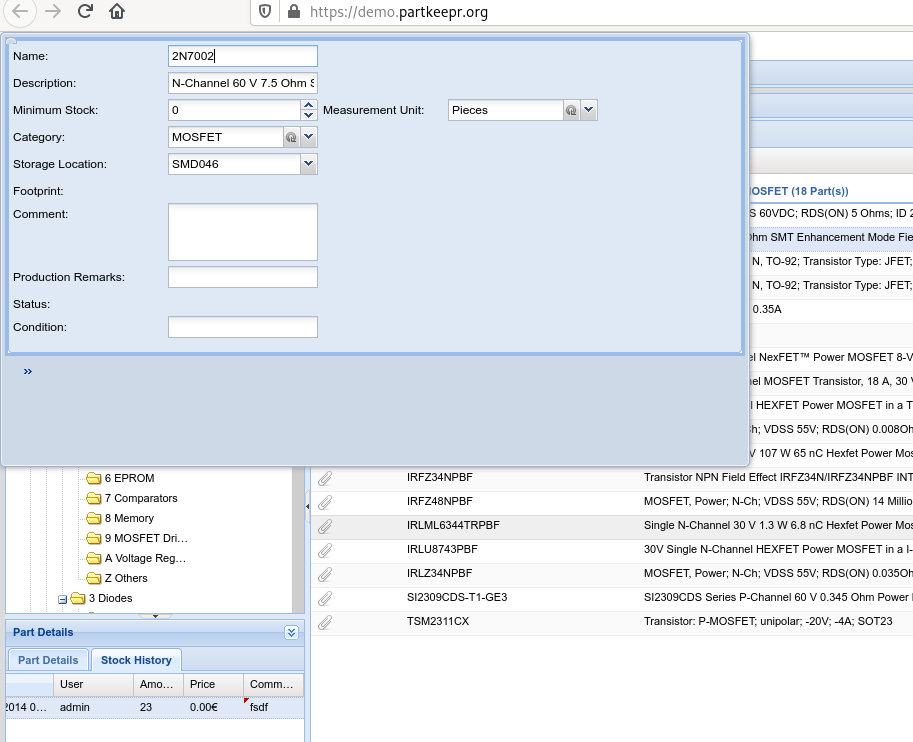
Note, other dialogs are also broken such as the System menu and probably others. Didn't see anything in the logs.
System Information
- reproduces on the current demo site as of 2020/04/13 as well as my own setup (docker from mhubig/partkeepr )
JavaScript errors
after pressing Enter while modifying the Comment field, I see
TypeError: record.getId is not a functionmain2.js:12064:43
    extractData https://demo.partkeepr.org/js/compiled/main2.js:12064
    readRecords https://demo.partkeepr.org/js/compiled/extjs.js:22
    read https://demo.partkeepr.org/js/compiled/main2.js:11958
    processResponse https://demo.partkeepr.org/js/compiled/extjs.js:22
    createRequestCallback https://demo.partkeepr.org/js/compiled/extjs.js:22
    callback https://demo.partkeepr.org/js/compiled/extjs.js:22
    onComplete https://demo.partkeepr.org/js/compiled/extjs.js:22
    onStateChange https://demo.partkeepr.org/js/compiled/extjs.js:22
    bind https://demo.partkeepr.org/js/compiled/extjs.js:22
not sure if relevant.
