

 parse-community
Cannot delete file from field in modal dialog
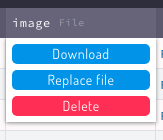
The latest version 3.2.0 has a new design for some parts, but the File buttons to "Download/Replace/Remove" was a good UX.
Before (good)

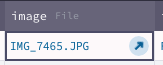
Now (missing the delete button):


Thanks for opening this issue!
- ❌ Please edit your post and use the provided template when creating a new issue. This helps everyone to understand your post better and asks for essential information to quicker review the issue.
![parse-github-assistant[bot] avatar](https://avatars.githubusercontent.com/in/136195?v=4 "Published by a pub.dev verified publisher")
@jadsonlourenco Thanks for opening this issue. Can you please use the provided template when opening an issue and explain in more detail what specifically you want to change and why. The template should guide you with that.

@jadsonlourenco Under the new UI, deleting a file works just like deleting any other field value by pressing the delete key. If this does not work in the modal dialog, then this would be a bug.
Could you clarify what the issue is - are you just preferring the old UI or are you unable to delete the file?
Good, but I don't know about this keyboard shortcut, most of the time on desktop and mobile we use mouse/touch. On the preview version, as we can see on the images, was three buttons, including one to delete by clicking/touching on it. So, how can we delete a file with mouse/touch now?
So, how can we delete a file with mouse/touch now?
It should work the same as with every other field. How do you delete the content of a file/text/pointer field in the data browser?
Yes, but these button never existed for non-file field. How do you delete non-file fields in the data browser in a touch interface?
Yes, like I've said in the first post too, the issue is on the modal edit.
I understand, but how did you delete non-file fields in the data browser in a touch interface, before the upgrade to 3.2.0?
Yes, in the data browser we have the three buttons, before the upgrade (2.1.0). Now on 3.2.0 is the same as the edit modal, with no delete button.
Version 2.1.0, data browser column:
Version 3.2.0:
Please read my question again, I am specifically asking for non-file fields 🙂 For example the username field in _User, how would you delete that?
I assume by pressing the "Delete" key. Would it help you if you could delete a file the same way in the modal dialog?
Sorry, you are right, great UX without buttons, "welcome to Windows 8", hahaha. You got the issue, so, if you want to write documentation explaining how to "delete" on the File field will be great, so, do the same as Microsoft did on Windows 8, hide the simple things to the user search on the UI, very good UX, very good.
At least this project is open source and I can add the buttons, use the old version, which makes my life easy.
Thank you, regards.
The buttons have been removed because other fields also do not have any buttons. If you can delete the username field with your touch UI, why do you need buttons for file fields.
If the modal dialog does not support this, then this would be a bug that needs to be fixed, so you can delete it the same way as in the data browser. I just checked and this seems to be an issue with the modal dialog in general. Once a value is set for any type of field, it's not possible to delete the whole field, so that's a bug.
I think the larger issue is that the dashboard does not have a specific touch UI vs. desktop UI. It's the same UI, which is not practical. On the desktop, using the "Delete" key may be faster, on a touch device, using a button may be faster than using the virtual keyboard.
I classified this as a bug with low severity; the workaround is to not use the modal dialog when creating a new object, but the data browser.
The issue specifically is that any field in the dialog cannot be erased completely, because it is not possible to select a field, like a cell can be selected. Adding something like a x icon to each field to delete the content could be a solution.
Yes, I think that we have the solution and then replace it with this new UI, that is missing.
Think:
What can you do with a "relation" column? You can select an object from the relational Class, so, add a button to do it is a good solution. Done, make much better than before just a string box.
What you can do with a "string" column? Add a text, but how? With mouse: double click, then add the text on the input. Easy, done. How to delete? The same way, double click, then delete with the keyboard.
What you can do with a "file" column? Can Upload, Replace and Delete this "file". You can do it with the mouse, double click on the row input, then select the action. Easy. Done.
So, now what we can do with this "file" column? Double click? Will replace the file. Click on this new "arrow" icon? Download the file - arrow means to share, means download? Maybe a button with texts is not easier to use? - And if we want to delete this file? Well, click to select the row input, then hit the delete on the keyboard.
Now imagine if you need this approach to submit this message here on github: select the "comment" button then press "enter" on the keyboard. Good UX? I don't think so.
Use just icons to actions will solve? Maybe, I think icons are good for small spaces when we can't use text to tell the "action".
I was just sharing my opinion. thank you.
What you can do with a "string" column? Add a text, but how? With mouse: double click, then add the text on the input. Easy, done. How to delete? The same way, double click, then delete with the keyboard.
That is not entirely the same. If you double click into a column and delete the string, the value is an empty string "", but if you select the cell and delete the cell, the value is undefined.
How could a good UI look like that works for desktop and touch - and both cases: empty string and undefined? If we find a good solution, maybe we can apply that to the data browser and to the modal dialog. If the UI is different in many places to achieve the same thing, that would also not be good UI.
Well, I think this approach to double click and delete the string should save undefined on the database.
As you said, and as we have before, using the buttons for the "File" type was the same UI on the data browser and dialog.
Well, I think this approach to double click and delete the string should save undefined on the database.
And how would you save an empty string then?
As you said, and as we have before, using the buttons for the "File" type was the same UI on the data browser and dialog.
Do you have an idea for a UI that works for all fields, not just for the file field?
And how would you save an empty string then?
Did you need it? Example?
Do you have an idea for a UI that works for all fields, not just for the file field?
No, but the "fields" are different types of data, can have different approaches in the UI.
Did you need it? Example?
I personally don't need it, but some else may need it, like you need the file buttons. 🙂
No, but the "fields" are different types of data, can have different approaches in the UI.
Different approaches for the same UI object seems rather confusing, and it means more code to maintain. Can you say which action specifically is difficult for you in a touch UI - adding a new file or deleting an existing file?
Different approaches for the same UI object seems rather confusing, and it means more code to maintain. Can you say which action specifically is difficult for you in a touch UI - adding a new file or deleting an existing file?
I mean for the same input type, so, like the File with buttons, the same on data browser and the dialog, on previews version.
No, I never used mobile to send or change "File" input, and discovered now that the "delete" key can be used.
No, I never used mobile to send or change "File" input, and discovered now that the "delete" key can be used.
I understand that you want to have the buttons back, but can you help me understand why. Which action specifically do you find difficult to do without the buttons, and is that on touch or desktop?
I understand that you want to have the buttons back...
No, I have the buttons on my Parse Dashboard installation, 2.1.0, and it works, so, no problem.
This issue is just to share that in the current version we don't have an option to delete the File with "click", just with the keyboard - which is not easy to know - on the dialog and data browser. I want the same as you, a good UI/UX (we have) for this project.
This issue is just to share that in the current version we don't have an option to delete the File with "click", just with the keyboard
That is consistent behavior with all other fields. That is why the buttons have been removed, to have a consistent UI.
The issue I see though is that the modal dialog behaves differently than the data browser. In the modal dialog it's not possible to delete any field (set it to undefined). I think that should be fixed, and it also seems to be the issue you originally brought up.
Do you have any suggestion how to solve that in the dialog UI for any field (not just file field).
Do you have any suggestion how to solve that in the dialog UI for any field (not just file field).
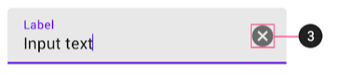
Well, can be an icon/button to "unset", more clean to say what this action will do. But visually, not a hidden key shortcut.
Another suggestion for the File field: edit the file URL as a string, someone can need it too.
an icon/button to "unset"
Do you mean like this?
Another suggestion for the File field: edit the file URL as a string, someone can need it too.
Good idea! Feel free to open a separate issue for this.
Yes, I will do research about it, and back with ideas and solutions. Keep this issue for now.