
gnome-shell-system-monitor-applet
 gnome-shell-system-monitor-applet copied to clipboard
 paradoxxxzero
Wrong numbers are used for memory, some memory is counted twice
Consider the following picture and notice that according to free -h I have 1.5G (=20%, = 5 pixels) of memory available, including 871M (=12%, = 3 pixels) not used for anything at all, not even buffers/caches. And yet, the system-monitor applet shows the memory being used entirely, so this is incorrect.
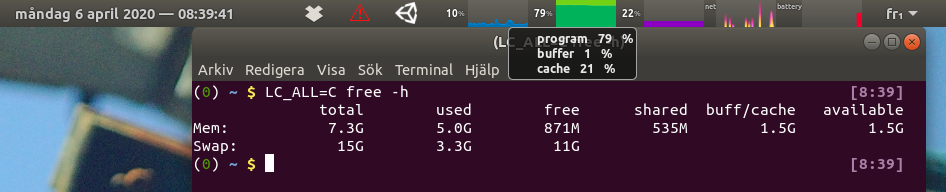
I believe the issue is that what system-monitor calls program corresponds to total - available in free -h, but note that this total - available may include memory that is also counted as part of cache, so some memory is being counted twice (as happens above, which is why it shows no free memory).
Ultimately, what the user cares the most about (I think) is whether they will be able to run a new program without swapping, i.e. the available column from free -h. I’m also not sure the difference between buffers and cache is relevant (at least it looks like free -h decided that it is not relevant). I would therefore propose the following:
- Dark green for memory actually being used by programs (
usedinfree -h) - Darkish green for unavailable buffer/cache (
total - available - used) - Very light green for available buffer/cache (
available - free) - The rest will then be
free, and no memory is being counted twice.
As far as the actual implementation goes (https://github.com/paradoxxxzero/gnome-shell-system-monitor-applet/blob/master/system-monitor%40paradoxxx.zero.gmail.com/extension.js#L1572), I haven’t tried it but I would assume that this.gtop.used corresponds to used, that this.gtop.user corresponds to total - available and that this.gtop.free corresponds to free, so it looks like this would be easy to fix.

To be honest, I'm non entirely sure that the information shown is wrong, but I can't say I fully understand the difference.
To begin with, this extension (10 years ago) did exactly what you are proposing, but this was then changed for the current calculation (7f6e58570c86ceec3dd7ac6b2485d7fd874e0208).
Now, what the difference between used and user is exactly, I don't really know. Here is an example where the current behaviour is explicitly preferred, for some reason: https://gitlab.gnome.org/radhika/gnome-usage/commit/cf4b99d6bf792bca17619be61d7eab2b3b86a174.

As another note, what Gnome Usage does (link above), what our extension does and what Gnome System Monitor are doing seems to be rather compatible.
Measuring ram usage is always a bit controversial. But just for the sake of testing, compare what you get with free -h vs. System Monitor (the app, not the extension). You'll see again a big difference in the claimed used section.
To be honest, I'm non entirely sure that the information shown is wrong, but I can't say I fully understand the difference.
In the example I gave, 12% of the memory is not being used at all (not even for buffers or caches), and yet the entire memory is shown green. I don’t see how that can be correct, no matter what the meaning of the different shades of green are.
To begin with, this extension (10 years ago) did exactly what you are proposing, but this was then changed for the current calculation (7f6e585).
Looks like this commit is more about changing the way the memory usage is being computed (using libgtop instead of parsing /proc/meminfo), so I’m not sure how that invalidates my point. Also, the computation of available memory (total - user) was only introduced six years ago in the Linux kernel (https://git.kernel.org/pub/scm/linux/kernel/git/torvalds/linux.git/commit/?id=34e431b0ae398fc54ea69ff85ec700722c9da773), so the extension cannot have been doing what I’m proposing 10 years ago.
Now, what the difference between
usedanduseris exactly, I don't really know. Here is an example where the current behaviour is explicitly preferred, for some reason: https://gitlab.gnome.org/radhika/gnome-usage/commit/cf4b99d6bf792bca17619be61d7eab2b3b86a174.
From what I understand, the difference between used and user is the following (assuming that libgtop’s used does correspond to free -h’s used)
usedis the memory being directly allocated/used by programsuserconsists ofusedplus part of the cache memory used by programs, the part that cannot be made available even if needed
In particular, used is not super relevant to a normal user, what they care about is rather user (i.e., the memory that is actually unavailable at the moment), so for a memory monitor that doesn’t display buffers/caches (like the one you linked above), it makes complete sense to use user instead of used. What does not make sense is to add buffers/caches on top of user, because user already includes some of them (the unavailable ones). This is what this extension does.
As another note, what Gnome Usage does (link above), what our extension does and what Gnome System Monitor are doing seems to be rather compatible.
Measuring ram usage is always a bit controversial. But just for the sake of testing, compare what you get with
free -hvs. System Monitor (the app, not the extension). You'll see again a big difference in the claimedusedsection.
Gnome System Monitor does not display buffers/caches, so it makes again perfect sense that it uses user instead of used. As for free -h, you should not look at the used column, but rather at the available column (= total - user), this seems to be the same amount of memory as reported available by Gnome System Monitor.
In summary, I do agree that user should be displayed prominently (and that the percentage displayed in the status bar, 79% in the OP, is correct), what I disagree with is that buffers/caches are being added on top of it, because a potentially large proportion of them are already included in user.
Anyway, here is more conservative and hopefully less controversial suggestion using only two different colors:
- Dark green for
user, as is currently the case (corresponds to unavailable memory, and compatible with both Gnome System Monitor andfree -h’savailablecolumn). - Light green for
total-free-user, i.e., the memory which is not free but not being actively needed either (this is the part of the buffer/cache memory that can be reclaimed at any time). - Then the space which is not colored would correspond to
free, i.e., memory not being used for anything at all.
The only difference (with the current behavior) is to use light green for total - free - user instead of using it for buffer and cache, so that it is clear that the part which is left uncolored is the memory which is really free.
@guillaumebrunerie thank you for your further comments and explanation.
I do like your new proposal.
I'd be glad to change the current method for calculation. But, before doing so, I'd like to know if anyone else feels strongly about this. Essentially, we would be merging the buffer+cache categories, and calculating this quantity differently, this is the only one that truly changes, but will then, as a consequence, show more accurately the free memory.
Any objections? Or further insight? @chrisspen @paradoxxxzero @darkxst
You can give this a try, for feedback: https://github.com/franglais125/gnome-shell-system-monitor-applet/tree/memory
Gosh its been a long time since I have even used this extension or even looked at libgtop however I do wonder does user include all system resources? Lets say I have a docker container running a huge database and taking ~4GB RAM (exaggerated a little for the example) running as a different user, does that get reported by libgtop under user.
I have noticed that both GNOME usage and system-monitor often don't report resource usage from my docker containers, etc. Same might apply to a multi-user system where you might have users sshing in or switching active GNOME sessions.

According to this line, user in libgtop corresponds to total - available, and according to this kernel commit, available is supposed to represent available memory.
If some memory is reported as available by Gnome System Monitor but isn’t actually available, this is strange, could it be a bug in the Linux kernel? But I don’t know what a docker container is, so I have no idea. Maybe you can look at /proc/meminfo to see how this memory is being counted.
By the way, I don’t think that user is meant to refer only to the memory used by a single user, it’s probably meant to refer to user space versus kernel space, so it should include memory used by all users.
@guillaumebrunerie would you mind testing the branch I pointed out above? I need to refine a few things, but at least the calculation is updated.
@franglais125 Sure, sorry, I just saw your comment now. I’ll try to figure out how to compile and test it.
@guillaumebrunerie would you mind testing the branch I pointed out above? I need to refine a few things, but at least the calculation is updated.
I’m using it now, as far as I can see it seems to work properly! I’ll keep on using it and come back here in case I notice any problem, but otherwise I believe it is working now.
The only issue I found is that in the preferences there is still a setting for the color of "buffer".
Thanks for the fix!
Hi, I'm also experiencing this issue. If it has been fixed in @franglais125's branch, would it be possible to merge the changes? Thanks!

