
pangeo-forge-recipes
 pangeo-forge-recipes copied to clipboard
 pangeo-forge
Transfer inputs using Globus
Background
Pangeo Forge recipes operate on "inputs", string URLs that point to individual source files. These inputs are generated by the recipe FilePattern object.
Currently, Pangeo Forge relies 100% on fsspec to download these files. This is great because fsspec has a ton of implementations for just about every file transfer / storage protocol in the world.
However, fsspec does not support Globus...
Globus provides a secure, unified interface to your research data. Use Globus to 'fire and forget' high-performance data transfers between systems within and across organizations.
...and it probably never will. Globus is a system for transferring whole files and nothing else, so wrapping it in a filesystem-like abstraction probably just doesn't make sense. (@martindurant correct me if I'm wrong.) However, so much scientific data is accessible over Globus. Our impact will be much greater if we can interoperate with Globus somehow.
However, using Globus will likely require us to refactor our approach to file transfers; Globus operates at a higher level, so much of the logic we have for opening, streaming, and saving files will be unnecessary (also discussed in #95).
Questions about Globus
To move forward, we need to answer some basic questions about Globus. I'm going to tag @rpwagner, who has been very helpful in this area in the past and see if he bites.
- Is there such thing as a "global namespace" for the entire Globus federation? Can I refer to a specific file at a specific endpoint via a string url, e.g
globus://my-globus-endpoint.columbia.edu/my/specific_file.nc? - If we wanted to use Globus to transfer data from user-specified HPC systems to our cloud buckets via automated batch jobs, how would we handle authentication? Does Globus support "service accounts," long-lived tokens, etc,...any way of storing credentials persistently for months / years without requiring interactive login? (Obviously such credentials would have to be managed securely, but that's the case for any credentials.)
- Would we need a paid Globus subscription to transfer data to buckets in S3 / GCS?
- Does Globus work with OSN?
- What does the python code look like to create and wait on a file transfer using Globus?
- Is it possible to rename the file as it is transferred to the target endpoint?
Another useful reference is the Parsl workflow tool, which already supports Globus file transfer. There is lots to learn from reading their docs and looking at their code.
Next Steps
Depending on the answer to those questions, here are some specific tasks we could take towards implementing Globus support in Pangeo Forge.
- [ ] Refactor file downloading / caching (e.g.
cache_inputsstep) out ofXarrayZarrRecipeand into a standalone mixin that can be added to any Recipe class (e.g.FsspecFileCacherMixin).- [ ] Create unit tests for this class.
- [ ] Make the current fsspec-based file cacher an implementation of a more generic base class for file caching (e.g.
FileCacherMixin) - [ ] Implement the
GlobusFileCacherMixin

@maxgrover recently pointed me to the Foundry project, from which I was able to track down this useful piece of code for transferring globus files.
https://github.com/materials-data-facility/toolbox/blob/master/mdf_toolbox/globus_transfer.py
Just a comment on :
If we wanted to use Globus to transfer data from user-specified HPC systems to our cloud buckets via automated batch jobs, how would be handle authentication? Does Globus support "service accounts," long-lived tokens, etc,...any way of storing credentials persistently for months / years without requiring interactive login? (Obviously such credentials would have to be managed securely, but that's the case for any credentials.)
Perhaps it would be interesting to integrate with Globus ID . Perhaps @rpwagner may refer to a more detailed, official, documentation.

My apologies, I meant to comment on this a while ago. The short answer to most of the questions about "can we do this?" is yes, you can. Then there are the details.
For the specific example of having services do automated transfers, it's not about the identity provider, like Globus ID, but rather having a client (service, script, etc.) use its own credentials. This can be combined with permissions or roles on a guest collection to let the client (script, portal, JupyterHub instance, etc.) do things like read and write data, or even manage permissions for users.
The practical aspect of implementation may be around which HPC centers allow guest collections. The ALCF model would enable this, as do several other XSEDE and DOE centers, and many campus research IT environments.
I would also suggest we bring some Globus folks into this thread, namely @lliming and @kylechard. (I'm back at UCSD.) Amongst us, we've seen a few potential architectures. Most of my recent experience is more from the genomics and bioinformatics side, but I'm glad to share them.

Thanks a lot for the reply @rpwagner. I appreciate your reply.
If anyone you tagged can provide specific replies to my "Questions about Globus" in https://github.com/pangeo-forge/pangeo-forge-recipes/issues/222#issue-1027771533 I will literally buy you a 🍺 or the beverage of your choice. 😉
@rabernat it would be great to have @kylechard opinion on this (hi Kyle!). If such a dialog between STAC endpoints (even if it is just a proxy) and Globus happens will be very interesting (but I don't know if is feasible or even desirable from a systems perspective).
I was at a talk by @ianfoster today, and he mentioned that they are moving a huge amount of data (If I'm not wrong, CMIP and MODIS), to be stored on Argonne ALCF, and it seems that they will be discoverable with Globus. So I think that this topic may be interesting for Globus folks too.
It is good to see this thread. @rabernat alerted me to it almost 2 months ago, and I am ashamed to say that I let myself be busy with other things. We will get answers to the questions not already answered, and to others as they arise. About @ricardobarroslourenco's data question: I provide some context in these slides, https://www.slideshare.net/ianfoster/big-data-big-computing-ai-and-environmental-science. We have replicated 700 TB of MODIS data to Argonne (slide 26), and are in the process of replicating 8.6 PB of ESGF CMIP data (slide 28). The idea is that they can then be computed on at high speed, as e.g. Takuya Kurihana is doing (https://ieeexplore.ieee.org/iel7/36/9633014/09497325.pdf).

Thanks for everyone who has chimed in here. Encouraged by @blaiszik, I am trying to organize an informal cross-project meeting between Pangeo and Globus, not specifically about this issue but about how our projects might collaborate more broadly. See details here - https://discourse.pangeo.io/t/pangeo-globus-labs-meeting-and-discussion/2308 - if you'd like to join!
@rabernat certainly interested in joining the call and hearing more about your work. Here are some answers to the questions you posed above.
Is there such thing as a “global namespace” for the entire Globus federation? Can I refer to a specific file at a specific endpoint via a string url, e.g globus://my-globus-endpoint.columbia.edu/my/specific_file.nc?
All Globus endpoints have a unique ID and thus files can be referenced directly. In Parsl and other systems we compose URLs like your example (globus://..).
When using the latest Globus Connect version 5 endpoints, data access is via what we call "collections". Each collection has an associated DNS name, such that you can refer to collections directly. By default collections are assigned DNS names in the data.globus.org subdomain, but they can also be customized by deployments.
v5 also supports HTTP/S access to data, while enforcing a common security policy across the access mechanism. For example, here is a publicly accessible file: https://a4969.36fe.dn.glob.us/public/read-only/logo.png. For non-public data, users must authenticate (and be authorized to access the data) before it can be downloaded via HTTPS.
If we wanted to use Globus to transfer data from user-specified HPC systems to our cloud buckets via automated batch jobs, how would we handle authentication? Does Globus support “service accounts,” long-lived tokens, etc,...any way of storing credentials persistently for months / years without requiring interactive login? (Obviously such credentials would have to be managed securely, but that’s the case for any credentials.)
Yes to all of the above: transfers can be automated, Globus supports long running transfers, and you can retrieve long-lived refresh tokens.
There are two authentication layers with Globus. a) Authenticating to the Globus service so it can manage and track you transfers; and b) authenticating to the storage system with the needed credentials and meeting their policy.
For (a), for complete automation, application credentials can be used. This leverages OAuth’s model of an application obtaining credentials with an authorization server. These credentials grant the application an identity in the Globus ecosystem, and permissions for data and other roles can be granted.
For data access, (b) the level of automation that can be achieved is determined by policy on the storage system. Globus supports shared endpoints (or guest collections in v5) that allow full automation of transfers (like the example Ian mentioned above for replicating the ESGF data).
Would we need a paid Globus subscription to transfer data to buckets in S3 / GCS?
Transferring to/from cloud storage requires a Globus subscription. 150+ institutions are existing subscribers, so you should check if you already have access to a subscription via your institution.
Does Globus work with OSN?
Yes. Globus has connectors for Ceph/S3 compatible object stores. Here is an example search portal that uses Globus to access data on OSN https://osn.globusdemo.org/.
What does the python code look like to create and wait on a file transfer using Globus?
Documentation about the Globus Python SDK is here: https://github.com/globus/globus-sdk-python.
Typically users will a submit a transfer and check the status asynchronously (rather than waiting).
There are some good examples in the tutorial notebooks: https://github.com/globus/globus-jupyter-notebooks/blob/master/Transfer_API_Exercises.ipynb and several automation examples that might match your use case : https://github.com/globus/automation-examples
Is it possible to rename the file as it is transferred to the target endpoint?
Yes, you can specify both the source and destination name in a transfer.

To test things out, I have created a sample public collection here:
https://app.globus.org/file-manager?origin_id=f0267e3e-f246-449c-8303-037a3b8bd233&origin_path=%2F
How do I access this data over HTTPS? Can someone point me to the relevant documentation for the HTTPS feature?
@rabernat take a look here: https://docs.globus.org/globus-connect-server/v5/https-access-collections/
@ricardobarroslourenco - thanks for the tip. I attempted to follow those directions and found some inconsistencies. But I was able to move forward with a little bit of trial and error. I can successfully access my data via HTTPS! 🎉
Trying to run the example from the globus docs
I installed the globus cli and logged in globus login using my institutional credentials. Then I tried to run the example CLI code from the docs
$ globus endpoint show 60a0c6af-3f73-453c-afbe-c8504fc428b6 --jq 'https_server' -F unix
Expected 60a0c6af-3f73-453c-afbe-c8504fc428b6 to be an endpoint ID.
Instead, found it was of type 'Guest Collection'.

Please run the following command instead:

    globus collection show 60a0c6af-3f73-453c-afbe-c8504fc428b6
So I tried to follow the advice
$ globus collection show 60a0c6af-3f73-453c-afbe-c8504fc428b6
MissingLoginError: Missing login for 0b3dfa5b-5572-41e2-a61e-dee56a9a87ea, please run

  globus login --gcs 0b3dfa5b-5572-41e2-a61e-dee56a9a87ea
So I tried globus login --gcs 0b3dfa5b-5572-41e2-a61e-dee56a9a87ea and used the browser to authenticate again. Then I tried running
globus collection show 60a0c6af-3f73-453c-afbe-c8504fc428b6

Globus CLI Error: A Globus API Error Occurred.
HTTP status:      404
code:             Error
message:
                  <!DOCTYPE HTML PUBLIC "-//W3C//DTD HTML 3.2 Final//EN">
                  <title>404 Not Found</title>
                  <h1>Not Found</h1>
                  <p>The requested URL was not found on the server. If you entered the URL manually please check your spelling and try again.</p>
My conclusion is that the example in the documentation is either broken or points to data that is not part of a public collection. I am using the latest globus CLI version (3.4.0).
I believe the globus docs need an update. Is there a place I can make a PR?
Try to make the command work for my collection
At this point, I hypothesize that I don't have the proper credentials to access the data from the example, so I am trying again with my public guest collection linked above (https://app.globus.org/file-manager?origin_id=f0267e3e-f246-449c-8303-037a3b8bd233&origin_path=%2F).
$ globus endpoint show f0267e3e-f246-449c-8303-037a3b8bd233 --jq 'https_server' -F unix
Expected f0267e3e-f246-449c-8303-037a3b8bd233 to be an endpoint ID.
Instead, found it was of type 'Guest Collection'.


Please run the following command instead:

    globus collection show f0267e3e-f246-449c-8303-037a3b8bd233

globus collection show f0267e3e-f246-449c-8303-037a3b8bd233
Display Name:                Two-layer QG Lagrangian Simulations
Owner:                       [email protected]
ID:                          f0267e3e-f246-449c-8303-037a3b8bd233
Collection Type:             guest
Storage Gateway ID:          e92a3268-70a2-4480-9638-85d942c1216d
Connector:                   POSIX
High Assurance:              False
Authentication Timeout:      43200
Multi-factor Authentication: False
Manager URL:                 https://0da32.08cc.data.globus.org
HTTPS URL:                   https://g-c70289.0da32.08cc.data.globus.org
TLSFTP URL:                  tlsftp://g-c70289.0da32.08cc.data.globus.org:443
Force Encryption:            False
Public:                      True
Organization:                Columbia University
Keywords:                    ['fluid', 'mechanics', 'coherent', 'structures']
Description:                 Dataset of Lagrangian trajectories from two-layer quasigeostrophic flow generated with pyqg.
Contact E-mail:              [email protected]
Collection Info Link:        https://github.com/ocean-transport/lcs-ml
Great! :tada: I found an HTTPS_URL
Try to figure out the correct URL for HTTPS
I now assumed that the directory would be accessible via this HTTPS endpoint. And it works!
$ curl  https://g-c70289.0da32.08cc.data.globus.org/pyqg_ensemble/001.zarr/.zgroup
{
    "zarr_format": 2
}%
I am also able to load the data via fsspec, xarray, and zarr!
import fsspec
import xarray as xr
url = 'https://g-c70289.0da32.08cc.data.globus.org/pyqg_ensemble/001.zarr'
mapper = fsspec.get_mapper(url)
ds = xr.open_zarr(mapper)
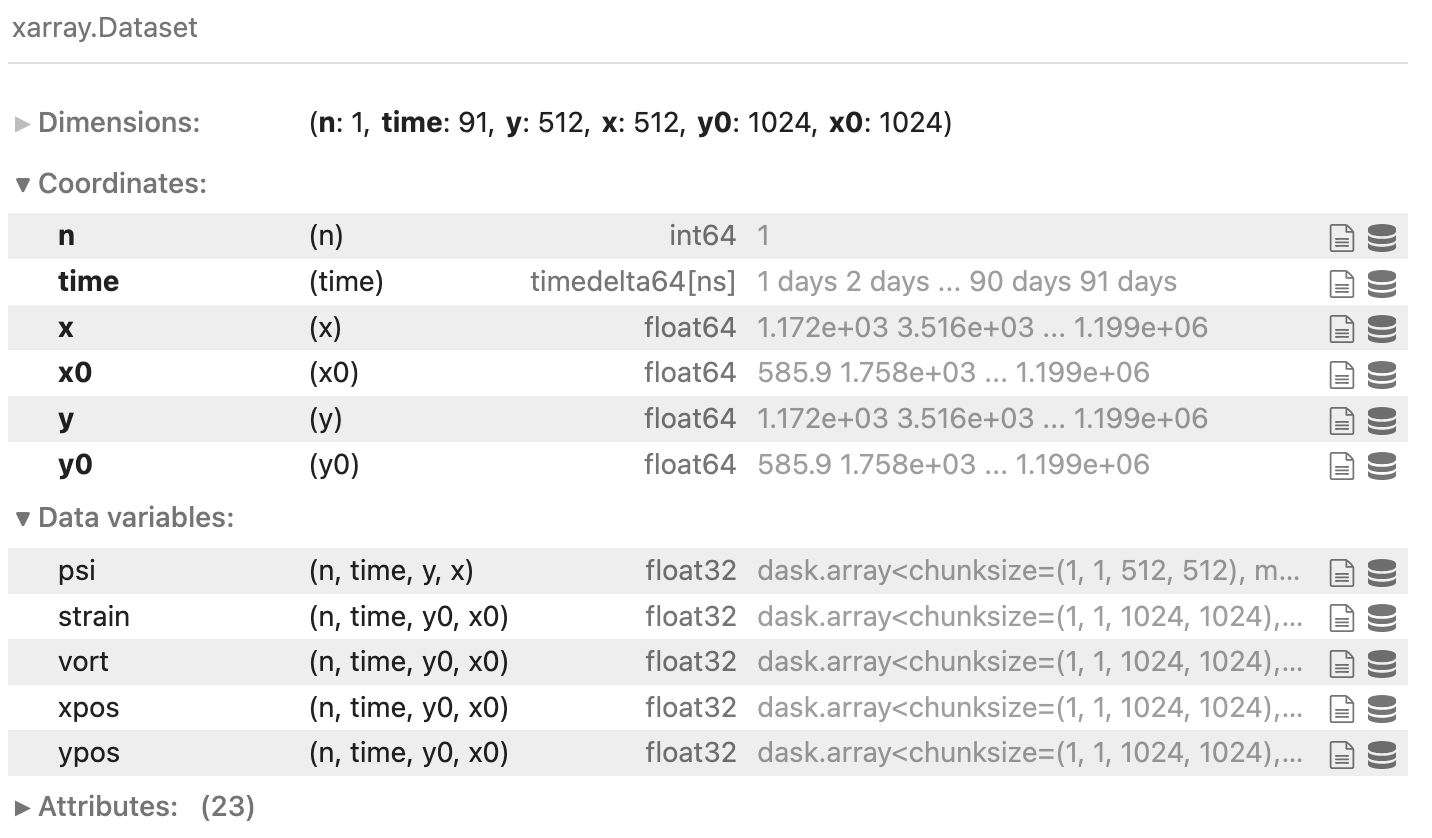
And plot it using lazy loading
ds.vort[0, 0].plot(robust=True)

This is a huge milestone. Thanks so much for your support.
One final subtle issue i have noticed: subdirectories in this HTTPS endpoint do not have the correct content-type httpd/unix-directory. Compare the root
$ curl --head https://g-c70289.0da32.08cc.data.globus.org/
HTTP/1.1 200 OK
Date: Mon, 28 Mar 2022 16:06:52 GMT
Server: Apache/2.4.37 (Red Hat Enterprise Linux) OpenSSL/1.1.1g
Strict-Transport-Security: max-age=31536000
Access-Control-Allow-Origin: *
Access-Control-Allow-Headers: Authorization, Content-Type, X-Requested-With, Range
Access-Control-Allow-Methods: HEAD, GET, PUT, DELETE, OPTIONS
Accept-Ranges: bytes
Content-Length: 4096
Content-Type: httpd/unix-directory
to the subdirectory
$ curl --head https://g-c70289.0da32.08cc.data.globus.org/pyqg_ensemble/001.zarr/
HTTP/1.1 200 OK
Date: Mon, 28 Mar 2022 16:06:47 GMT
Server: Apache/2.4.37 (Red Hat Enterprise Linux) OpenSSL/1.1.1g
Strict-Transport-Security: max-age=31536000
Access-Control-Allow-Origin: *
Access-Control-Allow-Headers: Authorization, Content-Type, X-Requested-With, Range
Access-Control-Allow-Methods: HEAD, GET, PUT, DELETE, OPTIONS
Accept-Ranges: bytes
Content-Length: 4096
This will cause some issues for our downstream tooling. I would consider it a bug in the globus HTTPS implementation. Where would be the best place to report this bug? Thanks.
Happy to help @rabernat ! @kylechard any comments on how Ryan should proceed?
I believe the globus docs need an update. Is there a place I can make a PR?
Yes, looking at this, and speaking as one of the maintainers of the globus-cli, we need to fix this doc. The docs.globus.org source is private, but I'll make sure we take care of this. If you're looking for a place to file upstream issues, we're happy to take any bug reports either via [email protected] or on the CLI issue tracker if they're globus-cli related.
This doc was correct until the release of globus-cli v3.0.0. In 3.0, we added features for handling GCS version 5 which made the command inaccurate (it should have been updated to globus collection show ...), and we didn't catch it.

Hi @sirosen - thanks for the response! Since you have noted the issue already, I'm not going to file a ticket for the doc fixes.
However, I would be very interested in opening one for the Content-Type: httpd/unix-directory HTTPS issue above. Would [email protected] be the right venue for that?
Ryan:
I am delighted to see you already finding issues!
Regards -- Ian
From: Ryan Abernathey @.> Date: Monday, March 28, 2022 at 11:10 AM To: pangeo-forge/pangeo-forge-recipes @.> Cc: Ian T. Foster @.>, Mention @.> Subject: Re: [pangeo-forge/pangeo-forge-recipes] Transfer inputs using Globus (#222)
One final subtle issue i have noticed: subdirectories in this HTTPS endpoint do not have the correct content-type httpd/unix-directory. Compare the root
$curl --head https://g-c70289.0da32.08cc.data.globus.org/
HTTP/1.1 200 OK
Date: Mon, 28 Mar 2022 16:06:52 GMT
Server: Apache/2.4.37 (Red Hat Enterprise Linux) OpenSSL/1.1.1g
Strict-Transport-Security: max-age=31536000
Access-Control-Allow-Origin: *
Access-Control-Allow-Headers: Authorization, Content-Type, X-Requested-With, Range
Access-Control-Allow-Methods: HEAD, GET, PUT, DELETE, OPTIONS
Accept-Ranges: bytes
Content-Length: 4096
Content-Type: httpd/unix-directory
to the subdirectory
$ curl --head https://g-c70289.0da32.08cc.data.globus.org/pyqg_ensemble/001.zarr/
HTTP/1.1 200 OK
Date: Mon, 28 Mar 2022 16:06:47 GMT
Server: Apache/2.4.37 (Red Hat Enterprise Linux) OpenSSL/1.1.1g
Strict-Transport-Security: max-age=31536000
Access-Control-Allow-Origin: *
Access-Control-Allow-Headers: Authorization, Content-Type, X-Requested-With, Range
Access-Control-Allow-Methods: HEAD, GET, PUT, DELETE, OPTIONS
Accept-Ranges: bytes
Content-Length: 4096
This will cause some issues for our downstream tooling. I would consider it a bug in the globus HTTPS implementation. Where would be the best place to report this bug? Thanks.
— Reply to this email directly, view it on GitHubhttps://github.com/pangeo-forge/pangeo-forge-recipes/issues/222#issuecomment-1080841134, or unsubscribehttps://github.com/notifications/unsubscribe-auth/AAW3ZLN2HWKQBN4ZOR5BL73VCHKUXANCNFSM5GCVVZXA. You are receiving this because you were mentioned.Message ID: @.***>
Hi @rabernat I checked with the team on the content-type problem. At present directory listing is not a supported feature via the HTTPS interface. Instead you would need to list the directory via the Globus API.
Thanks Kyle. I don't want to actually list the directory. I just want Globus to return a Content-Type: httpd/unix-directory header when I call GET on a directory. It's fine if the content is empty. Globus is already doing this for the top-level URL of the collection: https://g-c70289.0da32.08cc.data.globus.org/. Just not for the subdirectory https://g-c70289.0da32.08cc.data.globus.org/pyqg_ensemble/001.zarr/. Do you think that is feasible?
Actually, Kyle, perhaps this is not such a big deal, because changing the headers would not actually resolve https://github.com/zarr-developers/zarr-python/issues/993.