

 palantir
IntelliJ can't load Gradle project (works on command line)
What happened?
- Having issues loading a project with this plugin in IntelliJ.
- The project is a Java project that has a sub directory for the docker build. (https://github.com/andrewe123/palantir-gradle-docker-issue)
- The problem can be worked around by applying the Java plugin in the docker build.gradle, but I'm not sure if this should be required. (https://github.com/andrewe123/palantir-gradle-docker-issue/compare/workaround?expand=1)
- This project builds fine outside of IntelliJ (tried Eclipse and on the command line)
- I believe this issue might be specific to the palantir docker plugin. I'm not seeing the issue if I just replace the palantir plugin with a couple of different plugins, and perhaps this is expected behaviour, but I'm not sure.
Steps to reproduce IntelliJ version Community 2018.3 Gradle version 5.12.1
- Clone the repo (https://github.com/andrewe123/palantir-gradle-docker-issue)
- Import into IntelliJ as a Gradle project (select
Use default gradle wrapper (recommended)) - Refresh the Gradle build.
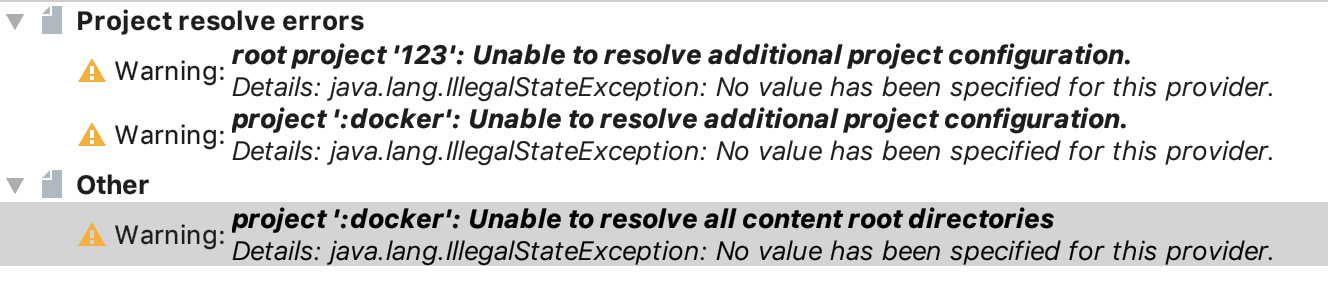
What did you want to happen?
I'd like to find out if you know of any specific reason why this problem might be happening (specific to the docker plugin with IntelliJ).


You can also fix the issue by applying the base plugin to the docker project.
I can't figure out a way to get the stacktraces of the Intellij warnings, so I'm not entirely sure what is causing the errors. My one theory is that it is because we use the ArchivePublishArtifact here.

I'm so relieved I found this issue! Been battling with this for hours and since the error message provides little information it was really hard to track down.
Strangely I only started seeing this after I changed some other configuration, so I didn't realise it was originating from this plugin. 😱
