

 palantir
4.0.0 dynamic icon imports not working in next.js
I'm seeing every icon imported into my nextjs app on 4.0.0. Is there a specific API I should be using to treeshake them dynamically? https://nextjs.org/docs/advanced-features/dynamic-import
Before I was overriding the generated/svgPaths file. I generally specify my icons via: <Icon icon="caret-down" /> but I can switch to explicit imports if that helps.
Environment
- Package version(s): 4.0.0-alpha.0
- Operating System: Mac OS X 11.2
- Browser name and version: Firefox Stable
Steps to reproduce
- Don't override generated svg icons file in a next.js repo. Set webpack build version to 5.
- Use
<Icon name="caret-down" /> - Analyze client bundle, all icons are included
Actual behavior
All icons are bundled
Expected behavior
Only used icons should be bundled
Possible solution
Not sure yet. Will report back here if I figure it out. Ref from #4513


I found it works with vitejs,but it always throw errors when dynamically importing icon.
There is only usage of <Icon icon="..." /> in project so all icons should be loaded lazily. The icons are rendered correctly tho, nothing wrong happens, it just always print errors in console.


It looks like in order to dynamically import react components in nextjs you must wrap it in a next/dynamic import: https://nextjs.org/docs/advanced-features/dynamic-import#basic-usage
import dynamic from 'next/dynamic'

const DynamicComponent = dynamic(() => import('../components/hello'))

function Home() {
  return (
    <div>
      <Header />
      <DynamicComponent />
      <p>HOME PAGE is here!</p>
    </div>
  )
}

export default Home
Would I be able to specify a custom loader? It looks like I can specify a custom loader for 'loadAll' or 'load'. But those are for loading all or specific icons. Is there a dynamic hook I can write to load icons as needed?
Would I be able to specify a custom loader? It looks like I can specify a custom loader for 'loadAll' or 'load'. But those are for loading all or specific icons. Is there a dynamic hook I can write to load icons as needed?
That's a good point, I think it would be worthwhile to add a customization point like Icons.setLoader(...) which sets a custom loader for all icons which the <Icon> component would use automatically.

What's interesting is it is loading in the icons dynamically (chunk 380), but it's loading all of them at once.
I also just noticed this in the next.js docs:
Note: In import('path/to/component'), the path must be explicitly written. It can't be a template string nor a variable. Furthermore the import() has to be inside the dynamic() call for Next.js to be able to match webpack bundles / module ids to the specific dynamic() call and preload them before rendering. dynamic() can't be used inside of React rendering as it needs to be marked in the top level of the module for preloading to work, similar to React.lazy.
emphasis mine.
Does this mean this isn't possible to be utilized in next.js?
hm, that's unfortunate... yeah, it seems like the fully dynamic import is unsupported in next.js... your other options are to load icons individually:
import dynamic from 'next/dynamic'

Icons.load("tick", {
  loader: dynamic(() => import('@blueprintjs/icons/lib/esm/generated/components/tick'))
})
or use the static imports:
import { Tick } from '@blueprintjs/icons'
this also suggests that we need to add some kind "less dynamic" import API for loading all icons; I would like <Icon> to have at least some way of working in next.js... maybe something like this:
// src/iconLoader.ts

export class Icons {
  // ...

  public static loadAllNotQuiteDynamicButAlsoNotStatic() {
    const allIcons = await import("./generated/allComponents");
    for (const [name, component] of allIcons) {
      const iconName = camelcase(icon, { pascalCase: true });
      singleton.loadedIcons.set(iconName, component);
    }
  }

  // ...
}
and src/generated/index.ts is adjusted so that the autogenerated list of all components is moved to a new file, src/generated/allComponents.ts
I converted all of my icon calls to component imports (import { Tick } from '@blueprintjs/icons') and it did tree shake successfully via next.js and webpack 5. So my issue is solved, personally. Feel free to close this, but if you want to leave it open for your open purposes that's fine too. Thanks!
edit: I also should add, the icon bundle does show up in my bundle analyzer, but is not requested via HTTP anymore as far as I can see. It would be nice to disable that to prevent any risk of that file loading (it's the size of my entire site).
Even in a simple login form without icons, I get all svg paths packed into my Next.js build
import {Button, FormGroup, InputGroup} from "@blueprintjs/core";

<form action="#">
	<FormGroup label="Login" labelFor="login_form__login">
		<InputGroup id="login_form__login" placeholder="Placeholder text" />
	</FormGroup>
	<FormGroup label="Password" labelFor="login_form__password">
		<InputGroup id="login_form__password" placeholder="Enter your password..."
		/>
	</FormGroup>
	<FormGroup>
		<Button type="submit" intent="none" text="Login" />
	</FormGroup>
</form>
Next.js: 11.1.2 Webpack: 5 Blueprint: 4.0.0-beta.2
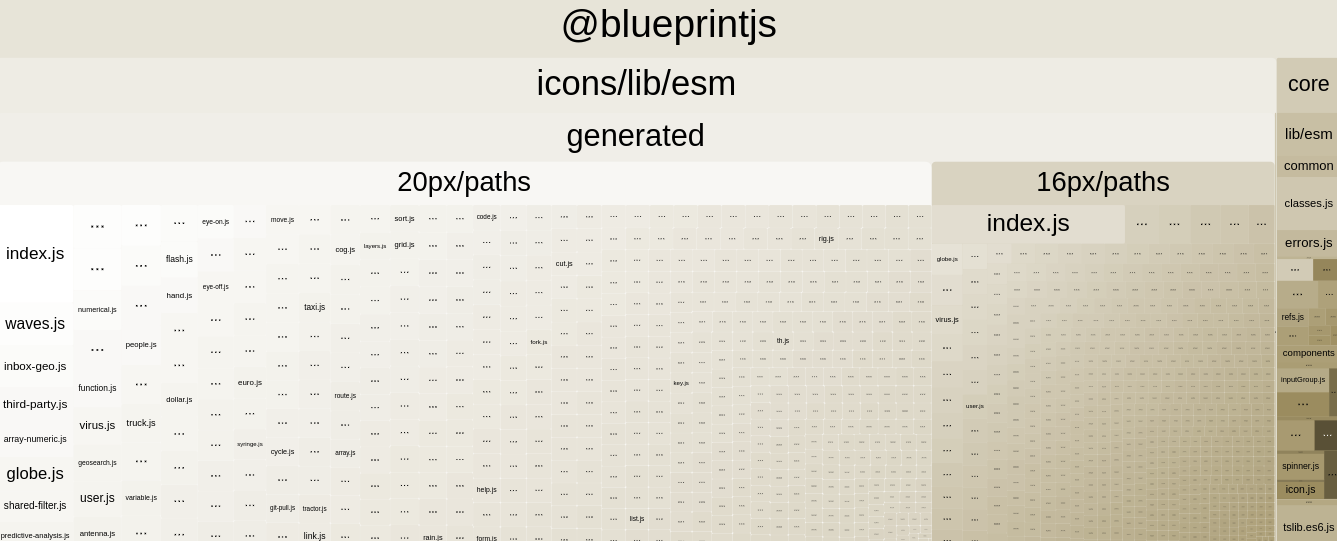

To reproduce:
- Download and unpack nextjs-blueprintjs-icon-shaking-issue-4645.zip
- yarn install
- yarn analyze
- Check "Show content of concatenated modules (inaccurate)" in server report
Yeap, some @blueprintjs/icons imports in src/components/icon/icon.tsx and few other places.
Please, let me know if the situation with adding icons was intended this way, or it's actually an undesired behavior.
I thought that icons should be modular, since they are in a separate package, and @blueprintjs/icons shouldn't be included in @blueprintjs/core.
We decided to change what "v4" and "v5" mean for Blueprint. This means that the 4.0.0-alpha.0 release differs greatly from 4.0.0-beta.x. The latter is a closer representation of what 4.0.0 will look like. See Blueprint v4.0 & v5.0 semantic swap for more info. Unfortunately you'll have to wait until 5.0 to get icon modularity.
I'm on "@blueprintjs/icons" "^4.0.0-beta.3" and can no longer import icons from the root package:


What's the best way to access specific Icons while tree shaking in v4? Is there any way?
Any plans to roll out v5 to npm?
@switz - I've posted an update code for ignoring via webpack. If that's helpful for tou
https://github.com/palantir/blueprint/issues/2193#issuecomment-1204741102

v5.0.0 is now in beta release, it should work with webpack / vite / nextjs, see #2193 for more discussion.
I'm going to close this old issue. If there are still issues with icon loading in v5, please open a new issue.