

 palantir
Editable text in tab titles
We should consider first class support for this kind of interaction:

Code for this roughly looks like:
<Tab2 title={<div><EditableText ... /> <span className="close-button" /></div>} ... />

@adidahiya How did you generate that gif? Is that functional code or a prototyping tool?

It's functional code in a real application. I used a GIF screencap tool (there are many available, right now I use gifox).
@adidahiya should Blueprint provide specific styles for EditableText within Tab2 out of the box? I'd have assumed this would be a consumer's responsibility since it's a little more complex than our regular tab system.
Can you elaborate on the interaction details from the GIF above? Single click to select a tab, double click to edit it, right? Cause EditableText is single click to edit, out of the box it conflicts with tab selection it seems

I'm open to ideas about / changes to the interaction details; I just think this would be nice to support out of the box. Here's another place I've seen this:

Synced offline. The exact interaction from the GIFs is single click to edit the text of a selected tab. (A tab has to be selected first before it can be edited.)
👍
Hi, this is something useful I'm really looking for. I've made a proof of concept, to find potential problems.
Assumptions I've take into consideration:
- We want to leverage
EditableTextcomponent under the hood - We can edit tab title on single click on already selected tab(as @llorca mentioned)
- Only controlled mode is implemented; tab title is not stored in the state of
TabTitlecomponent.
Problems discovered:
- Tab2
titleprop can be JSX element, butEditableTextcan only acceptstringas a value, so obviously we get Typescript error:Type 'string | Element' is not assignable to type 'string'. - When editing, space key, as well as left and right arrow keys, does not work. Space simply doesn't affect change of
EditableTextvalue, and using any of arrow key causes focus out ofEditableText. I've debugged this a little, replacingEditableTextwith standardinputelement, but it still doesn't work. Later on, I saw in tests that keys are used to manage tab focus. I've don't go in deep, but that might be a good lead. - There is a problem with tab indicator, but only if it's animated. It doesn't adapt well with the width of the tab. Take a look a the gif below.
A quick demo, it's a modified example from docs:
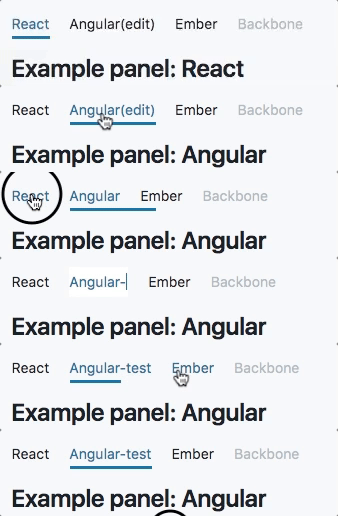
Unfortunately I can't link to docs artifact. The build is failing because of Typescript error. I think is too early to make a pull request, but you can preview code here: https://github.com/palantir/blueprint/compare/master...JacekJagiello:feature/1017-editable-tab-titles


If anyone is looking to fix spaces/arrow keys not working in their Editable text component, I solved it like this.
I tracked the id of the tab whose EditableText is currently being edited. And then wrapped the EditableText in a div which has key handlers to stop the event from propagating up the DOM and being canceled with e.preventDefault in Tabs code.
                    <div
                      onKeyPress={(e) => {
                        if (isEditing) e.stopPropagation();
                      }}
                      onKeyDown={(e) => {
                        if (isEditing) e.stopPropagation();
                      }}
                    >
                      <EditableText
                        isEditing={tabIdBeingEditing === id}
                        onConfirm={() => setTabIdBeingEditing(null)}
                        onCancel={() => setTabIdBeingEditing(null)}
                        onEdit={() => setTabIdBeingEditing(id)}
                      />
                     </div>
