
three-instanced-mesh
 three-instanced-mesh copied to clipboard
 pailhead
Add support for multiple materials (array)

This is not possible to achieve.
Multiple materials is the very antithesis of this approach, since it can break down a single geometry into multiple draw calls while this is about merging multiple geometries into a single draw call.
You cannot change the materials between different instances. What would be possible though is to make the instances consume different material properties, like have one be a standard red rubber, another standard blue plastic, the third one gold etc.

Dear lord, i didn't realize this was a PR. How does this work? Do you have an example? It looks like you'll just end up using mat[mat.length-1]
This actually isn't about having different materials for each of the instances, rather the ability to properly being able to use e.g. cubes. The default THREE Mesh allows you to pass in an Array as the material, which has been changed some time back to replace the THREE.MeshFaceMaterial to allow for different materials on each of a cube's faces.
e.g. this let's you specify a material for every cube face without doing UV mapping or whatever
new Mesh(myGeo, [mat1, mat2, mat3, mat4, mat5, mat6])
So this PR doesn't do much with the materials passed in, it only fixes the issues with missing .clone functions of arrays. (It also calls the old code in setM although I'm not sure what it does tbh ^^)
So this PR doesn't do much with the materials passed in, it only fixes the issues with missing .clone functions of arrays.
This i think is valid though, you should not be passing arrays in, and the user should probably be warned.
Did you try it out?
Yep, works just as intended :)
(You can try it yourself https://nbtviewer.inventivetalent.org/)
I dont have those types of files.
e.g. https://github.com/InventivetalentDev/minecraft-assets/blob/1.13.2/data/minecraft/structures/end_city/ship.nbt
Source of the rendering code is at https://github.com/InventivetalentDev/MineRender/blob/master/src/model/index.js#L825
Nothing happens :(, can you set up some code that sets an example like this. I'm actually not familiar with how this works under the hood, i never ever passed an array for materials. How does it get to decide which parts of the mesh to draw?
I think i'm inclined to suggest
whateverStructureDefinesWhatGetsDrawn.forEach( structure=>{
   const geometry = extractGeometryFromStructure(structure)

   const m = new InstancedMesh(geometry, ...)
}
Since this is supposed to be used sort of as the final step before rendering, i'd consider materials[] to be a very bad practice.
Nothing happens :(
That's what it renders (at least for me o.O)
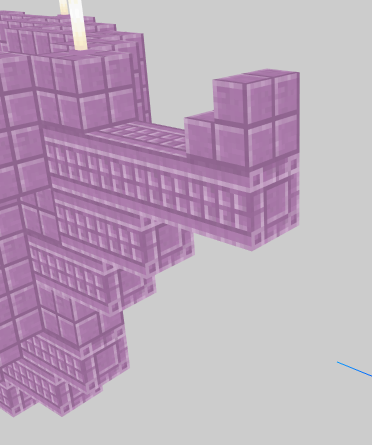
as you can see, there are different textures on the left and the right face.
The THREE.CubeTextureLoader also uses this array approach: https://threejs.org/docs/#api/en/loaders/CubeTextureLoader
THREE does the uv mapping internally if you pass an array to the mesh.
Right, the cube is somehow setup to do this. What happens when you load your own mesh, or if you apply this to the torus knot for example?
If auto anything should happen, something should be able to merge these materials if they're using the same material but different textures (or colors or other props) and it probably shouldnt happen in this package.
There is no reason to split the model up above in two calls and use two textures.
Edit well actually maybe mip mapping
Fixed some stuff to keep the behavior of non-array argument the same as before.
Tested with cubes with multiple materials: https://codepen.io/inventivetalent/pen/MZpxWX
and torus with single texture: https://codepen.io/inventivetalent/pen/dwvrzM
Why does the torus look all green?
Because the material is green :p
yeah but the other 5 are supposed to be something else :)
What i'm trying to say is that there is something missing defining which triangles get rendered with which program. The cube happens to have that defined. Honestly i don't know much about this system, since i never really liked it. I am pretty amazed that it works though.
Still, i'd only consider this if there is a valid use case, cubes with 6 different materials on each side are not :smile:
But then, i see the point in having something called "mesh" be consistent with THREE.Mesh. Let's see if someone else has any thoughts.
Well, cubes with different textures are my particular use case, which is why I added it.
The reason the toruses all look green is because it only uses a single material, the array in the code is only used by the code examples. This is just to demonstrate that the single material thing still works as intended and if you desire to use an array, as I do, you can if you'd like to.
yeah i didn't notice it passed a single material, when i passed in an array the whole scene just rendered black?
I'm just trying to add the same thing the native THREE Mesh class already has.
*whose only use case is different materials on different sides as well btw
I think you're mixing concepts here. The array does not have to have 6 materials, and it has nothing to do with cubes. The CubeGeometry just happens to be set up this way because:
a) people for some reason like seeing cubes with a unique material per side b) makes one effect (cube mapping) more convenient
Torus == cube on the level that this module is working at... it's just a bunch of triangles.
Ergo, it's not that toruses don't support "cube mapping" (they can) but that unlike CubeGeometry it does not have the proper groups sete up (or whatever it is thats driving this).
I'm just trying to add the same thing the native THREE Mesh class already has.
This could be a valid argument, but i'm having trouble justifying it in the context of this module. From my point of view, you are instancing 6 plane geometries. The convenience of arranging them in a cube should not be the responsibility of this module.
basically:
sixPlanes = extract(cubeGeometry)

sixPlanes.forEach(plane=> new THREE.InstancedMesh(plane...))
I want it to be explicit that having one THREE.InstancedMeshNode creates at most 1 draw call. Passing an array would create an arbitrary amount of draw calls. If you do the snippet above you know that you'll be making sixPlanes.length draw calls.
Does this explanation make sense? I think the cube just happens to be make in such a way that it works with this, but any other geometry might require steps that are almost guaranteed to make more sense done on their own.
From what i recall it draws ranges of triangle (start,end) so you have to take great care to arrange it so it works properly. The cube is basically 6 planes merged together. If you ever end up in a situation that you have N of somethings, just make N x InstancedMesh don't merge it into a single geometry and then have the module extract it.
The benefits that i see are making three not bind the buffer (1 vs 6 in the cube example) and mip maps with textures, but i'd like to see how this impacts things. Also since it is impossible to use multiple textures without adding another buffer and modifying the shader code, this might be the intermediary solution. Maybe keep it open for visibility?
I do get that explanation. It just made more sense to me to add the same support THREE has for creating a Mesh without throwing an error just because of the missing clone function in arrays, which is essentially what it comes down to when trying to replace the default Mesh with this module.
Surely it makes sense to split up the geometry into faces, but I found that pretty unnecessary.
Surely it makes sense to split up the geometry into faces, but I found that pretty unnecessary.
I think that "geometry" here refers only to the CubeGeometry since it's kinda specific. I'd love to see an example with a different geometry. Do you know if any loaders cause material arrays to happen? The file you referenced here, my guess is that it's a voxel grid, that just creates three instances at every cell, it doesn't actually load the cube geometry? Ie does the loader call new CubeGeometry or new BufferGeometry?
I came across this issue when trying to instance an imported 3D model that was a mutlimaterial mesh. I ended up hacking around it to decorate each material manually and then it rendered perfectly. I've been meaning to prep a PR for full support of material arrays. Here's a video of it in action: https://youtu.be/B1b-Pl_iaAg The plot is made from a model of a single strap of $10 bills with 10s of thousands of instances thanks to this incredible library.

What are thoughts on cloning the material inside the class. I never liked that, but i wanted to avoid:
const instanceMaterial = decorateMaterial(mateiral)
const m = new InstancedMesh(geom, instanceMaterial)
(same with geometry i guess)
Any chance you could share the model, or at least which loader was it using?
@pailhead the model is here, and the workaround code is here.
Re the material cloning, I definitely like how the current api mirrors the THREE.Mesh making it easy to use, but looking closely now I realize that the way I use this most (in a different project from the one linked), I'm actually creating each material twice because I make a normal one and then immediately it gets cloned. I wonder how common is the case that the material passed in the InstancedMesh constructor is a shared material that you wouldn't want to modify directly v. one created just for that mesh.
wonder how common is the case that the material passed in the InstancedMesh constructor is a shared material that you wouldn't want to modify directly v. one created just for that mesh.
@wmurphyrd sorry for the super long delay. This is a huge issue, that i'd like to step away from but not sure how. The only way i can think of is an InstancedMaterial wrapper around generic materials that would be created instead of the clone. There could be some caching happening, to maybe limit the creation of these wrappers when instantiating a mesh with a generic material. So instead of cloning the material, you'd get two wrappers if you just pass some non instance material, OR if you do a lookup of a regular material, share the same wrapper.
Sounds like a cache. What about mapping the passed-in materials to their new materials in a WeakMap?
