
cap-ui5-gpt-chat
 cap-ui5-gpt-chat copied to clipboard
 p36-io
A ChatGPT-like chat app built with SAP CAP and SAPUI5
A ChatGPT-like chat app built with SAP CAP and SAPUI5
This is a full working chat application built with the SAP Cloud Application Programming Model and SAPUI5. It uses a selectable OpenAI model (including the latest ChatGPT model) of the OpenAI API to generate responses to the user's prompts. More details can be found in the related blog posts in the SAP Community:
- ChatGPT-like chat app built with SAP CAP and SAPUI5 - Part 1 – Introduction
- ChatGPT-like chat app built with SAP CAP and SAPUI5 - Part 2 – Backend
- ChatGPT-like chat app built with SAP CAP and SAPUI5 - Part 3 – Frontend
Features
- Chat with a selectable OpenAI model including the GPT-4 and GPT-3.5 models powering ChatGPT
- Multi-user support for individual chats
- Selectable and maintainable personalities for the AI chatbot
- Chat history for each user (everything is stored in the database)
- Per chat option to enable streaming responses from the OpenAI API
- Code-Highlighting for code snippets in the chat messages
- Ready to be deployed to SAP BTP Cloud Foundry
Technical Aspects
- Full TypeScript implementation in backend (SAP CAP) and frontend (SAPUI5)
- Usage of advanced TypeScript features like decorators and dependency injection in the backend
- Chat UI built with SAPUI5 including a custom list item control and with the integration of external modules
Demo
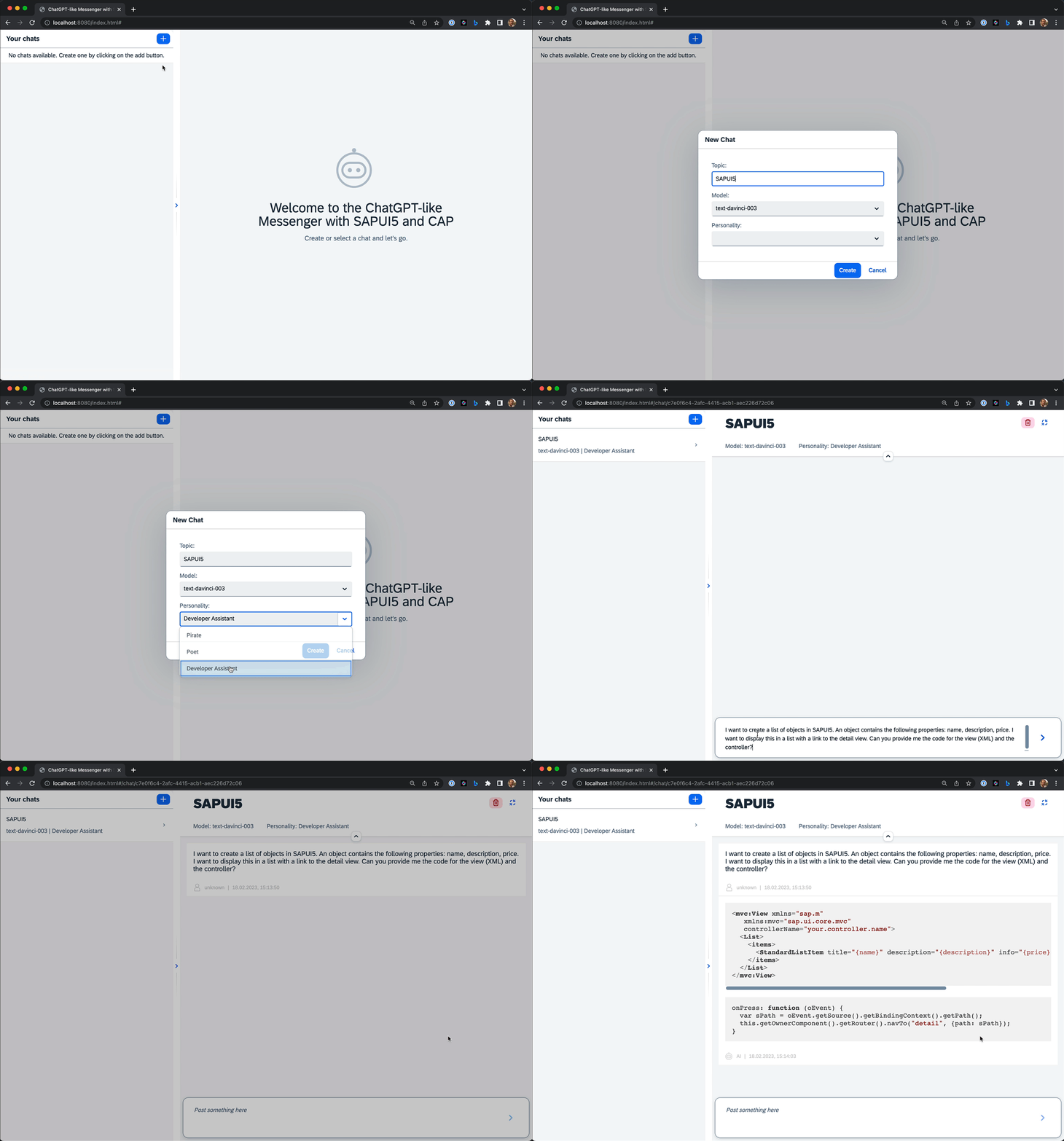
Ask the AI for help with SAPUI5:
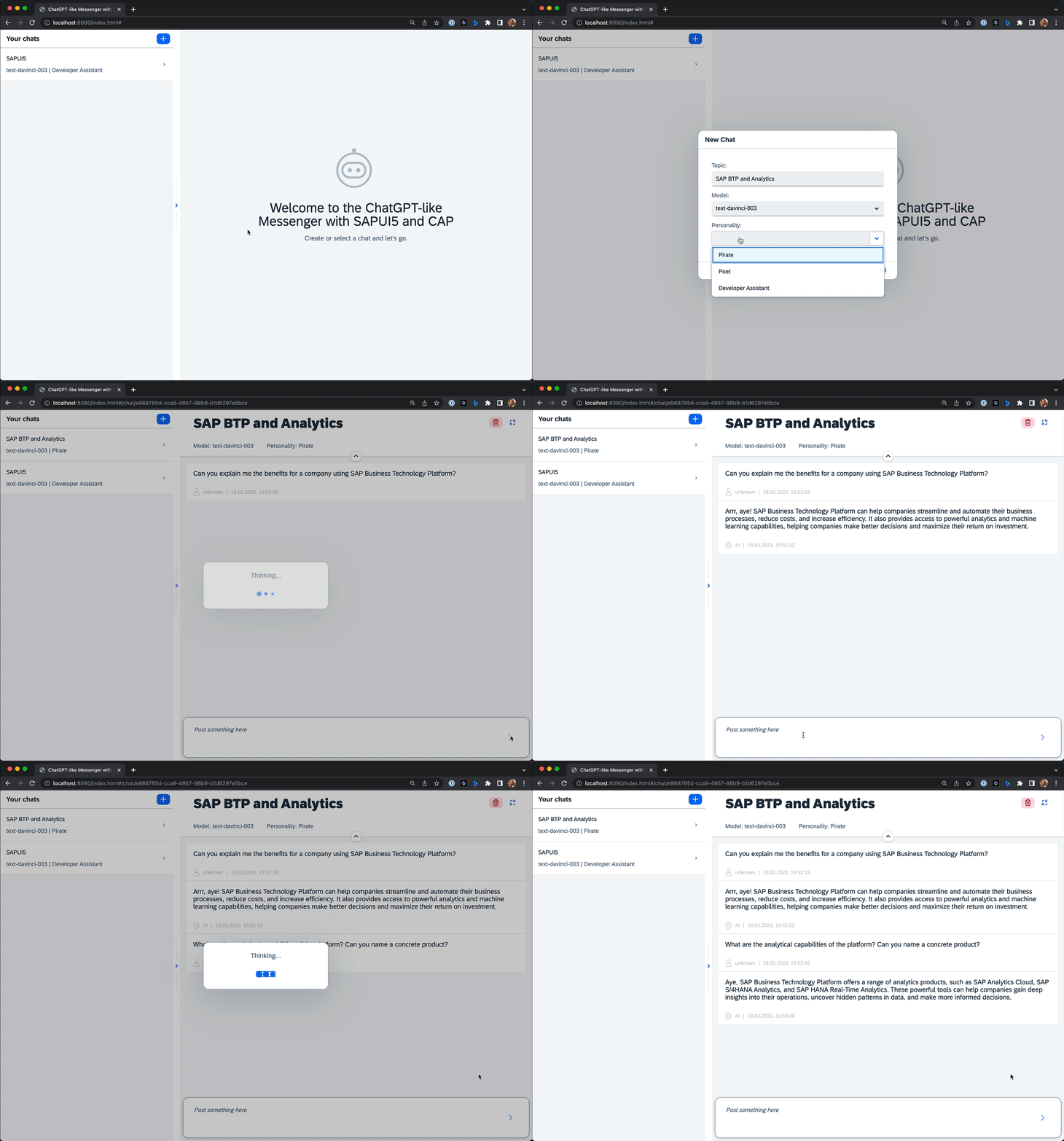
Ask the AI about SAP BTP:
Customize the app
Since the app is Open Source, you can simply fork the repository and customize it to your needs.
Without a technical deep dive, there are two ways to easily customize the app:
Add a new personality
There is currently no UI to administrate personalities, but they can easily be changed in a csv file. Open the file packages/server/db/data/p36.capui5gpt.chat-Personalities.csv and simply add a new line with the following format:
<name>;<instruction>
After changing the file you need to redeploy the entities to the database. In the local enviroment you can do this with the following command (please note that this will delete all data in the local database):
pnpm -r deploy:local
In the Cloud Foundry environment you can simply re-deploy the app (no data will be lost).
Modify the AI model parameters
It is possible to tweak the OpenAI API parameters for the completion request. For more details, see the OpenAI API documentation.
Simply add the following in the default-env.json file in the packages/server folder and change the parameters to your needs:
{
  "app_openai": {
    "apiKey": "YOUR-API-KEY",
    "completionAttributes": {
      "max_tokens": 1200,
      "temperature": 0.8,
      "top_p": 1,
      "frequency_penalty": 0,
      "presence_penalty": 0.6
    }
  }
}
When being deployed to the Cloud Foundry environment, you can also change the parameters by changing the values in the dev.mtaext file.
Run the app locally in development mode
Prerequisites
- Node.js (at least version 16)
- An OpenAI Account and an OpenAI API key
- SQLite
Install pnpm
If you haven't pnpm already installed, you can globally install it via the following command:
npm i -g pnpm
Install dependencies
Install all dependencies using the following command:
pnpm i
Deploy the cds entities from the CAP backend to the SQLite database
pnpm -r deploy:local
Add your OpenAI API key
Put a new file in the folder packages/server called default-env.json with the following content and add your OpenAI API key:
{
  "app_openai": {
    "apiKey": "YOUR-API-KEY"
  },
  "VCAP_SERVICES": {}
}
Start the app in development mode
The following command will start the app in development mode. Server and UI will be started in parallel.
pnpm --parallel start:dev
Open the app in the browser
Open the following URL in your browser and start chatting: http://localhost:8080/local.html
You need to login with one of the following credentials:
| username | password |
|---|---|
| developer | helloworld |
| pirate | ahoy |
There a no specific roles attached to either user, so feel free to choose.
Deploy the app to the SAP BTP Cloud Foundry environment
The project is already prepared to be deployed to the SAP BTP Cloud Foundry environment. The following diagram shows the architecture of the app:
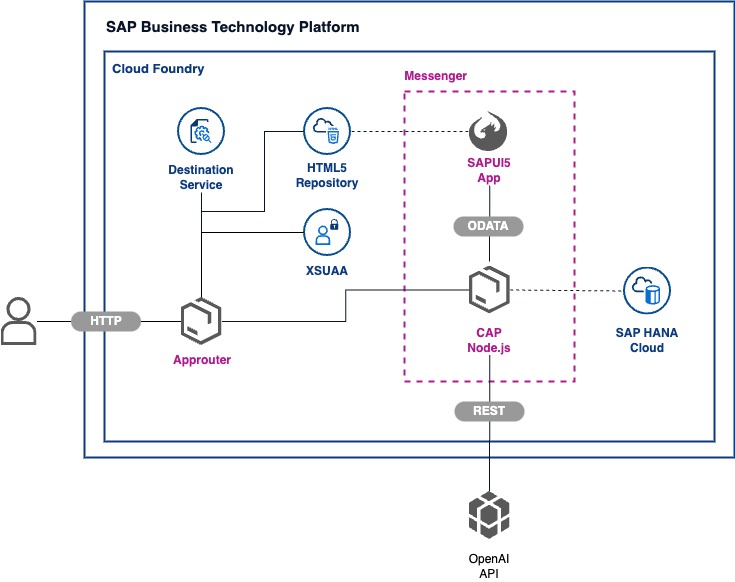
The full application can be deployed to SAP BTP without any cost, using a Trial or Free Tier acccount.
Prerequisites
- You have an OpenAI Account and requested an OpenAI API key
- You have a SAP BTP Trial SAP BTP Trial or Free Tier Account
- You have created an SAP HANA Cloud Service instance
- You have installed the Cloud Foundry CLI
- You have installed the MultiApps CF CLI Plugin
Add your OpenAI API key
Edit the file dev.mtaext and add your OpenAI API key to the app_openai property:
modules:
  - name: capui5gptchat-srv
    properties:
      app_openai: >
        {
          "apiKey": "YOUR-API-KEY",
          "completionAttributes": {
            "max_tokens": 1200,
            "temperature": 0.8,
            "top_p": 1,
            "frequency_penalty": 0,
            "presence_penalty": 0.6
          }
        }
Login to the SAP BTP Cloud Foundry environment
cf login
Deploy the MTA
All parts of the application can be deployed with a single command:
pnpm deploy:dev
The mta.yaml file contains all relevant services and modules:
- The
capui5gptchat-routermodule for a standalone approuter - The
capui5gptchat-servermodule including the CAP backend - The
capui5gptchat-uimodule including the SAPUI5 frontend
The app will be accessible via managed approuter as well as via the standalone approuter.
Assign the required role to your user
The deployment will create a Role Collection ChatGPT-like App Human in your Cloud Foundry environment. You need to assign the role to your user in order to be able to login to the app.
How to obtain Support
This content is provided "as-is" without warranties or conditions of any kind.
License
Copyright (c) 2023 p36 GmbH. All rights reserved. This project is licensed under the Apache Software License, version 2.0 except as noted otherwise in the LICENSE file.
 p36-io