

 owncloud
How to view compilation albums/albums with more than one artist?
(This ticket is to show how the album view breaks down for compilation albums, and to ask if there's a way to fix it. And you get to see my eleclectic music taste. 😆)
Problem
I'm updating my music library with compliation albums (i.e. an album with different artists playing on it) I've digitised.
With the current version (v1.5.0) of Music, I cannot view compliation albums in the album view.
Displaying album with one artist
Right now, the album view:

is a view of albums (not alphabetical) sorted by artists (alphabetically):

This view is fine (even though the albums aren't alphabetical) as long as the album has only 1 artist. However, it breaks down when the album is a compilation, or has more than one artist on it.
Displaying album with multiple artists
In the case of a compliation album, this sorting means the album is not viewable together, for example:
The album "Music at Matt Molloy's" is a compliation with multiple different artists. It is only viewable seperetely by the artist name, not by album:



Expected behaviour
The expected behaviour is to order the albums alphabetically - this would mean the "Music at Matt Molloy's" album songs would be listed together, by album instead of by artist as currently.
How to improve displaying album compliation?
There seems to be different ways to deal with this.
Sort albums by album title instead of artist name
This is how (my opinion) this should be fixed, but I guess there is some reason why this wasn't done.
Is there a reason why albums can't be sorted like this?
ID3 metadata
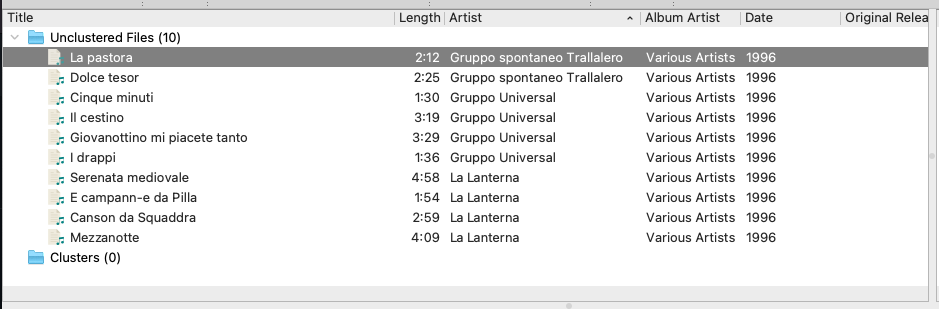
In this album - "Grupo Spontaneo Trallalero: Trallalero Genovese, Volume 1" - metadata distingushes the album artist from the artist:
this means in NC Music the album is displayed together, under the "Various Artists" group:
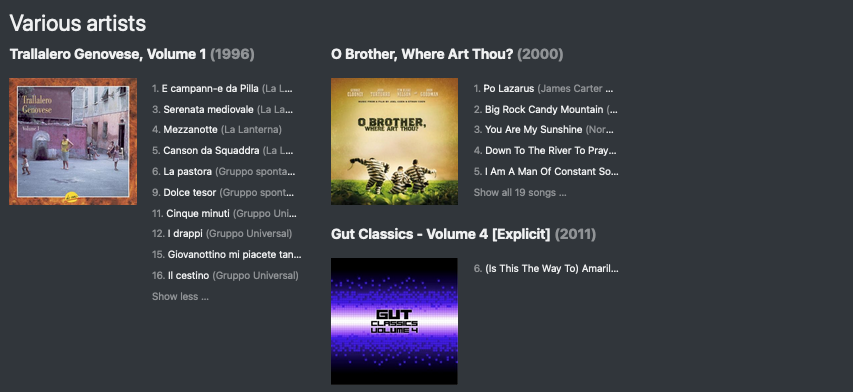
The files came with this metadata, I didn't add it.
If I add "album artist" metadata to the "Music at Matt Molloy's" album, the album is now displayed together.
How to improve this?
Is it possible to improve how these albums are displayed, automatically without the user having to add metadata, or change anything with the files?

Filling in the album artist is how this problem is designed to be solved. After all, problems like this are the sole reason why this tag has been invented in the first place. Personally, I have used this solution for years or maybe decades with various music playing applications.
Whether to sort the albums according the album artist or alphabetically by the album name, is somewhat separate question. Even if we were sorting the albums alphabetically, we would still need to somehow decide if two tracks belong to the same album or to two distinct albums which just happen to have the same name. As you probably know, the album names are not guaranteed to be unique but the combination of the album artist and album name usually are. Think, for example, an album called "The best of": there are countless artists who have published an album with this name.

