

 owncloud
[QA] occ upgrade does nothing, although web-ui says 'Update needed'
Seen in 10.7.0 RC1
I have no clear reproducer for this, but I ran by accdent into this situation multiple times:
The web ui asks for update.
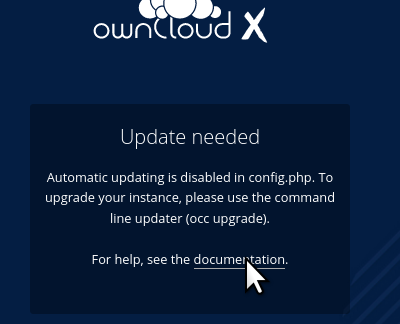
The occ command does not work: BAD
occ upgrade
ownCloud is already latest version
Attempted workaround:
- in config.php switch
upgrade.disable-web' => false, - a new error occurs:
It looks like your instance may host many files and/or users. To ensure a smooth upgrade process, please use the command line updater (occ upgrade)
This is a deadlock situation.
Evil workaround:
- hack into "lib/base.php" and force
$tooBig = false;after the ldap and user evaluation code and before the error printing. - now the web interface allows to run the upgrade procedure. Login is possible again.
Suggested improvement:
Add a --force option to occ upgrade to try as hard as the web version would do.

I have no clear reproducer for this, but I ran by accdent into this situation multiple times:
we need that context, otherwise we cannot qualify

I have no clear reproducer for this, but I ran by accdent into this situation multiple times:
we need that context, otherwise we cannot qualify
One instance, where this happened repeatedly yesterday and today is still online. All I can do for now, is leave that instance alone, and give investigators ssh access.
copied from https://github.com/owncloud/core/issues/37361
Still having this issue with a recent ownCloud 10.7
The expected behavior is to have two app versions in two folders, when updating an app that is installed in the read-only app folder?
yes,
'writable' => false,meansoC has no permissions to manage files and directories in this app folderso deletion of the previous app version is not allowed.
While I agree with this behavior I think the ownCloud app loading mechanism is broken. I did not dig into the code but shouldn't ownCloud browse all available apps and then use the most recent version, regardless of their locations?
Since it is the default ownCloud behavior to come with a read only apps directory and a writable apps-external directory it must not be delegated to the end user managing apps versions.
I consider this a nasty bug which leads to lots of confusion, especially for beginners. See some postings from central as reference:
- https://central.owncloud.org/t/disable-update-needed-message/32481
- https://central.owncloud.org/t/automatic-updating-is-disabled/32869
- https://central.owncloud.org/t/update-needed-and-nobody/32982
- https://central.owncloud.org/t/update-needed-although-up-to-date/29413
- https://central.owncloud.org/t/internal-server-error-owncloud-10-7-0/33052
- https://central.owncloud.org/t/server-version-10-5-0-10-requests-an-upgrade-over-and-over-again/30847
and so on ...
Edit: reproducable with any owncloud-complete installation where the market app updated any app (activity, files_pdfviewer, ...) using the default ro apps and rw apps-external directories

@micbar do you need more context or is the above information sufficent for you?
To understand the whole problem, I digged a bit into the whole app loading process. When loading (not updating!) an app, OC will use the latest app in the apps_paths array in the config. Meaning, if you have something like:
'apps_paths' =>
  array (
    0 =>
    array (
      'path' => '/oc/projects/owncloud/core/apps',
      'url' => '/apps',
      'writable' => false,
    ),
    1 =>
    array (
      'path' => '/oc/projects/owncloud/core/apps-external',
      'url' => '/apps-external',
      'writable' => true,
    ),
  ),
ownCloud will prioritize the app located in apps-external. This happens because the code simply travels through the array and inserts the result into the cache. Let's say you have the activity app in both dirs. ownCloud will then go though the array, first setting $availableApps['activity'] = '.../apps' and then overwriting it with $availableApps['activity'] = '.../apps-external'. As I said, this will be stored in the cache.
@VicDeo As you've dealt with this topic in the past: Do you know if this the intended behavior? I'm just wondering, because on the other hand,findAppInDirectories() (https://github.com/owncloud/core/blob/master/lib/private/App/AppManager.php#L697) will return the version and path for the newest version - regardless of the array order. I might be overseeing something, but to me it looks like we have an inconsistency here.
However, I was not able to reproduce the original issue from Jürgen yet. And I can't say for sure how these things are connected.

When loading (not updating!) an app, OC will use the latest app in the apps_paths array in the config.
That's definitely wrong. There is no guarantee that folder will contain the latest app version. Consider the following scenario.
- Install OC 10.x. package. The package contains a predefined user_ldap app
- Update the user_ldap app to the latest available version. Now, the "/apps" folder contains user_ldap version 1 and the "/files_external" the version 2. Note that this isn't the latest version available due to core restrictions (latest version might require a newer core)
- Update OC to the latest version. The package contains a user_ldap version 3 (not version 2)
In that case, you have a situation where the core has a newer version of the app.
The other option is that the entries in the config.php have been swapped, but that would be weird. Following this option, we could have 2 causes, both of them unlikely:
- An external (non-PHP) script creates those entries. Maps / dictionaries aren't sorted, which means that even if you enter A B and C, you could traverse the items as B C A. In any case PHP guarantees that the insertion order is preserved (as far as I know), and the code seems to be generated by PHP
- The admin edited the file. I don't think admins would need to touch this configuration, so this is also unlikely.
It seems the upgrade route is the most plausible explanation.

In that case, you have a situation where the core has a newer version of the app.
Absolutely right. But it least for me, OC will still load the version 2 app from apps-external. Can you confirm this behavior in general?
It seems the problem is in https://github.com/owncloud/core/blob/817f54f53d64249166feaa0eb9231c50ca1ed7e0/lib/private/App/AppManager.php#L513-L515
We have 2 apps with the same file id, but the second has a lower version. The data cached by filename should be the right one, but there are several methods accessing by appid, which gets overwritten with the data from the second (lower) version.
If Jürgen's instance is still up and running, we could try to remove the line 514 and check if it fixes the problem. This is mainly to verify the problem is there, but we'll still need to fix the caching. It should be possible to compare the versions of the cached data and the new data in order to decide whether we should overwrite or not.
Yep, that matches with my findings.
If Jürgen's instance is still up and running, we could try to remove the line 514 and check if it fixes the problem. This is mainly to verify the problem is there, but we'll still need to fix the caching. It should be possible to compare the versions of the cached data and the new data in order to decide whether we should overwrite or not.
I already asked him, unfortunately the instance is not available anymore.
It might be related... I've checked with user_ldap 0.15.4 in the apps folder and 0.14.0 in the apps-external folder. This seems to work although I have
  - user_ldap:
    - Version: 0.14.0
    - Path: /var/www/owncloud/apps/user_ldap
The inconsistency is there, but it doesn't seem to trigger the "update needed" in the web UI
The inconsistency is there, but it doesn't seem to trigger the "update needed" in the web UI
I'm also unable to reproduce the issue. However, maybe the affected instances somehow corrupted their cache, which leads to problems because if this inconsistency. We definitely need an instance to reproduce this error. I also pinged @enbrnz in chat because he experienced this issue in the past apparently, no answer yet though.
I might have something to reproduce the issue. The key point is that both paths must be writable and having the app in both locations. This causes the market app to put the updated app in the first location while the info is picked from the second. This causes a faulty app upgrade in the sense that the installed version stored in the DB to be kept as the old one, which causes the next upgrade notifications.
Steps roughly should be as follows:
- Start copying an app from the apps folder (first location) to the custom folder (second location). This should simulate a situation where an app has been updated to the latest available version.
- Set the apps folder as writable in the config.php
- update the app via
occ market:upgrade
So we should have reached the point we're the DB has the "old" installed_version for the app, but there is an updated version already installed.
The local cache (ACPu) seems to be part of the problem. Cleaning the local cache (and likely when the cache expires after 1 day) fixes the "update needed" loop.

https://github.com/owncloud/core/pull/39108 should be the solution. It should work with the scenario described in https://github.com/owncloud/core/issues/38549#issuecomment-896965081 although I'm not sure if it's the right one (seems quite convoluted to be hitting so many people)
AKAIF This problem should be solved in https://github.com/owncloud/enterprise/issues/4012
@pmaier1 FYI

AKAIF This problem should be solved in owncloud/enterprise#4012
Just checked - I don't think so. owncloud/enterprise#4012 was fixed with https://github.com/owncloud/core/pull/38309 which basically introduced an occ command that allows to find the location of an app.
The issue here is that occ upgrade apparently does not use the right location and thinks there's nothing to upgrade while actually there's a new version of an app available. For more context: If I'm not mistaken, this is only needed when you do an app upgrade that involves a database migration (you need to run occ upgrade in this case).

The issue here is that
occ upgradeapparently does not use the right location and thinks there's nothing to upgrade while actually there's a new version of an app available. For more context: If I'm not mistaken, this is only needed when you do an app upgrade that involves a database migration (you need to runocc upgradein this case).
I can read in https://github.com/owncloud/enterprise/issues/4012#issuecomment-660899512
Steps 3 and 4:
3.- When the admin goes to the login page, the message is shown that occ upgrade command needs to be run
4.- When the admin returns to the console and runs the occ upgrade it returns that there is nothing to do.
So is the same thing.
Still, this is not solved by https://github.com/owncloud/core/pull/38309! As Jan wrote in the ticket he only improved one thing with his PR:
Add location information to the app:list command
The original problem still exists and is maybe/hopefully fixed by https://github.com/owncloud/core/pull/39108. We need to verify that. I'll do that as soon as I finished my open tasks.
I've spend so many hours trying to reproduce the original issue, still no luck. The fix in https://github.com/owncloud/core/pull/39108 makes total sense though. So if nobody can provide clear steps to reproduce the original issue, I would suggest to take this fix and see if the problem still persists in the future.
So if nobody can provide clear steps to reproduce
Maybe I'm wrong but I think it's this:
- Set up oC with multiple app directories and
'upgrade.disable-web' => true,in config.php (like docker default) - Update an app via the market app. This update must involve e.g. a database migration as this will require to run
occ upgradeand bring up the "Update needed" page). - Run
occ upgrade - See that
occ upgradethinks there's nothing to do :)
I'm running into the same problem. Upping the userlimit makes the web interface run smoothly. (Change line 374: $tooBig = ($db->countUsers() > 50); into $tooBig = ($db->countUsers() > 500); Run the web update and change the number back to 50.

This issue has been automatically marked as stale because it has not had recent activity. It will be closed in 10 days if no further activity occurs. Thank you for your contributions.
![github-actions[bot] avatar](https://avatars.githubusercontent.com/in/15368?v=4 "Published by a pub.dev verified publisher")