

 ottomated
CPU usage
You MUST use this template or your issue will be deleted.
Pre-Flight Checklist
Please use this checklist to avoid spamming:
- [ ] I am not asking a question => use the Discord if you are
- [x] I am using the Steam version of Among Us
- [ ] I have tried to use an alternative voice server
- [x] I have checked everyone in my lobby is on the same CrewLink server
- [x] I have used
Ctrl+Ron the CrewLink app when I can't hear some people (this is a known issue) - [x] I have checked that the CrewLink server I'm using is up to date
- [ ] I have a screenshot of any errors
- [x] I have checked that someone else has not reported this using the search bar
Describe the bug Everyone sounds choppy. Checked CPU usage, crewlink is unexpectedly using 50-70% of my cpu (while in a game only / using 13% when not in game
To Reproduce Steps to reproduce the behavior:
- Go to '...'
- Click on '....'
- Scroll down to '....'
- See error
Expected behaviour Clear audio of other players
Screenshots
Desktop (please complete the following information):
- OS: Windows 10 Home
- Version: unsure crewlink v2.0.1
Additional context I checked my internet connection, speed is 48 mbps. ). I reinstalled latest version 2ce. I also restarted PC. I have a 2.8 ghz processor, 12 gb ramp, amd phenomtm II x4 830 processor computer. I have had no major issues with any previous version of crewlink.

Given that it was a low end processor back when it was released all the way back in 2010, I'd say that this is expected behavior.
Voice chat encoding and decoding can be intensive. A processor that old and that low end does not make it easier.

Intel i7 - 7700k @4.5 GHz https://i.imgur.com/OdeMLiD.png
I have also seen multiple different reports from others that the CPU usage is quite high with this update.

also i had no problems with the most recent update prior to 2.0.1, so I don't think that minor upgrade broke my computers ability to run this program.
Well, I have the same Problem on a Ryzen 1700x @3,9GHz(8Cores/16Threads).
And I really hope he isn't doing Bitcoins on our machines. Because ytf would it use 7 Cores at 100% otherwise? Not even Triple A games use my CPU like that. I mean I know another reason, but it isn't plausible to me.
230 Watt PC usage average instead of 85W before the update. (I'm keeping logs)

Same issue here, noticed a few notable details. 1. the CPU spike only happens when online and in lobby, sitting in the menus or in freeplay does not cause it. 2. got the below error message when attempting to close out while someone else was talking 3. full reinstall of crewlink and updating java did not help
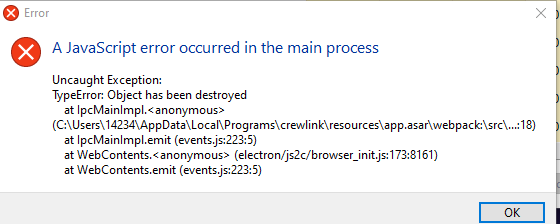
Anyone made any headway on this?

hey so
from another thread
Had such problems on my machine, fixed it by turning down the audio quality in my Realtek Audio Manager from 24bit/192kHz to 24bit/96kHz or 24bit/48kHz.
this fixed it for me