oroinc
Quick order form drop down not finding correct product
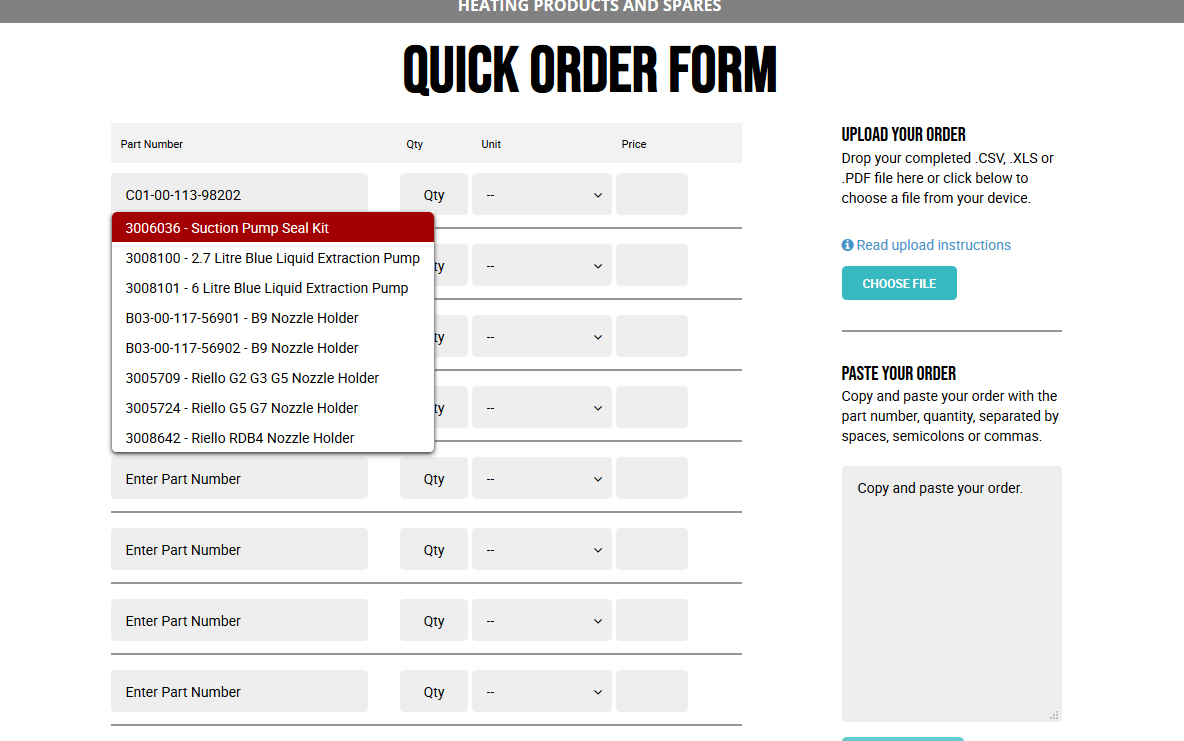
Description: When pasting an SKU into the quick order part number field the correct part number does not appear in the drop down. (The SKUs in question contain –‘s, example in steps below) If a correct part number is entered into the box and the user hits enter to add it to the form, the system searches for the first SKU in the suggested list rather than adding the SKU entered into the box by the user.
The only way to be able to override the dropdown and add the SKU manually added to the field is to click away from the field at which point the system then adds the SKU the user entered.
Steps to reproduce: • Navigate to Quick-Order in the main menu • Paste SKU into first part number field: C01-00-113-98202 • Wait for the drop down to appear and be populated • SKUs that appear in the dropdown are not relevant to SKU entered • Hit enter to submit the SKU that you have entered • The product returned is not the one entered • Repeat steps 1 &2 and instead of waiting, click in the white space at the side of the page and see the site load the correct product based on the SKU pasted in
Expected Result: On hitting return the SKU the user enters should be used to populate the price field.
Actual Result: The first result in the dropdown is used which is unrelated to the SKU pasted in.
Environment: OroCRM 3.0.0-rc, Linux CentOS 7 64-bit, FireFox 50.1.0
Browser: Firefox 73.0.1