

 orchidsoftware
Multiple Select with Empty Data
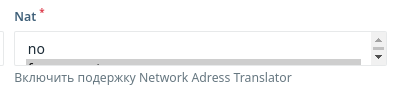
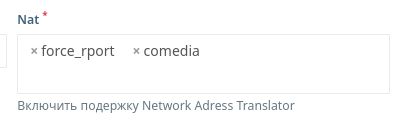
Bug Multiple Select In Modal Window When open multiple select open incorrectly
To Reproduce Steps to reproduce the behavior:
- Create Modal Form
- Add Select Multiple Element with Options by array values
- Open and see not correcten view and no dropdown menu
Expected behavior When put data with array (when edit) then look normal and select open dropdown menu.
Screenshots
If applicable, add screenshots to help explain your problem.
Desktop (please complete the following information):
- OS: Linux Debian 10
- Browser Chrome
- Version 95
Server (please complete the following information):
- Platfrom Version: latest
- Laravel Version: latest
- PHP Version: 7.3
- Database: mariadb
- Database Version: 10

Hi, I cannot reproduce this. Created a modal window with the following content:
Select::make('test_modal_select')
    ->multiple()
    ->options(['foo','bar','baz']),
I saved the values and selected them again. I also tried to close and open. But this did not lead to the same look as in your screenshots.
The only thing that led to this behavior was the complete duplication of the field on the pages. For example, one on the page, the other in a modal window:
Layout::modal('selectModal', Layout::rows([
    Select::make('test_modal_select')
        ->multiple()
        ->options(['foo','bar','baz'])
        ->required(),
])),

Layout::rows([
    Select::make('test_modal_select')
        ->multiple()
        ->options(['foo','bar','baz']),
])
The quick solution is to use a different name prefix for modals. At the moment, I'm not sure where this issue is happening in the dependent library or in our controller.
