oras-project
Command to fetch a blob from a remote registry
The proposed commands is:
Usage:
  oras blob fetch REG/REPO@DIGEST [flags]

Flags:
  --ca-file string               server certificate authority file for the remote registry
  -d, --debug                    debug mode
  --descriptor                   only fetch a descriptor of the blob
  -h, --help                     help for fetching a blob
      --insecure                 allow connections to SSL registry without certs
  -p, --password string          registry password or identity token
      --password-stdin           read password or identity token from stdin
      --plain-http               allow insecure connections to registry without SSL check
  -u, --username string          registry username
  -v, --verbose                  verbose output
  -o, --output string            save the fetched blob to a local file
Related to #459


Yes, should be also the same for oras manifest fetch if applicable. /cc @qweeah

-
crane: fetch a blob UX doc: https://github.com/google/go-containerregistry/blob/main/cmd/crane/doc/crane_blob.md code: https://github.com/google/go-containerregistry/blob/main/cmd/crane/cmd/blob.go#L26
Example:
-
crane blob zoeycr0707.azurecr.io/hello-world:linuxarmv5@sha256:b921b04d0447ddcd82a9220d887cd146f6ef39e20a938ee5e19a90fc3323e030 > blob.tar.gzWill save the blob output to the blob.tar.gz -
crane blob zoeycr0707.azurecr.io/hello-world:linuxarmv5@sha256:b921b04d0447ddcd82a9220d887cd146f6ef39e20a938ee5e19a90fc3323e030Will print the output. If the blob is a config, output will be like:
PS C:\Users\zoeyli\oras\oras> crane blob zoeycr0707.azurecr.io/hello-world:linuxarmv5@sha256:c0218de6585df06a66d67b25237bdda42137c727c367373a32639710c7a9fa94
{"architecture":"arm","config":{"Hostname":"","Domainname":"","User":"","AttachStdin":false,"AttachStdout":false,"AttachStderr":false,"Tty":false,"OpenStdin":false,"StdinOnce":false,"Env":["PATH=/usr/local/sbin:/usr/local/bin:/usr/sbin:/usr/bin:/sbin:/bin"],"Cmd":["/hello"],"Image":"sha256:f20fa1035a56301da8fee9595258ea5efb9c2c423676343e0903c5aa6a85dba3","Volumes":null,"WorkingDir":"","Entrypoint":null,"OnBuild":null,"Labels":null},"container":"ef0edb974fd16bb4d15b1398beb4f93ad9c3b012776c19ef24e777191f6de41c","container_config":{"Hostname":"ef0edb974fd1","Domainname":"","User":"","AttachStdin":false,"AttachStdout":false,"AttachStderr":false,"Tty":false,"OpenStdin":false,"StdinOnce":false,"Env":["PATH=/usr/local/sbin:/usr/local/bin:/usr/sbin:/usr/bin:/sbin:/bin"],"Cmd":["/bin/sh","-c","#(nop) ","CMD [\"/hello\"]"],"Image":"sha256:f20fa1035a56301da8fee9595258ea5efb9c2c423676343e0903c5aa6a85dba3","Volumes":null,"WorkingDir":"","Entrypoint":null,"OnBuild":null,"Labels":{}},"created":"2021-09-23T22:09:56.230950492Z","docker_version":"20.10.7","history":[{"created":"2021-09-23T22:09:55.772759506Z","created_by":"/bin/sh -c #(nop) COPY file:2b28186c8eb8bb7ee57e0b02055b51cb4023eac9161feab0338311b5a9ff6665 in / "},{"created":"2021-09-23T22:09:56.230950492Z","created_by":"/bin/sh -c #(nop)  CMD [\"/hello\"]","empty_layer":true}],"os":"linux","rootfs":{"type":"layers","diff_ids":["sha256:2118547e6e30fa68bd6595473da6b3a793e5fab40abd7eee0177ee6a18b4cc30"]},"variant":"v5"}
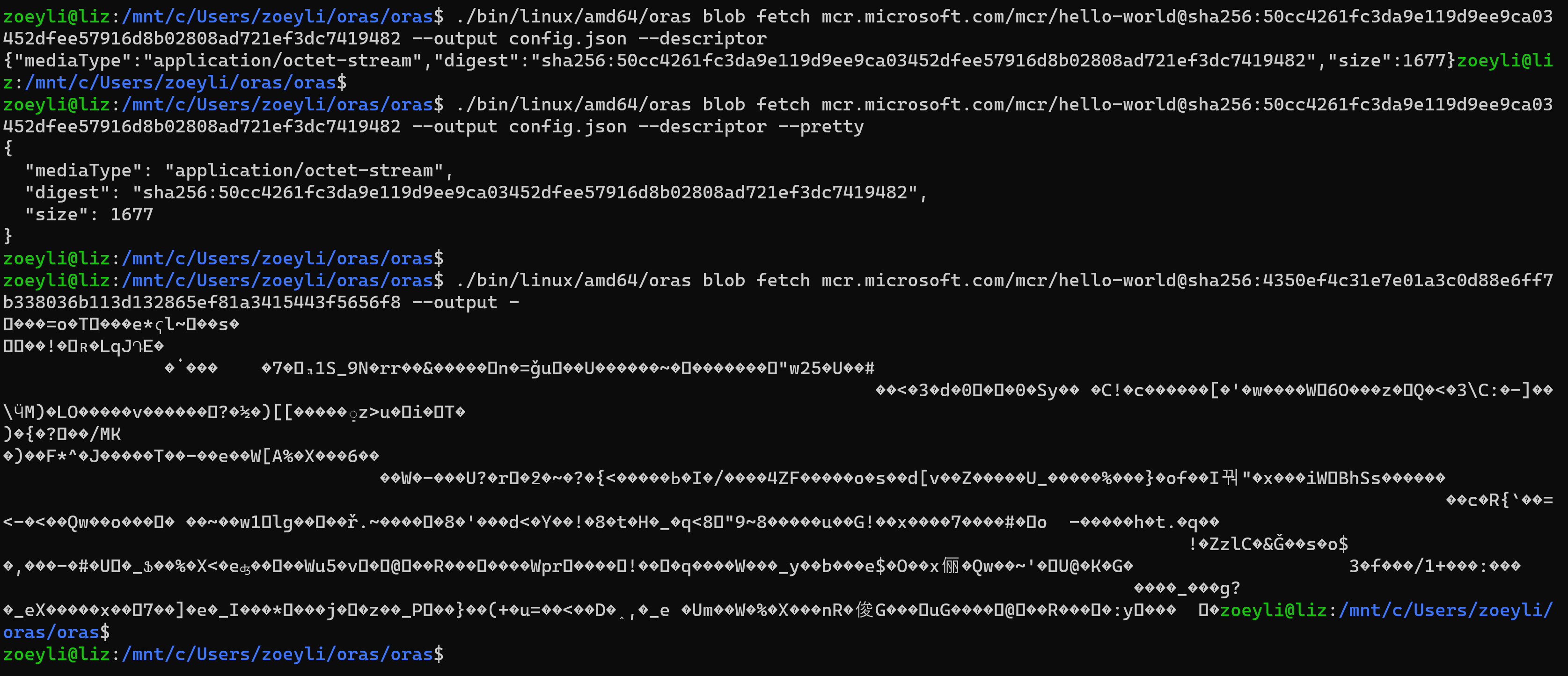
If the blob is a layer, the output is not readable since it is a binary file.
PS C:\Users\zoeyli\oras\oras> crane blob zoeycr0707.azurecr.io/hello-world:linuxarmv5@sha256:b921b04d0447ddcd82a9220d887cd146f6ef39e20a938ee5e19a90fc3323e030 ▼��Zl∟U~�����Y���q.��1/�@↕b��8►��:☺♥i§��8j�F!k{↕�X{��1 W�[{'|���→!�}��♥���ШjO������R�◄����1o&�v���u��"@L�f�`�浪⏪�JO3���>���}��▼Cv:���+���'�V�{��u▲x� �]��↔�|�`���§�@����[�+�Ѽ�́�����#����=��Y�▲�!�☻� p�◄�e��fan����ݨG�j�}���♥�ia;♥�@����↨�3��.�� �W:�k�G�>��↓��;Ě[l :�i�݁�♣%XV��`�↨OjXn�%��JR��]br_a ��☺�r▼.�M�$�yٽ▼\��e?6�♣���_|◄<`��9�J�(-I�]v5:�►���0UsL/���♦��A'�~�Ǧ↨�&�A ▲�+2�fd ... -
For oras fetch blob workflow, I am wondering how should we design the UX. Should we set the output (--output) as an optional flag or should we require users to provide output path since most of the blobs are not readable?
Do you have any suggestions? cc @FeynmanZhou @yizha1 @qweeah @shizhMSFT
Thanks @lizMSFT for driving this UX discussion. My thoughts are
-
Printing out a blob can be a valuable feature to user, e.g. when running
oras blob fetch mcr.microsoft.com/mcr/hello-world@sha256:fce289e99eb9bca977dae136fbe2a82b6b7d4c372474c9235adc1741675f587euser might want to only view the config content without saving it to a file. -
We should avoid printing out a unprintable blob. We can borrow the UX from curl like below:
$ curl https://mcr.microsoft.com/v2/mcr/hello-world/blobs/sha256:1b930d010525941c1d56ec53b97bd057a67ae1865eebf042686d2a2d18271ced -L
Warning: Binary output can mess up your terminal. Use "--output -" to tell
Warning: curl to output it to your terminal anyway, or consider "--output
Warning: <FILE>" to save to a file.
I agree with @qweeah 's thoughts and I want to share two typical scenarios. To fetch a specific sha256 blob from a remote registry, there are two typical types of blob that users will request to:
a. JSON b. Tar layer
- If users are requesting a JSON blob, it returns it to stdout:
$ oras blob fetch localhost:hello-world@sha256:fce289e99eb9bca977dae136fbe2a82b6b7d4c372474c9235adc1741675f587e | jq .
{
  "architecture": "amd64",
  "config": {
    "Hostname": "",
    "Domainname": "",
    "User": "",
    "AttachStdin": false,
    "AttachStdout": false,
    "AttachStderr": false,
    "Tty": false,
    "OpenStdin": false,
    "StdinOnce": false,
    ...
- If users are requesting a tar layer blob that is unreadable, it can prompt users that it is unreadable and will generate a file.
$ oras blob fetch localhost:hello-world@sha256:fce289e99eb9bca977dae136fbe2a82b6b7d4c372474c9235adc1741675f587e
Warning: This blob is an unreadable binary file that can mess up your terminal. You can add the flag "--output" to save it locally.

Blobs are intended to be binaries with garbled characters. Except config blobs, they are most likely to be non-printable. Since ORAS focuses more on artifacts where artifact manifest does not leverage configs, it does not make sense to print non-printable blobs by default.
Therefore, I’d like to always have an --output parameter to write the blob, and save stdout for printing progress status.
Of course, we need a curl-like --output - to output to stdout.
Here are my two cents:
- Use an optional
--outputflag, so the user can store the blob somewhere in the file system - Display readable blob in the
stdout, no matter output flag is used or not, so that the user can view it directly. It is convenient. - No output to
stdoutfor non-readable Blob, but inform the user it is not readable, no matter--outputflag is used or not.

Current options are:
Option 1:
- Use a mandatory output argument:
oras blob fetch localhost:5000@digest blob.tar.gz -
stdoutfor printing progress status, e.g.,
oras blob fetch localhost:5000@digest blob.tar.gz
Fetched localhost:hello-world@digest
Save to file: blob.tar.gz
- NOT support printing blob content
- When using
--descriptorflag:-
oras blob fetch localhost:hello-world@digest blob.tar.gz --descriptor.-
stdoutfor printing progress status, and save the descriptor toblob.tar.gz
-
-
Option 2:
- Use a mandatory
--outputflag:oras blob fetch localhost:5000@digest --output blob.tar.gz -
stdoutfor printing progress status, e.g.,
oras blob fetch localhost:5000@digest --output blob.tar.gz
Fetched localhost:hello-world@digest
Save to file: blob.tar.gz
- Using
--output -to output tostdoutno matter blob content is readable or not, e.g.,
oras blob fetch localhost:5000@digest --output -
{"architecture":"arm","config":{...}}
oras blob fetch localhost:5000@digest --output -
▼��Zl∟U~����output
- When using
--descriptorflag:-
oras blob fetch localhost:hello-world@digest --output blob.tar.gz --descriptor-
stdoutfor printing progress status, and save the descriptor toblob.tar.gz
-
-
oras blob fetch localhost:hello-world@digest --descriptor --output --
stdoutfor printing the descriptor
-
-
Option 3:
- Use an optional
--outputflag:oras blob fetch localhost:5000@digest- Either
--outputor--descriptorMUST be provided, or provide both of them. Otherwise will return error, e.g.,
- Either
oras blob fetch localhost:5000@digest --output blob.tar.gz // `stdout` for printing progress status, and save the blob content to the local file
Fetched localhost:hello-world@digest
Save to file: blob.tar.gz

oras blob fetch localhost:5000@digest --descriptor // `stdout` for printing the descriptor
{"MediaType":"application/octet-stream", ...}

oras blob fetch localhost:5000@digest --output blob.tar.gz --descriptor  // `stdout` for printing progress status, and save the descriptor to the local file.
Fetched localhost:hello-world@digest
Save to file: blob.tar.gz

oras blob fetch localhost:5000@digest
Error message: Either --output or --descriptor must be provided
Option 4:
- Use an optional
--outputflag:oras blob fetch localhost:5000@digest - No matter
--outputflag is used or not, always print readable blob contents, or print the descriptor if--descriptoris used.
oras blob fetch localhost:5000@digest --output blob.tar.gz
{"architecture":"arm","config":{...}}
- No matter
--outputflag is used or not, if the blob content is not readable, print the warning messages to inform the user it is not readable.
oras blob fetch localhost:5000@digest --output blob.tar.gz
Warning: This blob is an unreadable binary file that can mess up your terminal. You can add the flag "--output" to save it locally.
- Question: How could we determine whether it is readable?
isatty? (Playing with terminals are complex)
cc @shizhMSFT @qweeah @FeynmanZhou @yizha1
Option 1 and 3 are similar. The difference is option 3 allows printing descriptors to stdout. I vote for option 3.
@lizMSFT Can you add if blob path is '-', output to stdout to option1? So user can do cool things like one-line downloading and unzipping for a tarball blob as below:
oras fetch some.reg/repo@digest - | tar -xz -C unzipped
And one vote for both option1 and 2 since they are the same except the descriptor experience.
UX design (08/26/2022)
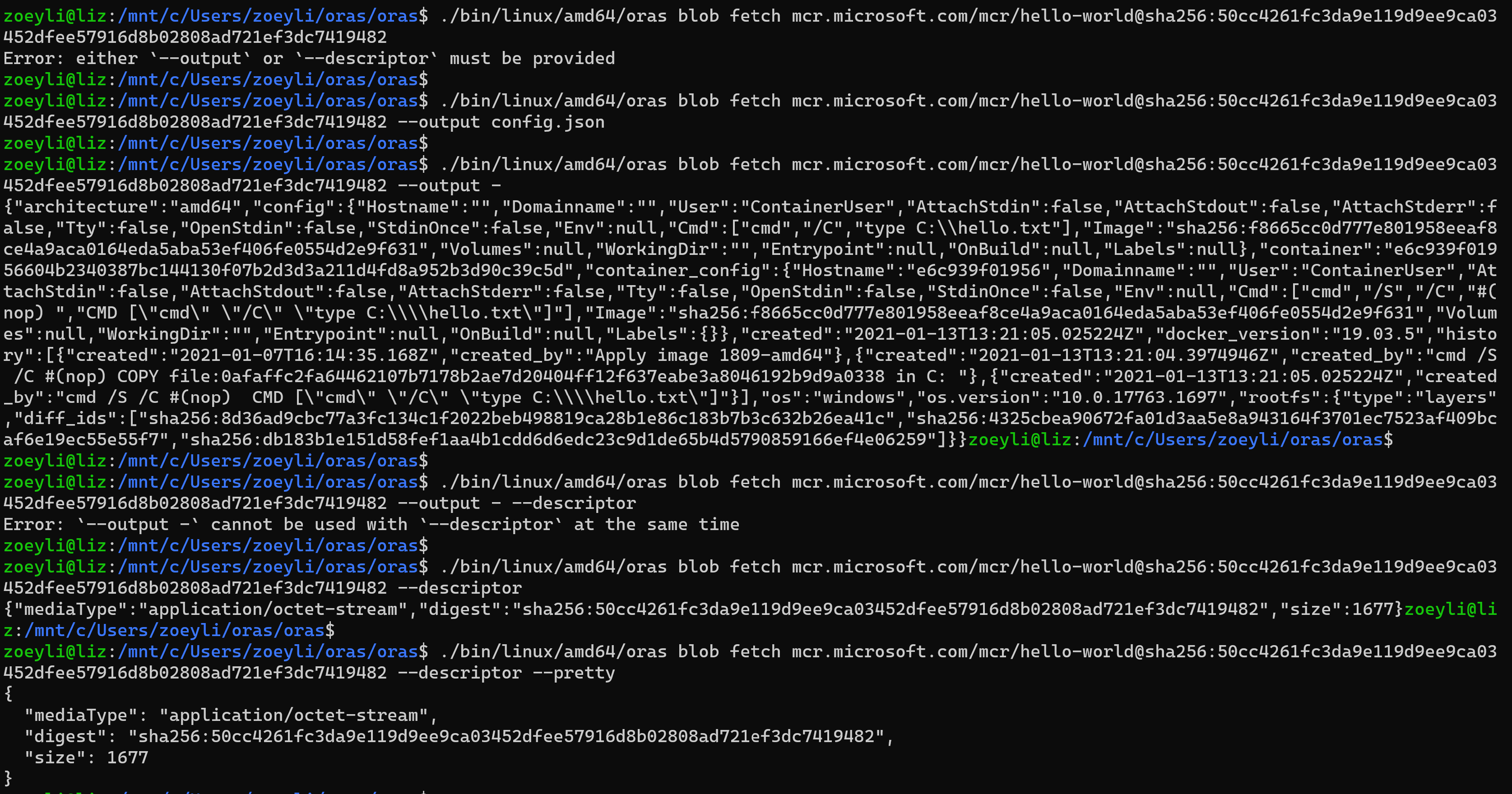
# INVALID: return error, either output or descriptor need to be provided, or provide both
oras blob fetch <name@digest>
# stdout: nothing, save blob content into file path. TODO: stdout progress status, e.g., use pv to view progress of commands
oras blob fetch <name@digest> --output <path>
# special case: stdout blob content.
# Note: --output - cannot be used with --descriptor at the same time
# Note: if `--output -` and `--pretty` are used at the same time, pretty flag will be ignored. (Blobs are intended to be binaries)
oras blob fetch <name> --output -
# stdout descriptor
oras blob fetch <name@digest> --descriptor
# stdout prettified descriptor
oras blob fetch <name@digest> --descriptor --pretty
# stdout descriptor, save blob content into file path
oras blob fetch <name@digest> --output <path> --descriptor
# stdout prettified descriptor, save blob content into file path
oras blob fetch <name@digest> --output <path> --descriptor --pretty