
visualvm
 visualvm copied to clipboard
 oracle
Not able to see the Threads view for remote applications
I am using VisualVM to monitor a remotely running application. I have jstatd running on remote server. I can see the Overview and Monitor tabs but the Threads view is missing.
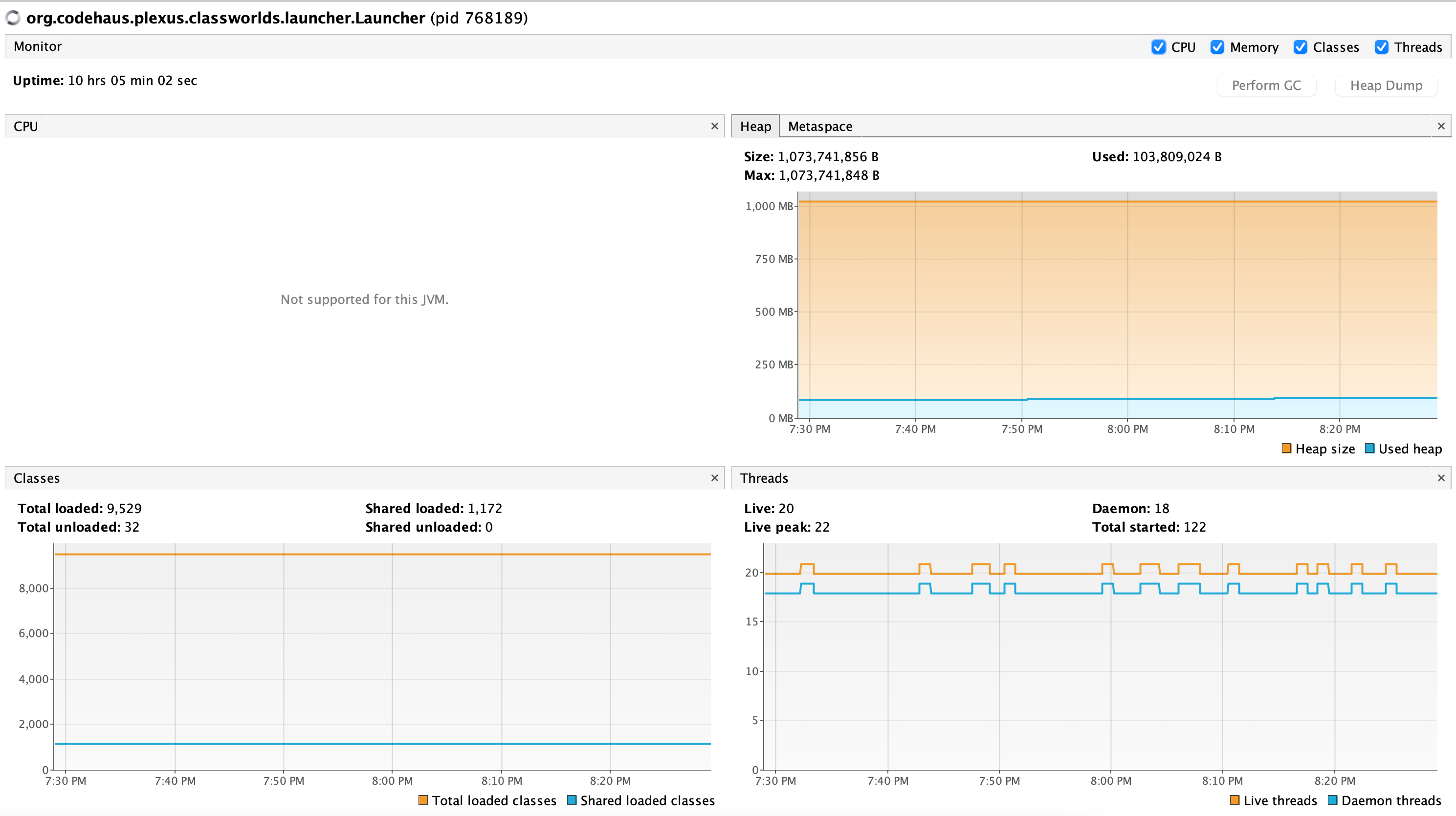
My client is MacOS and server is Linux. I have also tried running JMX in addition to jstatd but with no difference.
MAVEN_OPTS="-enableassertions -Dcom.sun.management.jmxremote.port=8080 -Dcom.sun.management.jmxremote.ssl=false -Dcom.sun.management.jmxremote.authenticate=false -Xms1024m -Xmx1024m" \
mvn exec:java -Dexec.mainClass=com.oracle.App -Dexec.cleanupDaemonThreads=false \
-Dexec.args="app.properties"
Client:
Product Version = VisualVM 2.1.4 Operating System = Mac OS X version 11.6.8 running on x86_64 Java; VM; Vendor = 17.0.2; OpenJDK 64-Bit Server VM 17.0.2+8-86; Oracle Corporation Runtime = OpenJDK Runtime Environment 17.0.2+8-86 Java Home = /Library/Java/JavaVirtualMachines/jdk-17.0.2.jdk/Contents/Home
Server:
Linux instance-1 5.10.0-15-cloud-amd64 #1 SMP Debian 5.10.120-1 (2022-06-09) x86_64 openjdk 17.0.4 2022-07-19 OpenJDK Runtime Environment (build 17.0.4+8-Debian-1deb11u1) OpenJDK 64-Bit Server VM (build 17.0.4+8-Debian-1deb11u1, mixed mode, sharing)

Right, Threads view is missing, since it needs JMX connection. VisualVM can merge data from jstatd and JMX, so you just need to enable JMX in remote application. Can you please post the screenshot from 'Overview' tab? This will show us that the JMX parameters were correctly passed to your application. Thanks.

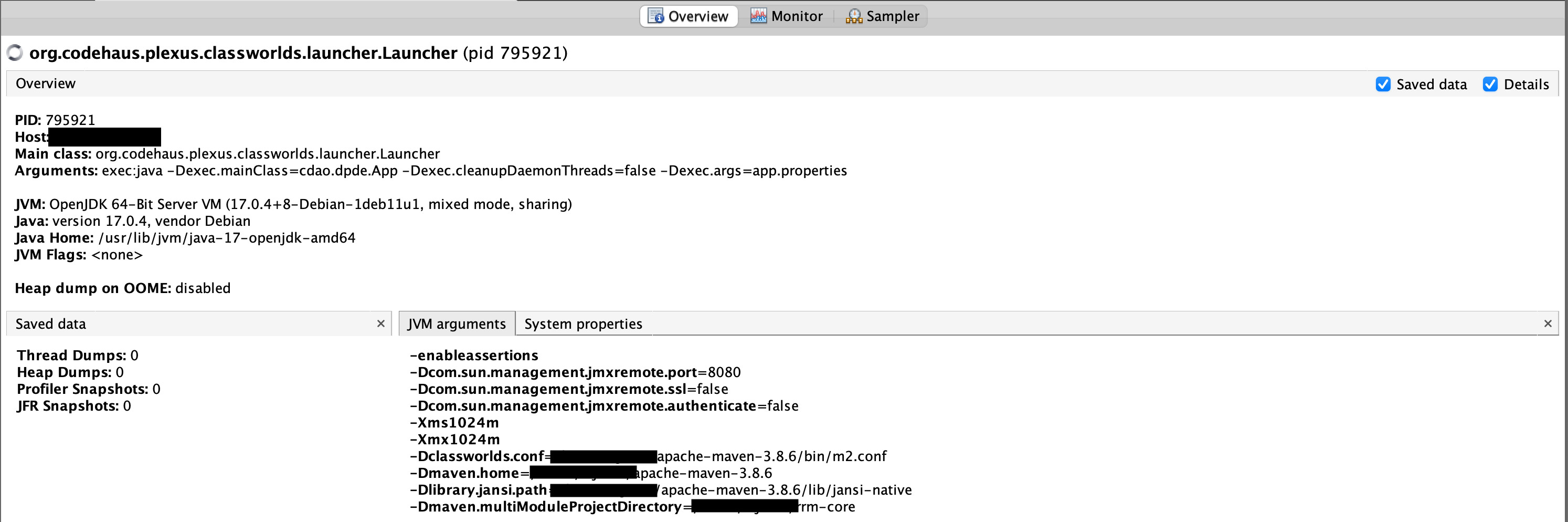
we get a constant stream of these errors btw on the server:
FINER: RMI TCP Connection(31)- sun.tools.jstatd.RemoteVmImpl[19954ae4:183567e5d0a:-7ff8, 1523488921081536347]: public abstract byte[] sun.jvmstat.monitor.remote.RemoteVm.getBytes() throws java.rmi.RemoteException]
Sep 19, 2022 5:35:25 PM sun.rmi.server.UnicastServerRef dispatch
FINER: RMI TCP Connection(31)- sun.tools.jstatd.RemoteVmImpl[19954ae4:183567e5d0a:-7ff2, -4746321153206651191]: public abstract byte[] sun.jvmstat.monitor.remote.RemoteVm.getBytes() throws java.rmi.RemoteException]
Sep 19, 2022 5:35:25 PM sun.rmi.server.UnicastServerRef dispatch
FINER: RMI TCP Connection(31)- sun.tools.jstatd.RemoteHostImpl[19954ae4:183567e5d0a:-7fff, 7587634555751142198]: public abstract int[] sun.jvmstat.monitor.remote.RemoteHost.activeVms() throws java.rmi.RemoteException,sun.jvmstat.monitor.MonitorException]
Thanks for the screenshot. The JMX arguments look OK, but setting up JMX connection in complex network environment is not easy. Note that by default JMX connection opens new network connections (in addition to already configured port 8080), If there is firewall as you mentioned in GH-443, this could be a problem. This can be changed by adding -Dcom.sun.management.jmxremote.rmi.port=8080 - this way JMX will only use one port. There is also problem with using correct name of the monitored host. This can be controlled by two system properties: -Djava.rmi.server.hostname= and -Dcom.sun.management.jmxremote.host=. Set them to IP address of your Linux system. Depending on your network and Llinux setup you will need any combination of these three properties. So for the start add them all your MAVEN_OPTS and see if it fixes the connection problem. You can trim them down later to those, which are really needed.
the steps above cause an exception as there is duplication of the port. I have changed to 9999 from 8080.
Error: JMX connector server communication error: service:jmx:rmi://x.x.x.x:9999
jdk.internal.agent.AgentConfigurationError: java.rmi.server.ExportException: Port already in use: 9999; nested exception is:
	java.net.BindException: Cannot assign requested address
	at jdk.management.agent/sun.management.jmxremote.ConnectorBootstrap.exportMBeanServer(ConnectorBootstrap.java:843)
	at jdk.management.agent/sun.management.jmxremote.ConnectorBootstrap.startRemoteConnectorServer(ConnectorBootstrap.java:480)
	at jdk.management.agent/jdk.internal.agent.Agent.startAgent(Agent.java:447)
	at jdk.management.agent/jdk.internal.agent.Agent.startAgent(Agent.java:599)
Caused by: java.rmi.server.ExportException: Port already in use: 9999; nested exception is:
	java.net.BindException: Cannot assign requested address
	at java.rmi/sun.rmi.transport.tcp.TCPTransport.listen(TCPTransport.java:346)
	at java.rmi/sun.rmi.transport.tcp.TCPTransport.exportObject(TCPTransport.java:243)
	at java.rmi/sun.rmi.transport.tcp.TCPEndpoint.exportObject(TCPEndpoint.java:415)
	at java.rmi/sun.rmi.transport.LiveRef.exportObject(LiveRef.java:147)
	at java.rmi/sun.rmi.server.UnicastServerRef.exportObject(UnicastServerRef.java:235)
	at jdk.management.agent/sun.management.jmxremote.ConnectorBootstrap$PermanentExporter.exportObject(ConnectorBootstrap.java:205)
other combinations also did not work.
It is hard to tell what is going on, since you did not provide enough details. From the exception above Port already in use: 9999 it looks like there is another process already using this port. Maybe your application is running twice, I don't know.
You can try to monitor something simpler like /usr/lib/jvm/java-11-openjdk-amd64/bin/jrunscript and once this is working fine, you can try your maven application.