

 oracle
startManagedWebLogic.sh: No such file or directory
Hello,

Customer is installing SOA Suite 12.2.1.4 on docker. Customer has configured 3 containers in the docker for AdminServer and 2 managed servers. AdminServer container started successfully and even the AdminServer is up and running Managed servers containers have been started and they are healthy. However when trying to start the Managed servers using startMS.sh, customer is encountering the below error /u01/oracle/container-scripts/startMS.sh: line 82: /u01/oracle/user_projects/domains/infra_domain/bin/startManagedWebLogic.sh: No such file or directory Here the container-scripts and user_projects are with root ownership under /u01/oracle whereas the rest of the files are with oracle user ownership As the container-scripts and user_projects are with root ownership, the startMS.sh was not able to start the Managed servers and failing with the above error Tried changing the ownership of container-scripts and user_projects to oracle user manually but still customer is facing the same error Tried following the solution provided in https://github.com/oracle/docker-images/issues/1086 but did not help. Any suggestions on this issue

Regarding the error seen while starting Managed server could be because of below reasons:
- Script startMS.sh seems to be getting executed but pointing that startManagedWebLogic.sh is not available at infra_domain. 2. As per the error, its trying to look for scripts from "infra_domain". Is this correct domain name you are referring to? Review if the domain name is set correctly in env file (soaserver1.env.list). Also verify if the domain home "/u01/oracle/user_projects/domains/xxxxxxx" is available for Managed servers to start the servers?
- Managed server containers may not be able to access the shared domain home created by Administration server container. Please verify if this is available for Managed server containers.
Please provide the below details:
- Which SOA Suite 12.2.1.4 image is being used for setup?:
- Built using latest dockerfiles ?
- or Image from OCR - container-registry.oracle.com/middleware/soasuite:12.2.1.4 ?
- or production release SOA images
- Are you referring to https://github.com/oracle/docker-images/tree/main/OracleSOASuite/dockerfiles/12.2.1.4#6-create-soa-managed-server-containers for starting Managed server containers?
- As you stated above that "Managed servers containers have been started and they are healthy.", please confirm which managed servers are running and healthy? If the Managed servers were started and healthy, then no need to run "startMS.sh" again.
- Are all 3 containers ( Admin, and 2 Managed servers) running in single host or multi host?
- Provide environment file used for Administration Server setup: adminserver.env.list
- Provide environment files used for Managed servers setup: soaserver1.env.list and soaserver2.env.list
- Provide the logs for managed server containers with below sample commands: docker logs soams1 > soams1.log docker logs soams2 > soams2.log
- Provide the permission set for host directory which is used as a data volume: ls -lRt $data_volume/SOA


I have put all the information in the attached document. Please check and let us know in case you need any further details.
Please find the below details based on the information provided in .docx:
1. Administration container soaas is started with below volume:

volumes:
      - ./soaas:/u01/oracle/user_projects
      - ./u01:/tmp


2. Managed Server container soams is started with below volume:

    volumes:
      - ./soams:/u01/oracle/user_projects


The two containers soaas and soams are not sharing the domain home and hence the error is seen on starting Managed server as the soams container does not have access to shared domain home.

In the sample https://github.com/oracle/docker-images/blob/main/OracleSOASuite/samples/docker-compose.yml which is referred, has below volumes and same is shared by Administration container (soaas) and Managed Server container (soams).

    volumes:
      - ${DC_DDIR_SOA}:/u01/oracle/user_projects

Please update the docker-compose.yml so that local host directory which is used as a data volume (for example ${DC_DDIR_SOA}) should be same for soaas and soams and mount to /u01/oracle/user_projects inside container as shown above.
Hello Ashageetha,
Please find the update from the customer:
I have changed the docker-compose.yml file but no luck. version: "3.0"
services:
The Oracle DB Definition
soadb: image: oracle/database:12.1.0.2-ee ports: - "${DC_ORCL_PORT}:1521" - "${DC_ORCL_OEM_PORT}:5500" environment: - ORACLE_SID=${DC_ORCL_SID} - ORACLE_PDB=${DC_ORCL_PDB} - ORACLE_PWD=${DC_ORCL_SYSPWD} container_name: soadb volumes: - ./oradata:/opt/oracle/oradata
The SOA Admin Server
soaas: image: container-registry.oracle.com/middleware/soasuite:12.2.1.4 container_name: soaas command: /bin/bash -c "sleep 5s; /u01/oracle/container-scripts/createDomainAndStart.sh" ports: - "31701:7001"
environment:
  - DOMAIN_TYPE=soa
  - ADMIN_HOST=${DC_HOSTNAME}
  - ADMIN_PASSWORD=${DC_ADMIN_PWD}
  - CONNECTION_STRING=${DC_ORCL_HOST}:${DC_ORCL_PORT}/${DC_ORCL_PDB}
  - DB_PASSWORD=${DC_ORCL_SYSPWD}
  - DB_SCHEMA_PASSWORD=${DC_RCU_SCHPWD}
  - RCUPREFIX=${DC_RCU_SOAPFX}
  - MANAGED_SERVER=soa_server1
volumes:
  - ./soaas:/u01/oracle/user_projects
  - ./u01:/tmp
The SOA Managed Server
soams: image: container-registry.oracle.com/middleware/soasuite:12.2.1.4 container_name: soams depends_on: - "soaas" command: /bin/bash -c "/u01/oracle/container-scripts/startMS.sh" ports: - "31801:8001" - "31802:8002" environment: - DOMAIN_TYPE=soa - ADMIN_HOST=${DC_HOSTNAME} - ADMIN_PORT=7001 - adminhostname=${DC_HOSTNAME} - adminport=7001 - MANAGED_SERVER=soa_server1 - ADMIN_PASSWORD=${DC_ADMIN_PWD}
volumes:
  - ./soaas:/u01/oracle/user_projects
Regards, Hari Kiran
ms.log thisis the log of managed server..looks like the boot.properties value is not correct. currently this is the entry for boot.properties file: username=weblogic password=Welcome01
From the ms.log could see that managed server is not able to connect Administration server :
<Sep 1, 2021 1:46:09 PM UTC> <Info> <Management> <BEA-141298> <Could not register with the Administration Server: weblogic.deploy.service.internal.transport.UnreachableHostException: [Deployer:149145]Unable to contact "null". Deployment is deferred until "null" becomes available. WARNING: If this is a redeploy app and contains JSP pages that have been touched, these JSP changes wont be reflected when the server starts unless precompile is set to true in weblogic.xml; nested exception is java.net.ConnectException: Tried all: '1' addresses, but could not connect over HTTP to server: '10.184.52.102', port: '7001' failed reasons: [0] address:'/10.184.52.102',port:'7001' : java.net.ConnectException: Connection refused (Connection refused)>
Hence security exception and Authentication denied: Boot identity not valid errors are seen.
As per the details provided above, Administration server is available at mapped port 31701. Hence please update this port for Administration server for soams container under "environment:" and start Managed server:
environment:
- DOMAIN_TYPE=soa
- ADMIN_HOST=${DC_HOSTNAME}
- ADMIN_PORT=31701
- adminhostname=${DC_HOSTNAME}
- adminport=7001
- MANAGED_SERVER=soa_server1
- ADMIN_PASSWORD=${DC_ADMIN_PWD}
Please confirm if the issue still persists.
Also note that, for quick reference I had provided the environment values used above. But refer to Readme provided under "https://container-registry.oracle.com/"-> "Middleware" -> "soasuite" for exact environment values required for the setup. Some of the values above used like "adminhostname" and "adminport" are obsolete.
After changing the adminport to 31701,it is showing in the log that server is running but I am not able to open em console as well as in admin server console,soa servers are still in not reachable state.Screenshots and logs are for reference.

There is a bug in startMS.sh and hence mapping of port other than 8001 for soa_server1 is causing the issue. Currently you can use 8001 and we are working on the final solution. Please use 8001 and 8002 only as a workaround:
ports:
- "8001:8001"
- "8001:8002"
As a workaround until the issue is fixed in image, you can update the docker-compose.yml with below command for starting soams and can provide different mapping port as given previously:
command: /bin/bash -c "cp /u01/oracle/container-scripts/startMS.sh /u01/oracle/startMS.sh; sed -i -e 's:$${MANAGED_SERVER} $${ADMIN_HOST}:$${MANAGED_SERVER} $$thehost:g' /u01/oracle/startMS.sh; /u01/oracle/startMS.sh"

ports:
      - "31801:8001"
      - "31802:8002"
Note: After soams container shows that "Managed server has been started", wait for couple of minutes until the status gets reflected on Administration console.
Please confirm if issue still exists.
Thank you so much.
Yes now the soa_server1 is up and running.
 But how to open em console?
I have tried with http://host:8001/em and http://host:31801/em.
Both of them are not working.
But how to open em console?
I have tried with http://host:8001/em and http://host:31801/em.
Both of them are not working.
EM is deployed on Administration server. Hence access with admin port i.e., http://host:31701/em.
When I am trying to open the url http://host:31701/em,it is redirecting to http://host:31701/em/faces/helppages/errorPage.jspx and nothing appears in that page.
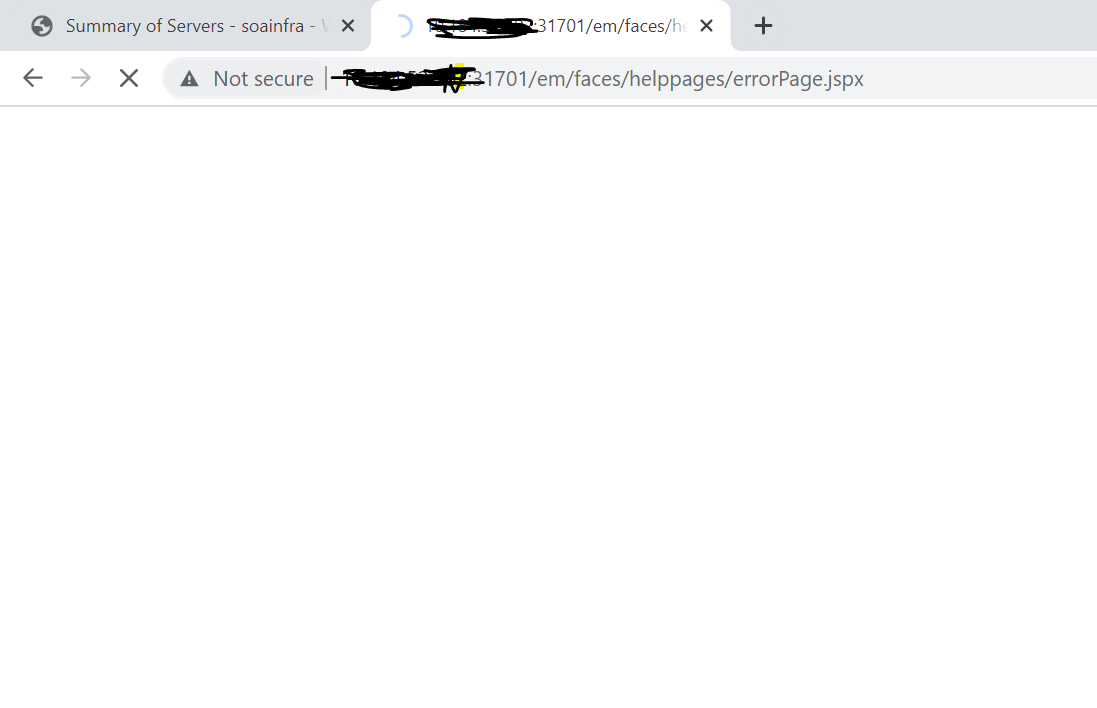
Hi @meghnath-ai , I'm able to reproduce the issue. Same fix need to applied to Adminserver as well. Please update the docker-compose.yml with below command for soaas and restart the Adminserver container (soaas).
command: /bin/bash -c "sleep 5s; cp /u01/oracle/container-scripts/createDomainAndStart.sh /u01/oracle/createDomainAndStart.sh; sed -i -e 's:AdminServer $${ADMIN_HOST}:AdminServer $${thehost}:g' /u01/oracle/createDomainAndStart.sh; /u01/oracle/createDomainAndStart.sh"
ports:
     - "31701:7001"
I am putting the below entry in docker-compose.yml,but it is not working: command: /bin/bash -c "sleep 5s; cp /u01/oracle/container-scripts/createDomainAndStart.sh /u01/oracle/createDomainAndStart.sh; sed -i -e 's:AdminServer $${ADMIN_HOST}:AdminServer $$localhost:7001' /u01/oracle/createDomainAndStart.sh; /u01/oracle/createDomainAndStart.sh"
You need to use the same command as provided above. Should not change the "$${thehost}" to $$localhost. It should be same as provided above. Currently it is trying to use $localhost in the script and this does not have any value and hence might fail. Also note, inside container we cannot use localhost and may loop back.
Now I have put the same command: command: /bin/bash -c "sleep 5s; cp /u01/oracle/container-scripts/createDomainAndStart.sh /u01/oracle/createDomainAndStart.sh; sed -i -e 's:AdminServer $${ADMIN_HOST}:AdminServer $${thehost}:g' /u01/oracle/createDomainAndStart.sh; /u01/oracle/createDomainAndStart.sh" But still em is not opening and after entering username password,it is redirected to some error page. http://host:31701/em/faces/helppages/errorPage.jspx This is basically a blank page.
Please execute below commands and confirm if the soaas got restarted with the required command:
-
docker inspect soaas|grep -A 4 Cmd
The output should be something as below:
$ docker inspect soaas|grep -A 4  Cmd
            "Cmd": [
                "/bin/bash",
                "-c",
                "sleep 5s; cp /u01/oracle/container-scripts/createDomainAndStart.sh /u01/oracle/createDomainAndStart.sh; sed -i -e 's:AdminServer ${ADMIN_HOST}:AdminServer ${thehost}:g' /u01/oracle/createDomainAndStart.sh; /u01/oracle/createDomainAndStart.sh"
            ],
- Get the container IP for soaas and soams and verify if these are updated in external-dns-name field with sample command below:
a.
docker inspect soaas|grep IPAddressb.docker inspect soams|grep IPAddressc.docker exec soaas grep external-dns-name /u01/oracle/user_projects/domains/soainfra/config/config.xml
Output will be something like below, where 172.18.0.3 and 172.18.0.4 are the container IPs for soaas and soams.
<external-dns-name>172.18.0.3</external-dns-name>
<external-dns-name>172.18.0.4</external-dns-name>
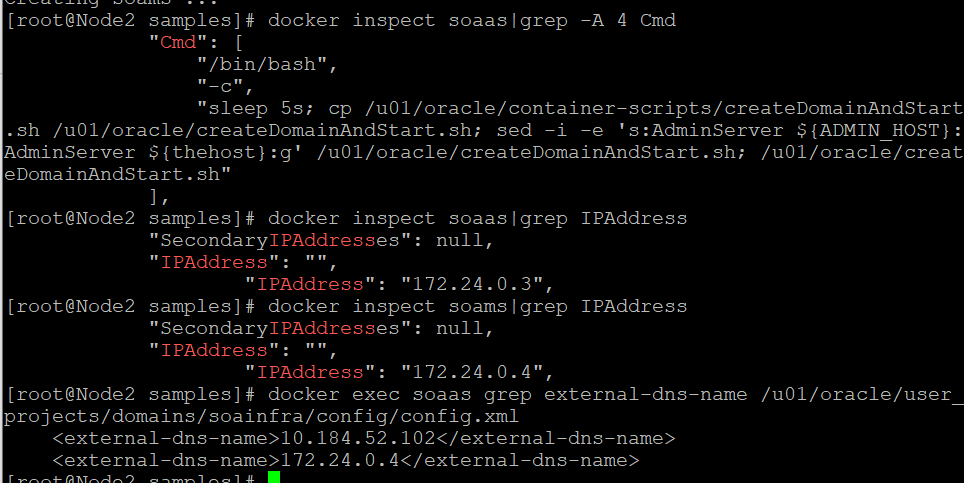
Can you verify if the changes are available in "/u01/oracle/createDomainAndStart.sh" with below command:
docker exec soaas cat /u01/oracle/createDomainAndStart.sh|grep updListenAddress.py
Output will look like below:
cmd="/u01/oracle/oracle_common/common/bin/wlst.sh -skipWLSModuleScanning /u01/oracle/container-scripts/updListenAddress.py $vol_name ${thehost} AdminServer ${thehost}"
Since external-dns-name is not updated, looks like the command is not executed. Make sure to delete the soaas container, so that it get restarted with the new command.
Hi @meghnath-ai, For soaas, the updListenAddress.py is not executed on existing domain. Its only called on creating a new domain.
The earlier provided command will work with creating a new domain. Since you are reusing the domain try applying the below workaround:
Update the command for soaas with below ( Note the below will only work for already created domain):
command: /bin/bash -c "sleep 5s; /u01/oracle/oracle_common/common/bin/wlst.sh -skipWLSModuleScanning /u01/oracle/container-scripts/updListenAddress.py u01 $$(hostname -i) AdminServer $$(hostname -i); /u01/oracle/container-scripts/createDomainAndStart.sh"
Thanks a ton for your help. It is working fine now. You have no idea for how many days I am struggling with this issue. Once again thank you so much. Regards, Meghnath