

 openwrt
PPPoE trickling WAN errors since move to 22.03.3
Describe the bug
1-3% error rate on WAN since upgrade
Clearly visible on my WAN monitor
OpenWrt version
r20028-43d71ad93e
OpenWrt target/subtarget
lantiq/xrx200
Device
BT Home Hub 5A
Image kind
Official downloaded image
Steps to reproduce
Errors are constant
Actual behaviour
No response
Expected behaviour
Error free as was the case on 19.07.10
Additional info
Don't know if relevant but I've completely disable ipv6 and DHCP services
Diffconfig
No response
Terms
- [X] I am reporting an issue for OpenWrt, not an unsupported fork.

I reverted back to 19.07.10, errors now gone. Everything backed up so can swap back if you need some debugs etc.
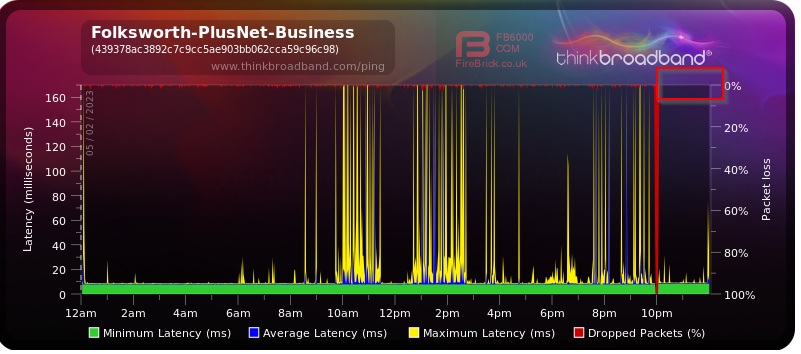
Why only PPPoE? There are some reports of increased ingress latency in 22.03.3 and this is mentioned in the forum post for the release. It may be a packet steering issue - have you tried toggling that? Also SQM is showing different results so maybe try that.

It's packet loss not latency, while playing PUBG the packet loss constantly bobs between 0 and 3 %
I'll try these settings but may have to wait to the weekend as is a bit of a pain...
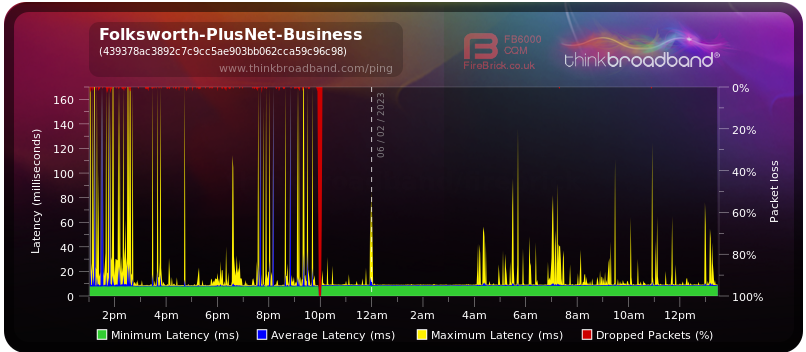
It's packet loss not latency
No, your test is only for incoming ICMP pings which are not prioritised with your current setup, which is presenting itself as "loss", but none of your normal packets are experiencing loss - unless you've tested for that independently.
I "test" with PUBG every evening for an hour or two, equally affected as far as I can tell
PUBG has data quality stats constantly running on the screen during the games, time of day or local broadband load seems to not affect the values.
Some people have reported a better outcome when reverting to 22.03.2, so I recommend trying it on your next test.
Upgraded to 22.03.2, restored the 22.03.3 archive and it's now running error free.
Unless you need some more information from my setup I'll stay with 22.03.2 and live with that for a while.

Wired, waste of time fault finding in wireless.
Graphs above are monitored from the Internet excluding my internal LAN components entirely.