

 openvinotoolkit
[Bug]RuntimeError: Device with "CPU" name is not recognised in InferenceEngine
System information (version)
OpenVINO=I am able to make inference using Raspberry Pi 3 + Neural Compute Stick2 but unable to make inference using Raspberry Pi3 + CPU
OpenVINO = 2021.4.2 Operating System / Platform => Raspeberry Pi 3 , version 10 (buster) Problem classification = Inference Python Version = 3.7
Detailed description
I am able to make inference using Raspberry Pi 3 + Neural Compute Stick2 but unable to make inference using Raspberry Pi3 + CPU
Device with "CPU" name is not recognised in Inference Engine
Steps to reproduce
Running model with command python3 hello_classification.py -m IR_model/IR_model.xml -i <image_name.tif> -d CPU
Issue submission checklist
- [ ] I report the issue, it's not a question
- [ ] I checked the problem with documentation, FAQ, open issues, Stack Overflow, etc and have not found solution
- [ ] There is reproducer code and related data files: images, videos, models, etc.

Please have a look at the ARM plugin, e.g. here: https://github.com/openvinotoolkit/openvino_contrib/blob/master/modules/arm_plugin/README.md

@brmarkus - Thanks for the response. I checked the link and looks like those plugins are for Raspberry Pi4 but I am using Raspberry pi 3.
Do you know if plugins are available for Raspberry Pi3 as well ?
Cheers Mira
Sorry, cannot answer, I haven't used the ARM plugins on my own, yet. You might need to seek for help under "https://github.com/openvinotoolkit/openvino_contrib".
I had tried to link that arm CPU plugin from openvino_contrib with OpenVINO build from the source but no luck so far.
command: cmake -DInferenceEngineDeveloperPackage_DIR=~/Downloads/openvino/build -DCMAKE_BUILD_TYPE=Release .. && make

Only MYRIAD is listed.

We'll get back to you with possible workaround soon. Thank you for your patience.

Thanks al ot @Iffa-Meah ..
@brmarkus , @Iffa-Meah -
Meanwhile, I have brought Raspberry Pi4 Model B 8 GB RAM. OpenVINO = 2021.4.2 Operating System / Platform => Raspeberry Pi 4 64 bit, version 10 (buster) Problem classification = Inference Python Version = 3.7
I am still getting same error.. Do I need to install the Plugins separately and if yes could you please let me know the process to download it ?
Also, could you Please let me know if I need to upgrade the OS as I am currently using same OS which I was using for Raspberry Pi 3 ?
I followed below steps to build ARM plugins but getting error -
-
sudo apt-get update
sudo apt-get install -y git cmake scons build-essential -
git clone --recurse-submodules --single-branch --branch=master https://github.com/openvinotoolkit/openvino_contrib.git
-
cd openvino_contrib/modules/arm_plugin
-
mkdir build && cd build
-
cmake -DInferenceEngineDeveloperPackage_DIR=opt/intel -DCMAKE_BUILD_TYPE=Release .. && make ON this command I faced below error -
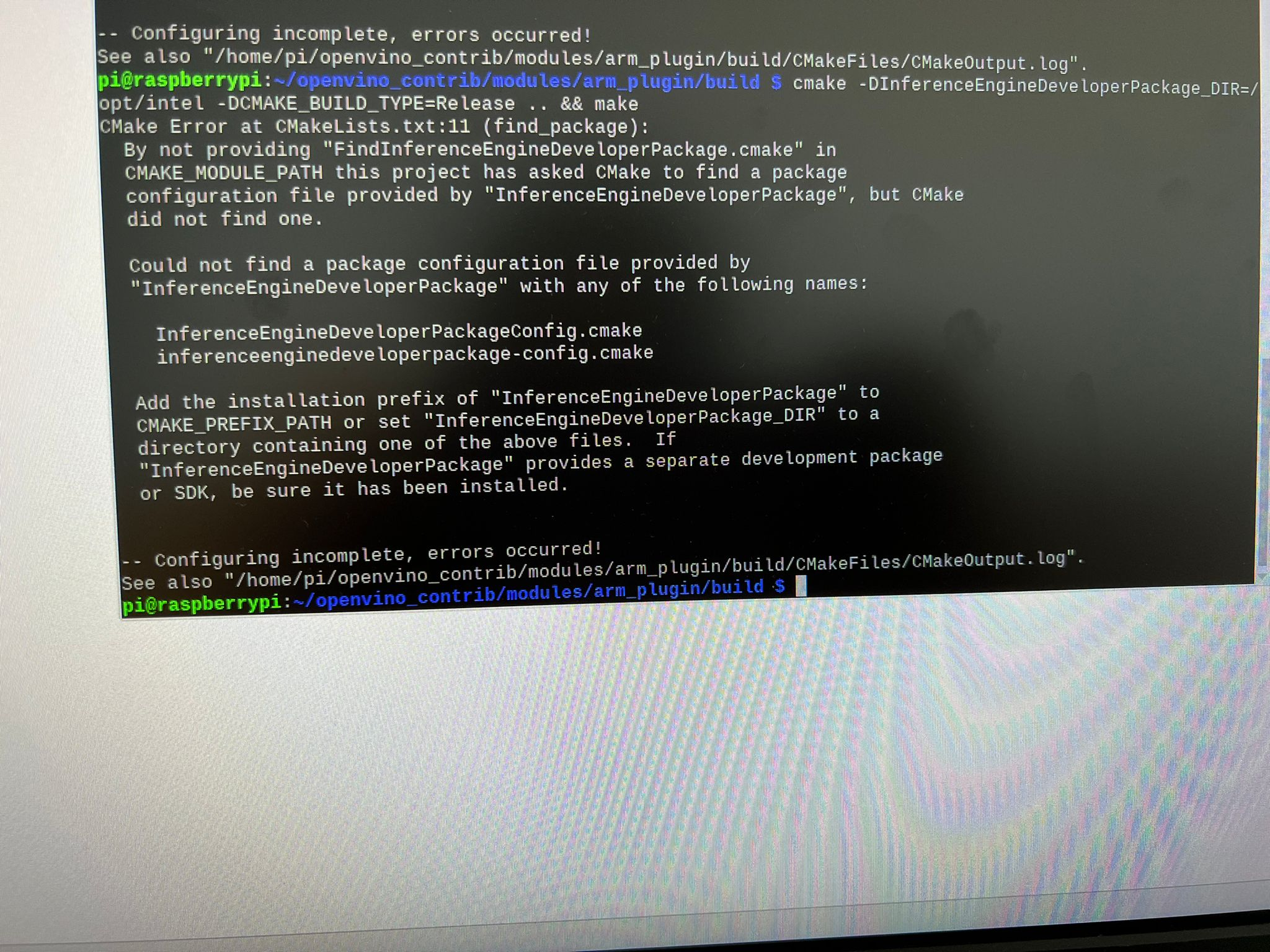
Many Thanks...!!!!
Cheers Mira
@MiraGaikwad you need to build both OpenVINO main repo and OpenVINO contrib.
You are trying to point to /opt/intel as InferenceEngineDeveloperPackage_DIR, but there is no such file named InferenceEngineDeveloperPackageConfig.cmake. Such file is created only when you build OpenVINO from scratch and it's located in the <build directory root>:
- Build OpenVINO
- Run cmake on OpenVINO Contrib with
InferenceEngineDeveloperPackage_DIRpointing to OpenVINO build tree
Or using a single step cmake -DIE_EXTRA_MODULE=<openvino_contrib source dir>/modules/arm_plugin <openvino source dir> when OpenVINO is built with extra modules like ARM plugin (see https://github.com/openvinotoolkit/openvino_contrib/wiki#how-to-build-openvino-with-extra-modules)


I follow the wiki and it works:
git clone --recurse-submodules --single-branch --branch=releases/2022/1 https://github.com/openvinotoolkit/openvino_contrib.git
cd openvino_contrib/modules/arm_plugin
docker image build -t arm-plugin -f dockerfiles/Dockerfile.RPi64_focal .
mkdir build
docker container run --rm -ti -v $PWD/build:/arm_cpu_plugin arm-plugin
You will get OV_ARM_package.tar.gz under build/ folder.

@brmarkus - Thanks for the response. I checked the link and looks like those plugins are for Raspberry Pi4 but I am using Raspberry pi 3.
Do you know if plugins are available for Raspberry Pi3 as well ?
Cheers Mira
I'm using asus tinkerboard and I believe all ARM boards will work.
@hbalasu1 - No it did not work for me yet. I am currently trying on Raspberry pi 3 but no luck.
Hi @MiraGaikwad After further investigation, OpenVINO for arm CPU plugin only supports the following devices (based on openvino_contrib)
| Raspberry Pi* 4 Model B | Debian* 9 (32-bit) |
|---|---|
| Raspberry Pi* 4 Model B | Debian* 10.3 (32-bit) |
| Raspberry Pi* 4 Model B | Ubuntu* 18.04 (64-bit) |
| Raspberry Pi* 4 Model B | Ubuntu* 20.04 (64-bit) |
| Apple* Mac mini with M1 | macOS 11.1 (64-bit) |
| Samsung* Galaxy S20 FE | Android 10 (64-bit) |
Unfortunately, OpenVINO does not support the Raspberry Pi 3 arm CPU, so the only option is only NCS2 if Raspberry Pi 3 is used.
Hope this information help
Thank you