

 openthread
How to build OTBR for NXP i.Mx6
I see there is aarch64.cmake under ot-br-posix/examples/platforms/nxp/linux-imx/ of GitHub OTBR source but couldn’t find related documents to show me how to use it. Does Anyone have experience about how to build and install OTBR on NXP i.Mx6 platform?

I see there is aarch64.cmake under ot-br-posix/examples/platforms/nxp/linux-imx/ of GitHub OTBR source but couldn’t find related documents to show me how to use it. Does Anyone have experience about how to build and install OTBR on NXP i.Mx6 platform?
@TE-N-ElvenWang @doru91 can probably help answer.

Hi,
You can refer to the git log for how we test the toolchain file:
./script/cmake-build -DOTBR_BORDER_ROUTING=ON -DOTBR_REST=ON -DOTBR_WEB=ON
-DBUILD_TESTING=OFF -DOTBR_DBUS=ON -DOTBR_DNSSD_DISCOVERY_PROXY=ON
-DOTBR_SRP_ADVERTISING_PROXY=ON -DOT_THREAD_VERSION=1.2
-DOTBR_INFRA_IF_NAME=mlan0
-DCMAKE_TOOLCHAIN_FILE=./examples/platforms/nxp/linux-imx/aarch64.cmake
If you want verify it based on imx6 platform, you just need to modify below based on aarch64.cmake:
- change the XXXX_COMPILER to arm32 one from your imx6 Yocto SDK like:
      set( CMAKE_C_COMPILER arm-poky-linux-gnueabi-gcc )
      set( CMAKE_CXX_COMPILER arm-poky-linux-gnueabi-g++ )
- change XXX_FLAGS's "-mcpu" to "-mcpu=cortex-a7" and remove the "-march" to "-march=armv7ve".

@TE-N-ElvenWang I follow your steps and run the following command.
./script/cmake-build -DOTBR_BORDER_ROUTING=ON -DOTBR_REST=ON -DOTBR_WEB=ON -DBUILD_TESTING=OFF -DOTBR_DBUS=ON -DOTBR_DNSSD_DISCOVERY_PROXY=ON -DOTBR_SRP_ADVERTISING_PROXY=ON -DOT_THREAD_VERSION=1.2 -DOTBR_INFRA_IF_NAME=eth0 -DCMAKE_TOOLCHAIN_FILE=./examples/platforms/nxp/linux-imx/aarch64.cmake
However, I get the following error: `CMake Error at /opt/fsl-imx-fb/5.10-hardknott/sysroots/x86_64-pokysdk-linux/usr/share/cmake-3.19/Modules/CMakeTestCCompiler.cmake:66 (message): The C compiler
"/opt/fsl-imx-fb/5.10-hardknott/sysroots/x86_64-pokysdk-linux/usr/bin/arm-poky-linux-gnueabi/arm-poky-linux-gnueabi-gcc"
is not able to compile a simple test program.
It fails with the following output:
Change Dir: /home/yk/ot-br-posix/build/otbr/CMakeFiles/CMakeTmp

Run Build Command(s):/opt/fsl-imx-fb/5.10-hardknott/sysroots/x86_64-pokysdk-linux/usr/bin/ninja cmTC_55291 && [1/2] Building C object CMakeFiles/cmTC_55291.dir/testCCompiler.c.o
[2/2] Linking C executable cmTC_55291
FAILED: cmTC_55291
: && /opt/fsl-imx-fb/5.10-hardknott/sysroots/x86_64-pokysdk-linux/usr/bin/arm-poky-linux-gnueabi/arm-poky-linux-gnueabi-gcc -mcpu=cortex-a7 -march=armv7ve -fstack-protector-strong  -O2 -D_FORTIFY_SOURCE=2 -Wformat -Wformat-security -Werror=format-security  --sysroot=/opt/fsl-imx-fb/5.10-hardknott/sysroots/cortexa7t2hf-neon-poky-linux-gnueabi  -O2 -pipe -g -feliminate-unused-debug-types -Wno-error   -mcpu=cortex-a7 -march=armv7ve -fstack-protector-strong  -O2 -D_FORTIFY_SOURCE=2 -Wformat -Wformat-security -Werror=format-security  -mcpu=cortex-a7 -march=armv7ve -fstack-protector-strong  -O2 -D_FORTIFY_SOURCE=2 -Wformat -Wformat-security -Werror=format-security  --sysroot=/opt/fsl-imx-fb/5.10-hardknott/sysroots/cortexa7t2hf-neon-poky-linux-gnueabi  -Wl,-O1 -Wl,--hash-style=gnu -Wl,--as-needed -Wl,-z,relro,-z,now -Wl,-O1 -Wl,--hash-style=gnu -Wl,--as-needed -Wl,-z,relro,-z,now CMakeFiles/cmTC_55291.dir/testCCompiler.c.o -o cmTC_55291   && :
/opt/fsl-imx-fb/5.10-hardknott/sysroots/x86_64-pokysdk-linux/usr/libexec/arm-poky-linux-gnueabi/gcc/arm-poky-linux-gnueabi/10.2.0/real-ld: error: cmTC_55291 uses VFP register arguments, CMakeFiles/cmTC_55291.dir/testCCompiler.c.o does not
/opt/fsl-imx-fb/5.10-hardknott/sysroots/x86_64-pokysdk-linux/usr/libexec/arm-poky-linux-gnueabi/gcc/arm-poky-linux-gnueabi/10.2.0/real-ld: failed to merge target specific data of file CMakeFiles/cmTC_55291.dir/testCCompiler.c.o
collect2: error: ld returned 1 exit status
ninja: build stopped: subcommand failed.
CMake will not be able to correctly generate this project.`
,which you can refer to my attached build_err.log. I also attach my aarch64.cmake for your reference. Can you help me to move forward? build_err.txt aarch64.cmake.txt
OK, I add "-mfloat-abi=hard -mfpu=vfp" into aarch64.cmake to fix this VFP trouble. But it comes the following new issue "No package 'jsoncpp' found" in attached build_err_new.txt. Do you know how to fix this? build_err_new.txt
@chenek the jsoncpp is not included into the default SDK package. Please set "-DOTBR_WEB=OFF" in your CMake config as jsoncpp is required by otbr-web.
On the other hand, if you have the NXP i.MX Yocto environment, you can try to follow and include this recipe to build the OpenThread modules for your arm32 platforms. It is validated by i.MX7ULP in my environment: https://github.com/NXPmicro/meta-matter.git
@TE-N-ElvenWang I try to follow steps in . I use "MACHINE=imx6ullevk DISTRO=fsl-imx-xwayland source sources/meta-matter/tools/imx-iot-setup.sh bld-xwayland" and "bitbake imx-image-multimedia". However, my "bitbake imx-image-multimedia" gets error to build it for imx6ullevk. I attach my build log. Can you help me to check if I miss anything to build this for imxullevk? bitbake build error.txt
@chenek looks your host is using Python2. Please make Python3 as the default Python. BTW, when use SDK build, did you try below option? set "-DOTBR_WEB=OFF" in your CMake config.
@TE-N-ElvenWang Thanks for fast response. I will remove python2 and make sure it uses python3 as default Python. But, which/where is CMake config to set "-DOTBR_WEB=OFF" when I follow steps in https://github.com/NXPmicro/meta-matter.git ?
@chenek I mean modify below command's bold parameter from "ON" to "OFF" to disable otbr-web which have dependency of jsoncpp: ./script/cmake-build -DOTBR_BORDER_ROUTING=ON -DOTBR_REST=ON -DOTBR_WEB=ON -DBUILD_TESTING=OFF -DOTBR_DBUS=ON -DOTBR_DNSSD_DISCOVERY_PROXY=ON -DOTBR_SRP_ADVERTISING_PROXY=ON -DOT_THREAD_VERSION=1.2 -DOTBR_INFRA_IF_NAME=eth0 -DCMAKE_TOOLCHAIN_FILE=./examples/platforms/nxp/linux-imx/aarch64.cmake
@TE-N-ElvenWang I see. I will make sure I set "-DOTBR_WEB=OFF" when I build otbr later. For now, I am using Python3 to run "bitbake imx-image-multimedia". Hope everything will go smoothly.
@TE-N-ElvenWang I get the following error. I try to do "pip install python-config" and bitbake again. However, I still see the same trouble. Do you know hoe to fix this trouble?
| checking for python-config... no | configure: error: python version 3 probe support requested but not found | WARNING: exit code 1 from a shell command.
@chenek I guess this might be the regression for python3. How about you use python 2 to build regular "bitbake imx-image-multimedia" without meta-matter.git. Then switch to python3 and build image with meta-matter.git cloned?
@TE-N-ElvenWang I had used python2 to do bitbake but get error in my bitbake build error.txt. You replied it's cause by python2. If I switch back to use python2, how can I fix the issue in my bitbake build error.txt?
@chenek previously the issue reported in this floor is because that matter project need python3. So please clean the "conf" folder of your "bld-xwayland", and don't use the imx-iot-setup.sh. Use ./imx-setup-release.sh to generate the "conf" of "bld-xwayland" only. Then switch to python2, "bitbake imx-image-multimedia". Make sure built successfully. Then switch to python3. And in your ${ROOT_OF_YOCTO}, execute "MACHINE=imx6ullevk DISTRO=fsl-imx-xwayland source sources/meta-matter/tools/imx-iot-setup.sh bld-xwayland" and then "bitbake imx-image-multimedia" to generate the matter related binary including otbr.
@TE-N-ElvenWang I try to follow steps in . I use "MACHINE=imx6ullevk DISTRO=fsl-imx-xwayland source sources/meta-matter/tools/imx-iot-setup.sh bld-xwayland" and "bitbake imx-image-multimedia". However, my "bitbake imx-image-multimedia" gets error to build it for imx6ullevk. I attach my build log. Can you help me to check if I miss anything to build this for imxullevk? bitbake build error.txt
@TE-N-ElvenWang I can use ./imx-setup-release.sh to generate the "conf" of "bld-xwayland" and switch to python2, "bitbake imx-image-multimedia" to built successfully. However, I get the following error when I switch back to python3, execute "MACHINE=imx6ullevk DISTRO=fsl-imx-xwayland source sources/meta-matter/tools/imx-iot-setup.sh bld-xwayland" and then "bitbake imx-image-multimedia". `| cc1plus: note: unrecognized command-line option '-Wno-unknown-warning-option' may have been intended to silence earlier diagnostics | [415/447] c++ obj/third_party/connectedhomeip/src/transport/libTransportLayer.SecureSessionMgr.cpp.o | cc1plus: warning: switch '-mcpu=cortex-a7' conflicts with '-march=armv8-a' switch | cc1plus: note: unrecognized command-line option '-Wno-unknown-warning-option' may have been intended to silence earlier diagnostics | ninja: build stopped: subcommand failed. | WARNING: exit code 1 from a shell command. | ERROR: Task (/home/yk/yocto/sources/meta-matter/recipes-matter/matter/matter.bb:do_compile) failed with exit code '1' NOTE: Tasks Summary: Attempted 8259 tasks of which 8159 didn't need to be rerun and 1 failed.
Summary: 1 task failed: /home/yk/yocto/sources/meta-matter/recipes-matter/matter/matter.bb:do_compile Summary: There was 1 ERROR message shown, returning a non-zero exit code. ` I know this might related to matter aarch64.cmake but how can I fix this with python3 to excute "MACHINE=imx6ullevk DISTRO=fsl-imx-xwayland source sources/meta-matter/tools/imx-iot-setup.sh bld-xwayland" and then "bitbake imx-image-multimedia"?
@TE-N-ElvenWang I build OpenThread Border Router with Yocto SDK successfully now. Will upload it to our HW to see if otbr-agent/ot-ctl can run properly.
@chenek Glad to see that you made it. So may I know which RCP module you are using now?
@TE-N-ElvenWang We have EFR32MG22 to act as RCP and I need to build RCP for it now.
@chenek OK. Please align the RCP's OpenThread version. If it not support 1.2, you need modify "-DOT_THREAD_VERSION=1.2" to "-DOT_THREAD_VERSION=1.1".
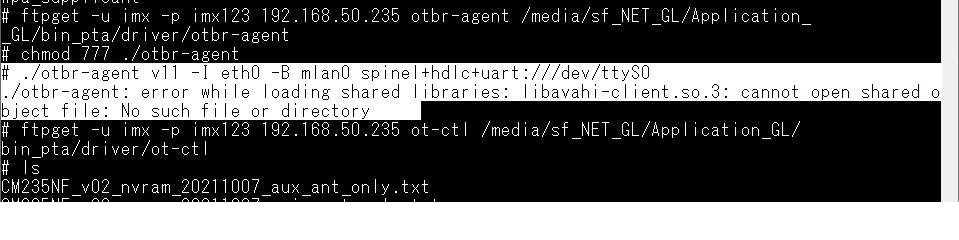
@TE-N-ElvenWang When I try to run otbr-agent, I see the it cannot load shared libraries libavahi-client.so.3. where can I find libavahi-client.so.3 after I build OpenThread Border Router with Yocto SDK successfully
 ?
?
@chenek Please flash your newly built Yocto images to your board which built with meta-matter.git enabled. It will have all avahi related binaries in it.
@TE-N-ElvenWang I build i.MX6ull Yocto image with integrated OpenThread Border Router by following steps in "How to build the Yocto image with integrated OpenThread Border Router" and download the image to microSD to start up my i.Mx6ull EVK.
I build and copy otbr-agent/ot-ctl into /usr/sbin folder of my i.Mx6ull EVK. However, I still get "cannot load shared libraries libavahi-client.so.3" issue as the followings:

Do I still miss anything?
@chenek did you try below command to generate the image? $MACHINE=imx6ullevk DISTRO=fsl-imx-xwayland source sources/meta-matter/tools/imx-iot-setup.sh bld-xwayland $bitbake imx-image-multimedia
@TE-N-ElvenWang Thanks for the hint and I think that's what exactly I missed. I am rebuilding the image to test again. Will update here to let you know my result.
@TE-N-ElvenWang I finally get the image built for my imx6 EVK. However, I get "connect session failed: No such file or directory" after I run "otbr-agent -I eth0 -B mlan0 spinel+hdlc+uart:///dev/ttyACM0 &" and "ot-ctl state". Please note that I use eth0 instead of wpan0. Can you advise what to do next to check to make me move forward?
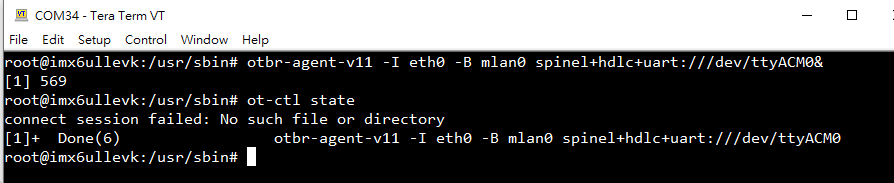
@chenek please note that in the example: wpan0 is the virtual interface for thread. mlan0 is the backed WiFi interface /dev/ttyACM0 is the RCP device UART.
Please match above interfaces based on your platform design.
@TE-N-ElvenWang I correct the interface to use "otbr-agent -I mpan0 -B eth0 spinel+hdlc+uart:///dev/ttyACM0&" but the otbr-agent is still inactive.
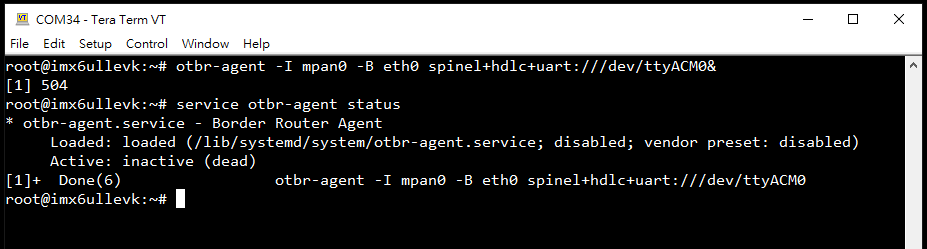
@chenek I think you may need to check the log via "cat /var/log/syslog" for detail.