
core
 core copied to clipboard
 opensumi
🚀 A framework helps you quickly build AI Native IDE products. https://preview.opensumi.com

**描述你的问题(Describe the bug)** 期望将底部栏的这个菜单里的图标都换成自定义类型的,但是调用registerMenuItem注册不生效,发现下图代码中做了过滤 

自己遇到的一种情况,我有一个 CodeRunner 文件夹,我会在里面创建各种测试代码,现在我想展开所有文件夹的第一层以便于我删除掉这些文件夹。没有 VSCode 插件能做这种事情

**如果你的需求与问题相关,请在下面描述一下(Is your feature request related to a problem? Please describe.)** 例如 svg 文件里的一些 a 标签的 href 是带有 command 协议的链接  以及一些 fill 属性是支持 color token 的  目前在适配 walkthrough api...

**描述你的问题(Describe the bug)** 运行存在报错,定位到是缺少相关实现,参考 : https://github.com/microsoft/vscode/blob/88a2fd7239fed3526af9cd411e33bf85de9ecb38/src/vs/workbench/contrib/debug/browser/rawDebugSession.ts#L624 **复现路径(To Reproduce)** 1. 测试案例 `[email protected]:microsoft/vscode-extension-samples.git ` **预期表现(Expected behavior)** 正常运行调试 **问题截图(Screenshots)** 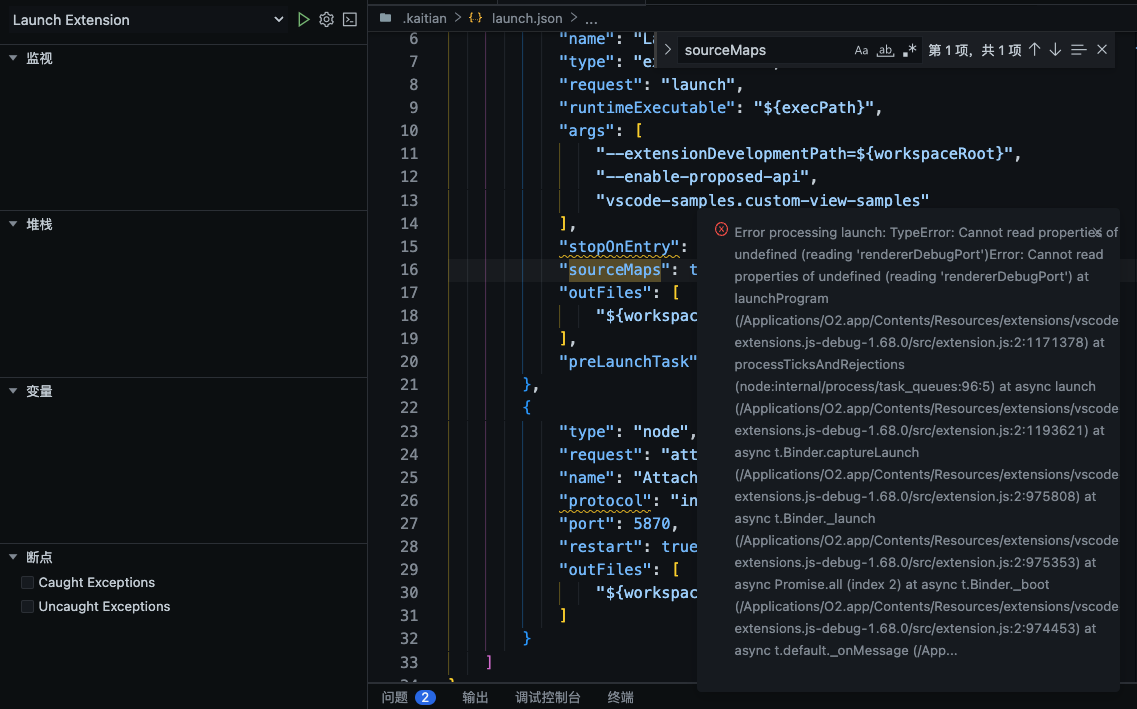 **环境信息(Environment)** - OpenSumi Version: 2.21

**如果你的需求与问题相关,请在下面描述一下(Is your feature request related to a problem? Please describe.)** **描述你预期的功能表现(Describe the solution you'd like)** **描述你考虑过的替代方案(Describe alternatives you've considered)** **补充信息(Additional context)**
**描述你的问题(Describe the bug)** 打开一个软链的目录,在命令行删除文件后,文件树内对应的文件没有变动 **复现路径(To Reproduce)** 1. opensumi/core 会默认打开 tool/workspace 目录作为项目路径 2. 如果 tool/workspace 是软链不会监听里面的文件变动 **预期表现(Expected behavior)** **问题截图(Screenshots)**  **环境信息(Environment)** - OS: macOS 12 - Browser: Chrome 100 - OpenSumi...

**如果你的需求与问题相关,请在下面描述一下(Is your feature request related to a problem? Please describe.)** 目前关闭 SLOT,比如右侧面板,会直接设置 “display:none、block”来隐藏和显示,UI 过渡显得生硬。 **描述你预期的功能表现(Describe the solution you'd like)** 建议关闭和展开有一个宽度逐渐增大、减小的渐变动画 **描述你考虑过的替代方案(Describe alternatives you've considered)** **补充信息(Additional context)**

**描述你的问题(Describe the bug)** Electron版本下,执行createTerminal,终端闪现后立刻异常退出,控制台报“[node][extHost:error] [error] Terminal CODE_WINDOW_CLIENT_ID:1|t_cy80Tlnr2VjzYRst8o2 not found”错误。 **复现路径(To Reproduce)** 1、在modules/***/browser/***.contribution.ts文件中,通过模块注册Terminal OPEN_WITH_PATH命令,代码如下: 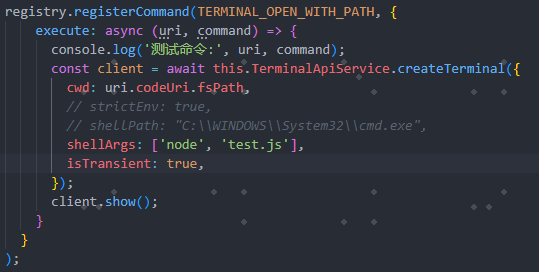 2、在modules/***/browser/***.service.ts文件中,调用Terminal OPEN_WITH_PATH命令,代码如下:  3、test.js,文件中只是打印“Hello world”字符串; 如果createTerminal不加shellArgs参数,Terminal可以打开, 加上shellArgs参数,目的是想直接自动跑命令,“Hello world”可以在终端中打印出来,但终端立刻异常关闭,并控制台报“[node][extHost:error] [error] Terminal CODE_WINDOW_CLIENT_ID:1|t_cy80Tlnr2VjzYRst8o2 not found”错误 **预期表现(Expected behavior)** 可正常执行命令,不要异常退出终端...

## 目前存在的问题 目前框架内部有许多视图容器,每个视图容器在页面上依赖容器 ID 进行绑定注册,命名方式包括: 1. 使用包名注册的,如 `@opensumi/ide-output` 2. 使用自定义名称注册的,如 `debug-console` 相关代码见: https://github.com/opensumi/core/blob/b39260cfa73158e32f643b745b5576cacb724028/packages/output/src/browser/output-contribution.ts#L77 https://github.com/opensumi/core/blob/96477a517f05e47209e42aa3d53444baa4117b63/packages/debug/src/browser/view/console/debug-console.contribution.ts#L56 而同时,视图也存在自己的视图 ID(containerId),该 ID 会在视图中创建 `#{containerId}` 标签,可用于样式覆盖及 E2E 案例编写,如: https://github.com/opensumi/core/blob/96477a517f05e47209e42aa3d53444baa4117b63/packages/debug/src/browser/view/console/debug-console.contribution.ts#L64 这些 ID 的命名存在规范不统一,且缺少统一维护/获取的地方,文档需求:https://github.com/opensumi/docs/issues/62. ## 修改意见 目前在 `@opensumi/ide-core-browser`...
**描述你的问题(Describe the bug)** 在两个 Opensumi 的连接中,一个发送了完整的(5条)ActivateExtension 消息去启动进程,而出现问题的连接只发送了一条(vscode.typescript)ActivateExtension 消息,导致 Merge-conflict 插件等失效。   **复现路径(To Reproduce)** 在测试环境下出现问题的容器会稳定复现问题。希望能够知道触发 Activate Extension 的规则,或者一些有用的辅助查询信息。 **预期表现(Expected behavior)** 发送所有需要 Activate 的 Extension 的消息。
