
OpenSearch
 OpenSearch copied to clipboard
 opensearch-project
[BUG]Wrong OS and Chip versions are being displayed.
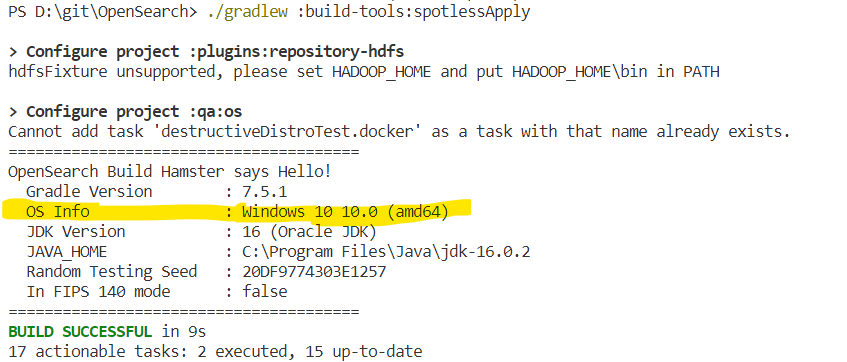
Describe the bug This executes successfully "./gradlew: build-tools:spotlessApply". But the OS version and the chip manufacturer displayed is wrong. I am running a win 10 pc with Inter i5 8th gen Chip(64 bit). Manufacturer - Acer (Model - Predator Helios 300).
To Reproduce Steps to reproduce the behavior:
- just run ./gradlew: build-tools:spotlessApply
- Scroll down.
- Verify with your System specs.
Expected behavior It should display the correct System OS version and the processor chip.
Plugins None.
Screenshots
Host/Environment (please complete the following information):
- OS: win 11
- Version Home
Additional context

Hi, I don't think this is a bug for OpenSearch, because the displayed value is obtained by the Java Platform (JDK) installed in your system, and depends on the JDK version.
See the below code and link for reference: https://github.com/opensearch-project/OpenSearch/blob/72e680154428c5c705f68e4d8f72d408b8d01890/buildSrc/src/main/java/org/opensearch/gradle/info/GlobalBuildInfoPlugin.java#L158-L160
https://docs.oracle.com/javase/tutorial/essential/environment/sysprop.html
About OS version: Older JDK version can't recognize the newly released Windows 11, and the bug is fixed in newer JDK version, see https://bugs.openjdk.org/browse/JDK-8274840. Please update the JDK in your system if you want Windows 11 to be detected correctly. (Here is an example that older JDK version can't recognize newer Windows version: https://stackoverflow.com/a/31110542/11408564. Especially Windows 11 and Windows 10 share the same version number "10.0": https://www.gaijin.at/en/infos/windows-version-numbers https://docs.microsoft.com/en-us/windows/win32/sysinfo/operating-system-version)
About CPU architecture:
The name in the () of the "OS Info" stands for the the CPU architecture name, but not the CPU model name, so "amd64" is the correct value for your CPU.
Although it's hard to find all possible value of the detected CPU architecture value of JDK (https://stackoverflow.com/questions/10846105/all-possible-values-os-arch-in-32bit-jre-and-in-64bit-jre), I think it's similar with what Gradle detects: https://docs.gradle.org/7.5.1/javadoc/org/gradle/nativeplatform/platform/Architecture.html.

Although it's hard to find all possible value of the detected CPU architecture value of JDK
They're in this macro (focused on where the JDK produces amd64):
https://github.com/openjdk/jdk/blob/bddef7151849a213926ffdd86a7e228db66606b1/make/autoconf/platform.m4#L475-L484

Hey @rohan8538 I'm going to close this issue since I think the information above explains where the information comes from (the JVM).
Older JDKs were unaware of Win 11 (which is distinguished by a build number comparison, the "major" version is still 10) so updating your JDK should fix the problem.