
cva6
 cva6 copied to clipboard
 openhwgroup
The boot program in the SD card cannot start the system
When I was performing the "Booting from an SD card" operation, I put the downloaded bbl.bin file into the SD card, and the output content when using FPGA for simulation is as follows:
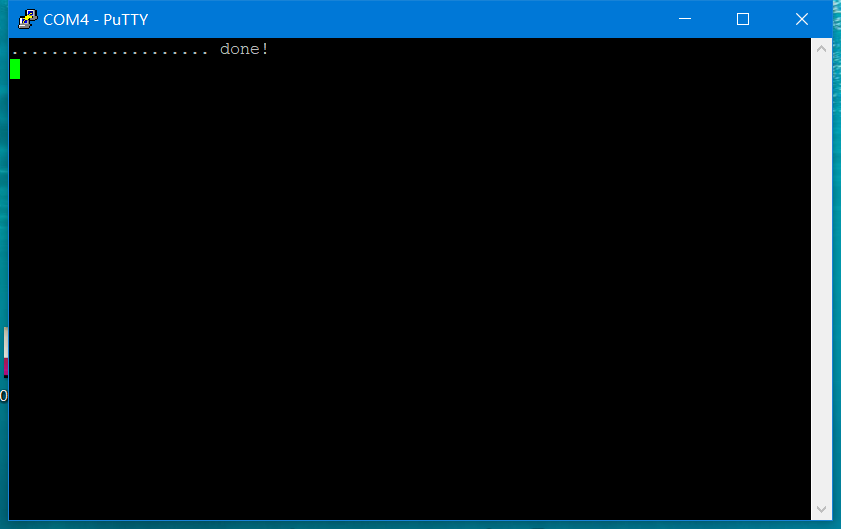 It seems that the operating system has not been started. I am using FPGA for the first time. Does the bbl.bin file contain an image file? If not, can you give me a website?

Yes it contains the full Linux Image + rootfs. Do you see the bootloader enumerating the GPT partitions? Did you follow the GPT guide in the ariane-sdk Readme?

thank you very much
------------------ 原始邮件 ------------------ 发件人: "openhwgroup/cva6" @.>; 发送时间: 2021年4月19日(星期一) 下午2:30 @.>; @.@.>; 主题: Re: [openhwgroup/cva6] The boot program in the SD card cannot start the system (#653)
Yes it contains the full Linux Image + rootfs. Do you see the bootloader enumerating the GPT partitions? Did you follow the GPT guide in the ariane-sdk Readme?
— You are receiving this because you authored the thread. Reply to this email directly, view it on GitHub, or unsubscribe.
This issue is still open, I have the same behavior... During boot, I can see the GPT partitions:
gpt partition table header:
        signature:      5452415020494645
        revision:       00010000
        size:           0000005C
        crc_header:     9C53F177
        reserved:       00000000
        current lba:    0000000000000001
        backup lda:     0000000001CD7FFF
        partition entries lba:          0000000000000002
        number partition entries:       00000080
        size partition entries:         00000080
gpt partition entry 00
        partition type guid:    D5F7127456A1134B81DC867174929325
        partition guid:         1AB49918482C6B428576278B80AFDA9A
        first lba:      0000000000000800
        last lba:       0000000000001AFD
        attributes:     0000000000000000
        name:   000000000000000000000000000000000000000000000000000000000000000000000000000000000000000000000000000000000000000000000000000000000000000000000000
gpt partition entry 01
        partition type guid:    AF3DC60F838472478E793D69D8477DE4
        partition guid:         24BE3D0C06BAE744B86E81FBBE1F16EC
        first lba:      0000000000100000
        last lba:       0000000001CD7FDE
        attributes:     0000000000000000
        name:   000000000000000000000000000000000000000000000000000000000000000000000000000000000000000000000000000000000000000000000000000000000000000000000000
gpt partition entry 02
        partition type guid:    00000000000000000000000000000000
        partition guid:         00000000000000000000000000000000
        first lba:      0000000000000000
        last lba:       0000000000000000
        attributes:     0000000000000000
        name:   000000000000000000000000000000000000000000000000000000000000000000000000000000000000000000000000000000000000000000000000000000000000000000000000
gpt partition entry 03
        partition type guid:    00000000000000000000000000000000
        partition guid:         00000000000000000000000000000000
        first lba:      0000000000000000
        last lba:       0000000000000000
        attributes:     0000000000000000
        name:   000000000000000000000000000000000000000000000000000000000000000000000000000000000000000000000000000000000000000000000000000000000000000000000000
copying boot image ................................ done!
And I used the Makefile available in the cva6-sdk repo (https://github.com/openhwgroup/cva6-sdk#booting-from-an-sd-card). It creates GPT partition table + copy fw_payload.bin / uImage.
sgdisk --clear -g --new=1:2048:6909 --new=2:512M:0 --typecode=1:3000 --typecode=2:8300 /dev/mmcblk0
dd if=cva6-sdk/install64/fw_payload.bin of=/dev/mmcblk0p1 status=progress oflag=sync bs=1M
dd if=cva6-sdk/install64/uImage         of=/dev/mmcblk0p2 status=progress oflag=sync bs=1M
Just checked partitions in Gparted, everything seems fine.
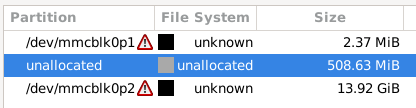
On the Genesys2, jumpers were in their default positions (JP4 in SD, JP5 in QSPI)
Any ideas?
EDIT: another related issue (https://github.com/openhwgroup/cva6/issues/331). I'll try another SD card asap.

Hi, I meet the same problem when I implement Ariane on VC707 FPGA board. How did you fix the problem? Change the SD card? I'm not sure whether my card is ok because this is a new card and I can use this card with linux on Rocket-Chip.

I've solved the problem. It's all about the partitioning. The SD card must be partitioned properly. I just followed the operations in cva6-sdk and check every step in makefile.
Hi @shecairui ,
I am facing also issues with my SD card and CVA6 not being able to load the kernel image due to bad CRC checksum.
What do you mean by proper partitioning?
The partitions I have inside my SD card are the following:
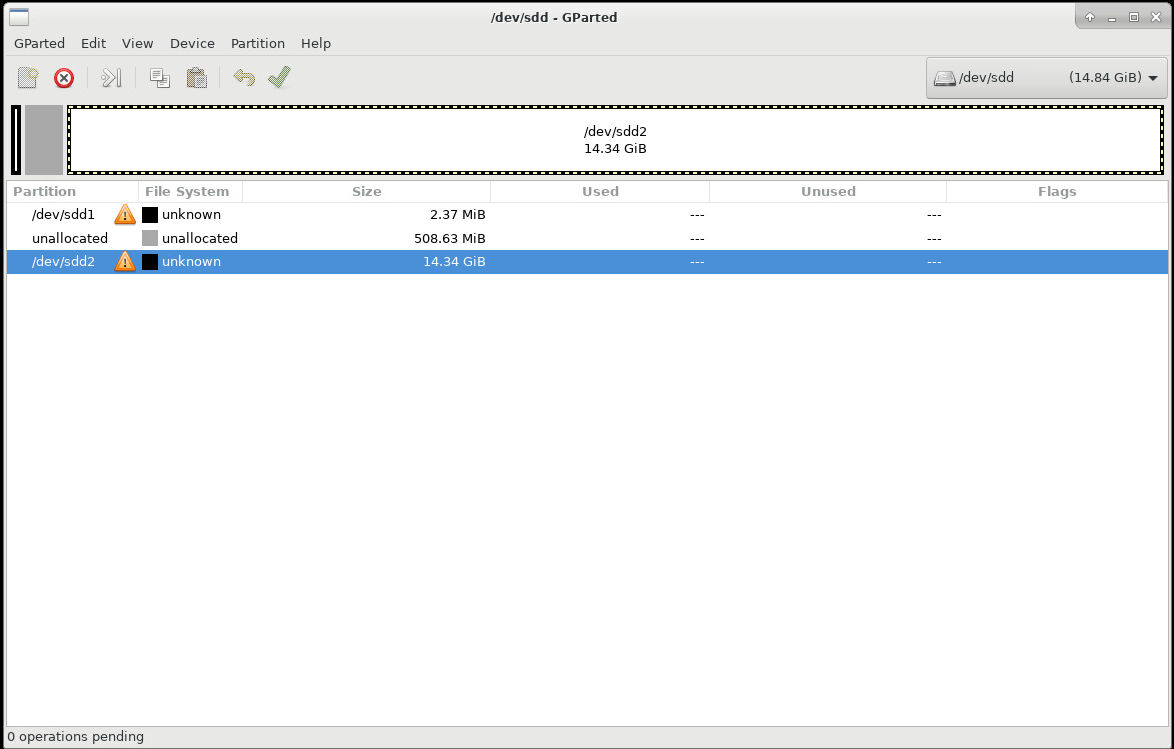
The error I am getting is the following:
U-Boot 2021.07-rc4-g920075e-dirty (Nov 23 2022 - 20:05:46 -0500)

CPU:   rv64imafdc
DRAM:  1 GiB
MMC:   xps-spi@20000000:mmc@0: 0
Loading Environment from nowhere... OK
In:    uart@10000000
Out:   uart@10000000
Err:   uart@10000000
Net:   No ethernet found.
Hit any key to stop autoboot:  0
Device: xps-spi@20000000:mmc@0
Manufacturer ID: 3
OEM: 5344
Name: SC16G
Bus Speed: 12500000
Mode: MMC legacy
Rd Block Len: 512
SD version 2.0
High Capacity: Yes
Capacity: 14.8 GiB
Bus Width: 1-bit

MMC read: dev # 0, block # 1048576, count 20480 ... 20480 blocks read: OK
## Booting kernel from Legacy Image at 90000000 ...
   Image Name:   CV64A6Linux
   Image Type:   RISC-V Linux Kernel Image (gzip compressed)
   Data Size:    10687721 Bytes = 10.2 MiB
   Load Address: 80200000
   Entry Point:  80200000
   Verifying Checksum ... Bad Data CRC
ERROR: can't get kernel image!
I have tried multiple SD cards with no solution so far. Can you share your partitions in the SD card from gparted?
Thanks!

I'm also facing the same problem, with the exact same error message than @0ena . I'm following the make images -> make flash-sdcard workflow of the cva6-sdk repo. I've found this gets worse if a few files are added to the rootfs and/or the files are large. How have you managed to get it working?

Hi @shecairui ,
I am facing also issues with my SD card and CVA6 not being able to load the kernel image due to bad CRC checksum. What do you mean by proper partitioning? The partitions I have inside my SD card are the following:
The error I am getting is the following:
U-Boot 2021.07-rc4-g920075e-dirty (Nov 23 2022 - 20:05:46 -0500)

CPU:   rv64imafdc
DRAM:  1 GiB
MMC:   xps-spi@20000000:mmc@0: 0
Loading Environment from nowhere... OK
In:    uart@10000000
Out:   uart@10000000
Err:   uart@10000000
Net:   No ethernet found.
Hit any key to stop autoboot:  0
Device: xps-spi@20000000:mmc@0
Manufacturer ID: 3
OEM: 5344
Name: SC16G
Bus Speed: 12500000
Mode: MMC legacy
Rd Block Len: 512
SD version 2.0
High Capacity: Yes
Capacity: 14.8 GiB
Bus Width: 1-bit

MMC read: dev # 0, block # 1048576, count 20480 ... 20480 blocks read: OK
## Booting kernel from Legacy Image at 90000000 ...
   Image Name:   CV64A6Linux
   Image Type:   RISC-V Linux Kernel Image (gzip compressed)
   Data Size:    10687721 Bytes = 10.2 MiB
   Load Address: 80200000
   Entry Point:  80200000
   Verifying Checksum ... Bad Data CRC
ERROR: can't get kernel image!
I have tried multiple SD cards with no solution so far. Can you share your partitions in the SD card from gparted?
Thanks!
Hello,
Your partitioning seems OK.
Did you use the flash_sdcard command from the cva6-sdk repo ?
The error seems to be on the Linux image.
With the SDcard plugged in, can you execute xxd /dev/sdd2 | head and compare it to xxd install[32,64]/uImage | head ?

Hello @eyssartk ,
In my case I have used the flash_sdcard command and the output of both commands is the same:
00000000: 2705 1956 78fd 6b8a 637f a43a 00a5 49bf  '..Vx.k.c..:..I.
00000010: 8020 0000 8020 0000 6933 677b 051a 0201  . ... ..i3g{....
00000020: 4356 3634 4136 4c69 6e75 7800 0000 0000  CV64A6Linux.....
00000030: 0000 0000 0000 0000 0000 0000 0000 0000  ................
00000040: 1f8b 0808 39a4 7f63 0203 496d 6167 6500  ....9..c..Image.
00000050: ec59 7b54 5357 badf e79c 9c84 00b6 a191  .Y{TSW..........
00000060: 1e59 ad6d 2082 35f6 ba62 ad52 6bd5 8806  .Y.m .5..b.Rk...
00000070: 3477 a48c ad5a ed2b 1804 b15a f182 c3c5  4w...Z.+...Z....
00000080: 5ea7 09c9 4908 8f8a 37e2 9682 6364 0434  ^...I...7...cd.4
00000090: 9d3a b18c 52ad 8f38 4ab9 dab1 63ef 6d75  .:..R..8J...c.mu
There is a size limit that the current setup supports. I believe it's about 32mb. So if your image is more than that, you might see some weird errors.
Edit: The limit is in the FPGA bootrom that only copies 32mb of the boot partition into memory: https://github.com/openhwgroup/cva6/blob/3a8cc95eaa73ffd488ba25f829936b8f31e28938/corev_apu/fpga/src/bootrom/src/main.c#
Edit2: I might be wrong since we now switched to u-boot. Feel free to ignore this comment :)

In my case, everything in the install64 folder is under 20mb, the uImage in particular is 10.8mb.
The FPGA output (in case it serves to compare with the one from @0ena ):
Hello World!
init SPI
status: 0x0000000000000025
status: 0x0000000000000025
SPI initialized!
initializing SD...
SD command cmd0 	response : 01
SD command cmd55 	response : 01
SD command cmd41 	response : 01
SD command cmd55 	response : 01
SD command cmd41 	response : 01
SD command cmd55 	response : 01
SD command cmd41 	response : 01
SD command cmd55 	response : 01
SD command cmd41 	response : 01
SD command cmd55 	response : 01
SD command cmd41 	response : 01
SD command cmd55 	response : 01
SD command cmd41 	response : 01
SD command cmd55 	response : 01
SD command cmd41 	response : 01
SD command cmd55 	response : 01
SD command cmd41 	response : 01
SD command cmd55 	response : 01
SD command cmd41 	response : 01
SD command cmd55 	response : 01
SD command cmd41 	response : 01
SD command cmd55 	response : 01
SD command cmd41 	response : 01
SD command cmd55 	response : 01
SD command cmd41 	response : 01
SD command cmd55 	response : 01
SD command cmd41 	response : 01
SD command cmd55 	response : 01
SD command cmd41 	response : 01
SD command cmd55 	response : 01
SD command cmd41 	response : 01
SD command cmd55 	response : 01
SD command cmd41 	response : 01
SD command cmd55 	response : 01
SD command cmd41 	response : 01
SD command cmd55 	response : 01
SD command cmd41 	response : 01
SD command cmd55 	response : 01
SD command cmd41 	response : 01
SD command cmd55 	response : 01
SD command cmd41 	response : 01
SD command cmd55 	response : 01
SD command cmd41 	response : 01
SD command cmd55 	response : 01
SD command cmd41 	response : 01
SD command cmd55 	response : 01
SD command cmd41 	response : 01
SD command cmd55 	response : 01
SD command cmd41 	response : 01
SD command cmd55 	response : 01
SD command cmd41 	response : 00
sd initialized!
gpt partition table header:
	signature:	5452415020494645
	revision:	00010000
	size:		0000005C
	crc_header:	FF2687E0
	reserved:	00000000
	current lba:	0000000000000001
	backup lda:	0000000001DACBFF
	partition entries lba:   	0000000000000002
	number partition entries:	00000080
	size partition entries:  	00000080
gpt partition entry 00
	partition type guid:	D5F7127456A1134B81DC867174929325
	partition guid:     	17E881CAB295AA4E815C160BD796CD12
	first lba:	0000000000000800
	last lba:	0000000000001AFD
	attributes:	0000000000000000
	name:	000000000000000000000000000000000000000000000000000000000000000000000000000000000000000000000000000000000000000000000000000000000000000000000000
gpt partition entry 01
	partition type guid:	AF3DC60F838472478E793D69D8477DE4
	partition guid:     	E953DAB848913B47AB94C61A5D7BD2B1
	first lba:	0000000000100000
	last lba:	0000000001DACBDE
	attributes:	0000000000000000
	name:	000000000000000000000000000000000000000000000000000000000000000000000000000000000000000000000000000000000000000000000000000000000000000000000000
gpt partition entry 02
	partition type guid:	00000000000000000000000000000000
	partition guid:     	00000000000000000000000000000000
	first lba:	0000000000000000
	last lba:	0000000000000000
	attributes:	0000000000000000
	name:	000000000000000000000000000000000000000000000000000000000000000000000000000000000000000000000000000000000000000000000000000000000000000000000000
gpt partition entry 03
	partition type guid:	00000000000000000000000000000000
	partition guid:     	00000000000000000000000000000000
	first lba:	0000000000000000
	last lba:	0000000000000000
	attributes:	0000000000000000
	name:	000000000000000000000000000000000000000000000000000000000000000000000000000000000000000000000000000000000000000000000000000000000000000000000000
copying boot image .... done!

OpenSBI v0.9
   ____                    _____ ____ _____
  / __ \                  / ____|  _ \_   _|
 | |  | |_ __   ___ _ __ | (___ | |_) || |
 | |  | | '_ \ / _ \ '_ \ \___ \|  _ < | |
 | |__| | |_) |  __/ | | |____) | |_) || |_
  \____/| .__/ \___|_| |_|_____/|____/_____|
        | |
        |_|

Platform Name             : ARIANE RISC-V
Platform Features         : medeleg
Platform HART Count       : 1
Platform IPI Device       : aclint-mswi
Platform Timer Device     : aclint-mtimer @ 1000000Hz
Platform Console Device   : uart8250
Platform HSM Device       : ---
Platform Reboot Device    : ---
Platform Shutdown Device  : ---
Firmware Base             : 0x80000000
Firmware Size             : 220 KB
Runtime SBI Version       : 0.3

Domain0 Name              : root
Domain0 Boot HART         : 0
Domain0 HARTs             : 0*
Domain0 Region00          : 0x0000000002008000-0x000000000200bfff (I)
Domain0 Region01          : 0x0000000002000000-0x0000000002007fff (I)
Domain0 Region02          : 0x0000000080000000-0x000000008003ffff ()
Domain0 Region03          : 0x0000000000000000-0xffffffffffffffff (R,W,X)
Domain0 Next Address      : 0x0000000080200000
Domain0 Next Arg1         : 0x0000000082200000
Domain0 Next Mode         : S-mode
Domain0 SysReset          : yes

Boot HART ID              : 0
Boot HART Domain          : root
Boot HART ISA             : rv64imafdcsux
Boot HART Features        : scounteren,mcounteren
Boot HART PMP Count       : 16
Boot HART PMP Granularity : 8
Boot HART PMP Address Bits: 54
Boot HART MHPM Count      : 0
Boot HART MIDELEG         : 0x0000000000000222
Boot HART MEDELEG         : 0x000000000000b109


U-Boot 2021.07-rc4-g920075ecfa (Nov 24 2022 - 18:04:38 +0100)

CPU:   rv64imafdc
DRAM:  1 GiB
MMC:   xps-spi@20000000:mmc@0: 0
Loading Environment from nowhere... OK
In:    uart@10000000
Out:   uart@10000000
Err:   uart@10000000
Net:   No ethernet found.
Hit any key to stop autoboot:  5  4  3  2  1  0
Device: xps-spi@20000000:mmc@0
Manufacturer ID: 3
OEM: 5344
Name: SC16G
Bus Speed: 12500000
Mode: MMC legacy
Rd Block Len: 512
SD version 2.0
High Capacity: Yes
Capacity: 14.8 GiB
Bus Width: 1-bit

MMC read: dev # 0, block # 1048576, count 20480 ... 20480 blocks read: OK
## Booting kernel from Legacy Image at 90000000 ...
   Image Name:   CV64A6Linux
   Image Type:   RISC-V Linux Kernel Image (gzip compressed)
   Data Size:    10832319 Bytes = 10.3 MiB
   Load Address: 80200000
   Entry Point:  80200000
   Verifying Checksum ... Bad Data CRC
ERROR: can't get kernel image!
=>
I have an idea of the problem.
In the current configuration, there is no file system. U-boot performs a binary copy of 0x5000 * 512 bytes from the SD card. So if the uImage is bigger, the CRC will fail.
Here is a test to confirm this:
You have to hit a key to stop the autoboot in u-boot. Then you type :
mmc read 90000000 100000 6000
setenv fdt_high 0xFFFFFFFFFFFFFFFF
bootm 90000000
tell me if it works.
Hello @eyssartk ,
This generated a new error:
Hello World!
init SPI
status: 0x0000000000000025
status: 0x0000000000000025
SPI initialized!
initializing SD...
SD command cmd0 	response : 01
SD command cmd55 	response : 01
SD command cmd41 	response : 01
SD command cmd55 	response : 01
SD command cmd41 	response : 01
SD command cmd55 	response : 01
SD command cmd41 	response : 01
SD command cmd55 	response : 01
SD command cmd41 	response : 01
SD command cmd55 	response : 01
SD command cmd41 	response : 01
SD command cmd55 	response : 01
SD command cmd41 	response : 01
SD command cmd55 	response : 01
SD command cmd41 	response : 01
SD command cmd55 	response : 01
SD command cmd41 	response : 01
SD command cmd55 	response : 01
SD command cmd41 	response : 01
SD command cmd55 	response : 01
SD command cmd41 	response : 01
SD command cmd55 	response : 01
SD command cmd41 	response : 01
SD command cmd55 	response : 01
SD command cmd41 	response : 01
SD command cmd55 	response : 01
SD command cmd41 	response : 01
SD command cmd55 	response : 01
SD command cmd41 	response : 01
SD command cmd55 	response : 01
SD command cmd41 	response : 01
SD command cmd55 	response : 01
SD command cmd41 	response : 01
SD command cmd55 	response : 01
SD command cmd41 	response : 01
SD command cmd55 	response : 01
SD command cmd41 	response : 01
SD command cmd55 	response : 01
SD command cmd41 	response : 01
SD command cmd55 	response : 01
SD command cmd41 	response : 01
SD command cmd55 	response : 01
SD command cmd41 	response : 01
SD command cmd55 	response : 01
SD command cmd41 	response : 01
SD command cmd55 	response : 01
SD command cmd41 	response : 01
SD command cmd55 	response : 01
SD command cmd41 	response : 01
SD command cmd55 	response : 01
SD command cmd41 	response : 00
sd initialized!
gpt partition table header:
	signature:	5452415020494645
	revision:	00010000
	size:		0000005C
	crc_header:	FF2687E0
	reserved:	00000000
	current lba:	0000000000000001
	backup lda:	0000000001DACBFF
	partition entries lba:   	0000000000000002
	number partition entries:	00000080
	size partition entries:  	00000080
gpt partition entry 00
	partition type guid:	D5F7127456A1134B81DC867174929325
	partition guid:     	17E881CAB295AA4E815C160BD796CD12
	first lba:	0000000000000800
	last lba:	0000000000001AFD
	attributes:	0000000000000000
	name:	000000000000000000000000000000000000000000000000000000000000000000000000000000000000000000000000000000000000000000000000000000000000000000000000
gpt partition entry 01
	partition type guid:	AF3DC60F838472478E793D69D8477DE4
	partition guid:     	E953DAB848913B47AB94C61A5D7BD2B1
	first lba:	0000000000100000
	last lba:	0000000001DACBDE
	attributes:	0000000000000000
	name:	000000000000000000000000000000000000000000000000000000000000000000000000000000000000000000000000000000000000000000000000000000000000000000000000
gpt partition entry 02
	partition type guid:	00000000000000000000000000000000
	partition guid:     	00000000000000000000000000000000
	first lba:	0000000000000000
	last lba:	0000000000000000
	attributes:	0000000000000000
	name:	000000000000000000000000000000000000000000000000000000000000000000000000000000000000000000000000000000000000000000000000000000000000000000000000
gpt partition entry 03
	partition type guid:	00000000000000000000000000000000
	partition guid:     	00000000000000000000000000000000
	first lba:	0000000000000000
	last lba:	0000000000000000
	attributes:	0000000000000000
	name:	000000000000000000000000000000000000000000000000000000000000000000000000000000000000000000000000000000000000000000000000000000000000000000000000
copying boot image .... done!

OpenSBI v0.9
   ____                    _____ ____ _____
  / __ \                  / ____|  _ \_   _|
 | |  | |_ __   ___ _ __ | (___ | |_) || |
 | |  | | '_ \ / _ \ '_ \ \___ \|  _ < | |
 | |__| | |_) |  __/ | | |____) | |_) || |_
  \____/| .__/ \___|_| |_|_____/|____/_____|
        | |
        |_|

Platform Name             : ARIANE RISC-V
Platform Features         : medeleg
Platform HART Count       : 1
Platform IPI Device       : aclint-mswi
Platform Timer Device     : aclint-mtimer @ 1000000Hz
Platform Console Device   : uart8250
Platform HSM Device       : ---
Platform Reboot Device    : ---
Platform Shutdown Device  : ---
Firmware Base             : 0x80000000
Firmware Size             : 220 KB
Runtime SBI Version       : 0.3

Domain0 Name              : root
Domain0 Boot HART         : 0
Domain0 HARTs             : 0*
Domain0 Region00          : 0x0000000002008000-0x000000000200bfff (I)
Domain0 Region01          : 0x0000000002000000-0x0000000002007fff (I)
Domain0 Region02          : 0x0000000080000000-0x000000008003ffff ()
Domain0 Region03          : 0x0000000000000000-0xffffffffffffffff (R,W,X)
Domain0 Next Address      : 0x0000000080200000
Domain0 Next Arg1         : 0x0000000082200000
Domain0 Next Mode         : S-mode
Domain0 SysReset          : yes

Boot HART ID              : 0
Boot HART Domain          : root
Boot HART ISA             : rv64imafdcsux
Boot HART Features        : scounteren,mcounteren
Boot HART PMP Count       : 16
Boot HART PMP Granularity : 8
Boot HART PMP Address Bits: 54
Boot HART MHPM Count      : 0
Boot HART MIDELEG         : 0x0000000000000222
Boot HART MEDELEG         : 0x000000000000b109


U-Boot 2021.07-rc4-g920075ecfa (Nov 24 2022 - 18:04:38 +0100)

CPU:   rv64imafdc
DRAM:  1 GiB
MMC:   xps-spi@20000000:mmc@0: 0
Loading Environment from nowhere... OK
In:    uart@10000000
Out:   uart@10000000
Err:   uart@10000000
Net:   No ethernet found.
Hit any key to stop autoboot:  5  0
=> mmc read 90000000 100000 6000

MMC read: dev # 0, block # 1048576, count 24576 ... 24576 blocks read: OK
=> setenv fdt_high 0xFFFFFFFFFFFFFFFF
=> bootm 90000000
## Booting kernel from Legacy Image at 90000000 ...
   Image Name:   CV64A6Linux
   Image Type:   RISC-V Linux Kernel Image (gzip compressed)
   Data Size:    10832319 Bytes = 10.3 MiB
   Load Address: 80200000
   Entry Point:  80200000
   Verifying Checksum ... OK
   Uncompressing Kernel Image
Device tree not found or missing FDT support
### ERROR ### Please RESET the board ###
Can you try the same procedure but with with lower case 'f' ?
setenv fdt_high 0xffffffffffff
EDIT: Nevermind, the error is the last line :
bootm 90000000 - $(fdtcontroladdr)
instead of
bootm 90000000
Can you try with this correction ?
Yes! This last correction solved the issue. That is:
mmc read 90000000 100000 6000
setenv fdt_high 0xFFFFFFFFFFFFFFFF
bootm 90000000 - $(fdtcontroladdr)
Thanks for your help!
Hi @eyssartk ,
to create and write the image in the SD card, after I have inserted some test binaries inside rootfs, I use the following script:
make vmlinux
make uImage
make fw_payload.bin
sudo -E make flash-sdcard SDDEVICE=/dev/sdd
This is the output I get when writing the bootloader and the Linux image inside the SD card.
sgdisk --clear -g --new=1:2048:6909 --new=2:512M:0 --typecode=1:3000 --typecode=2:8300 /dev/sdd
The operation has completed successfully.
dd if=/mnt/nvme1T8/user1/newTools/cva6-sdk/install64/fw_payload.bin of=/dev/sdd1  status=progress oflag=sync bs=1M
2+1 records in
2+1 records out
2488392 bytes (2.5 MB) copied, 0.0740499 s, 33.6 MB/s
dd if=/mnt/nvme1T8/user1/newTools/cva6-sdk/install64/uImage         of=/dev/sdd2 status=progress oflag=sync bs=1M
10+1 records in
10+1 records out
10687710 bytes (11 MB) copied, 0.181956 s, 58.7 MB/
You are saying that U-boot copies 0x5000 * 512 bytes from the SD card, which is equivalent to 10485760 bytes (or 10.48576 MBs). My "bad" uImage is 10687710 bytes (or 10.68771 MBs) which is bigger than the bytes copied from the SD card. I deleted all my custom binaries inside rootfs and I created a new uImage with a size of 10463616 bytes (or 10.463616 MBs). I confirm that the new uImage that is smaller than the threshold of 10485760 bytes, can load properly without giving an error for a bad CRC checksum.
How can the number of bytes loaded by the U-boot be increased? Where can I change the 0x5000 * 512 bytes line?
Thank you for helping us understand the problem @eyssartk . I am looking forward for your response.
-Nassos
@eyssartk Ok, something weird is happening. So to generate the image that is smaller than the accepted threshold, I deleted my custom binaries from the ./rootfs folder and performed a make clean on the folder. I then generated the new image again running the commands:
make vmlinux
make uImage
make fw_payload.bin
sudo -E make flash-sdcard SDDEVICE=/dev/sdd
As I said the newly generated image that is bellow the size threshold, is able to boot inside the kernel. However when I do an ls inside the / directory, I see that the custom binaries still exist inside the SD card, although I deleted them from the ./rootfs folder. I verified that using an SD card fresh out of its box too.
How is that possible? Thanks!
-Nassos
EDIT:
So apparently the make clean doesn't delete the contents of the ./buildroot/output/target/ folder and my custom binaries still exist there.
But still the question remains: How can the newly generated uImage be smaller and still have the custom binaries inside it?
Hello @0ena ,
The 'bootcmd' environment variable contains the size of the u-boot SD copy. It is set in the u-boot config :
https://github.com/openhwgroup/u-boot/blob/920075ecfa679976fde9beaa718036afe3e69d52/configs/openhwgroup_cv64a6_genesysII_defconfig#L9
You an modify the size and rebuild the firmware.
There is a 'make clean-all' target that clean everything.
Kevin
Hi @0ena, thanks for sticking with it!
I will close the issue now. Hi @2536786901, if this has not addressed your original question, please create a new issue (this one is toooo long).
