

 openframeworks
(iOS) Projects created with addons that specify extra frameworks to include fail to build on Big Sur
So to quickly preface this - this will likely be massively unhelpful in solving the issue so I apologize ahead of time. That said I will try to describe the issue as best I can.
Basically in short - I manage a iOS addon and as I was going to update some things today. I got hit with some very odd errors during compilation with regards to things like missing definitions for OpenGL(I know it's slated for deprecation but last I heard that hadn't happened quite yet) as well as other seemingly important frameworks.
- This is from a fresh download of oF and my addon,
- No changes were made at this point. I was just testing things due to me only recently updating to Big Sur
After some digging I saw a suggestion somewhere suggesting that the linked frameworks in the addon could be the issue. I tried it a few ways but ultimately the fix was to
- Remove specified frameworks from
addon_config.mkin my addon - Create a blank project with my addon included.
- Re-add the necessary frameworks my addon needs.
I don't have the link off-hand (if I find it again I will edit the issue) but I also saw another suggestion was to remove all the absolute paths under Framework Search Paths within build settings.
Any ideas as to what might be happening? Is there another way I can bundle the frameworks my addon requires without running into issues? Worst case I can just make a note saying that new users should add the additional frameworks but it'd be really great to have the whole process baked in.
Thank you!

it seems like there are two issues -- regarding missing definitions for OpenGL, did you update your project files using the project generator? OF changes from release to release so if you use an older OF project file you can often see linking and other types of errors.
in terms of your add-on, I just tested and I am seeing the frameworks added correctly when I use the project generator
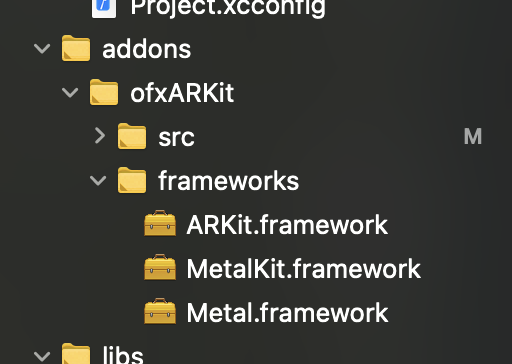
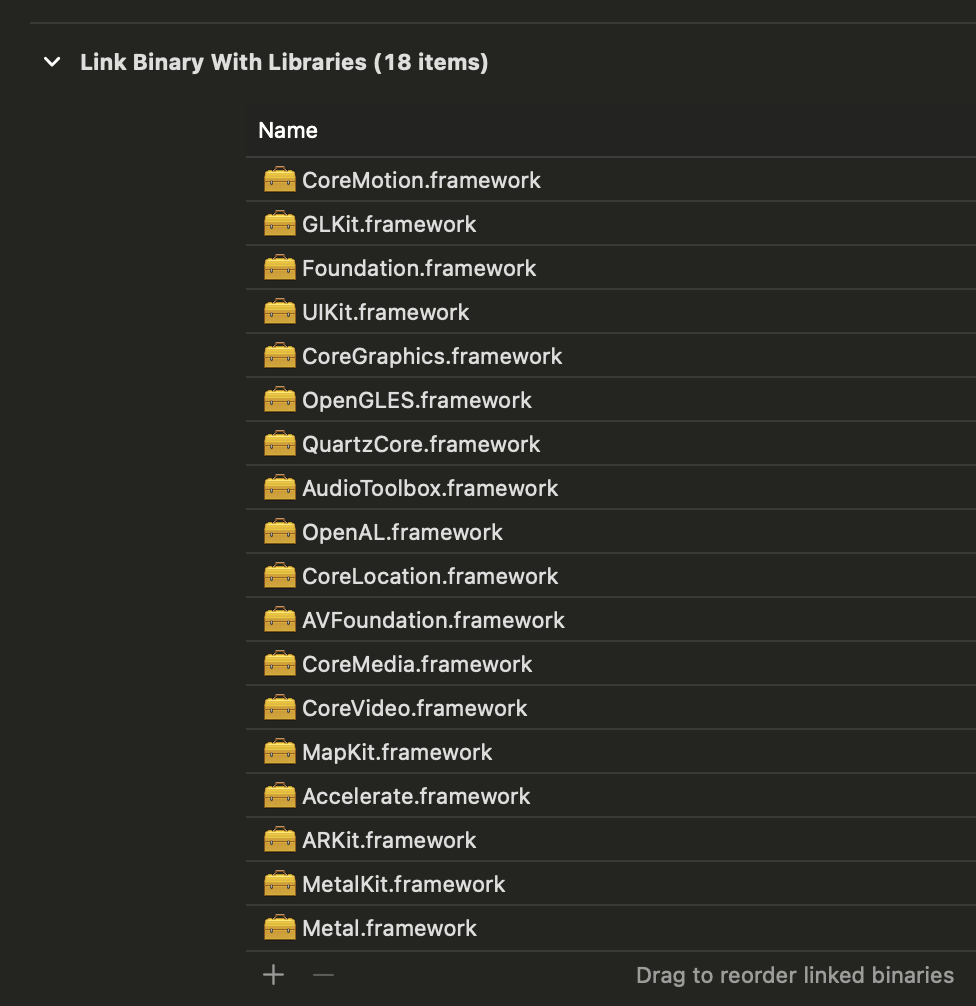
I think there are some issues with a clean project and this add-on, what I see is you need to set the deployment target to 11, deal with signing, and make sure your plist has the necessary elements (cam permission). that said, I compiling apps then and a crash at [_view loadMetal] -- I just had something working previously (I was helping Garett, who posted an issue earlier about airPods) so I will dig around and see what I can learn....

ah that metal issue is described here:
https://forum.openframeworks.cc/t/mtlrender-error-ios-ofxarkit/31290
can confirm that on my side (besides the removal of the AirPods stuff) the add-on seems to work as expected, but you have a variety of steps to make a generated project file work:
- change deployment target (maybe openframeworks should up this)
- make sure plist has needed cam permissions
- change Shaders.metal to Metal Shader Source and make sure it's a target of the app you are building
it seems like there are two issues -- regarding missing definitions for OpenGL, did you update your project files using the project generator? OF changes from release to release so if you use an older OF project file you can often see linking and other types of errors.
Yea - one of the first things I tried was to generate a fresh project from the latest oF package w/ ofxARKit and still ran into the weird assorted build issues.
in terms of your add-on, I just tested and I am seeing the frameworks added correctly when I use the project generator
Adding the frameworks isn't necessarily the problem - I saw the frameworks get added fine as well. It's just that for whatever reason, having projectGenerator add them seems to cause issues for some reason vs manually adding them. Looking at the paths generated under Framework Search Paths, they "seem" like they'd be correct (can't remember exact path of the top of my head but points to XCode install).
I'll try doing a bit more testing in this regard - I noticed a completely blank project w/out addons doesn't generate any extra paths beyond whatever is defined via variables - I think the settings here is probably at the root of this mystery.
ah that metal issue is described here:
https://forum.openframeworks.cc/t/mtlrender-error-ios-ofxarkit/31290
Ah yes, that's unfortunately a long standing problem - I actually opened another issue about it a while back but never saw a response so I just added a footnote. I wasn't aware of the thread, thanks for bringing that to my attention - I'll re-write that portion of the readme and make it more obvious.
odd -- I am def not seeing the problems you are seeing. generally things seem to work once I do the things I listed (which are how I remember ofxArKit in the past). what version of osX, Xcode and OF are you using?
It's just that for whatever reason, having projectGenerator add them seems to cause issues for some reason vs manually adding them.
also could you include some screenshots or examples that show what you mean? for me the linking seems fine so it's a little hard to track what the issue is.
odd -- I am def not seeing the problems you are seeing. generally things seem to work once I do the things I listed (which are how I remember ofxArKit in the past). what version of osX, Xcode and OF are you using?
Interesting! How weird; I tried and tried but couldn't get things to compile without first making sure the extra frameworks weren't included
For the most part, everything is at the latest - only thing slightly behind is OSX which is at 11.5.1.
It's just that for whatever reason, having projectGenerator add them seems to cause issues for some reason vs manually adding them.
also could you include some screenshots or examples that show what you mean? for me the linking seems fine so it's a little hard to track what the issue is.
Apologies! I probably could have worded things better. I don't know how well screenshots will illustrate things but let me try to explain in more detail.
-
Currently, the
ARKit,MetalandMetalKitframeworks are added via projectGenerator by specifying them in theaddon_config.mkfile -
If I don't remove the listed frameworks, generate a new project w/ ofxARKit and then attempt to compile, I get OpenGL, etc errors
The only thing that has worked so far is
-
I first remove the listed frameworks in the
addon_config.mkfile. -
I generate a new project with addon; there are errors but errors are expected, for example ARKit functions have missing symbols, etc. Nothing more serious relating OpenGL, EGL etc pops up.
-
I add the necessary frameworks like any other XCode project
-
Things are then able to compile
can you get specific about the "OpenGL, etc errors" -- like, include screenshots of the errors or some more info?
There are over 100 errors but here's a small sample of some OpenGL ones. They're pretty much all missing symbols related though.
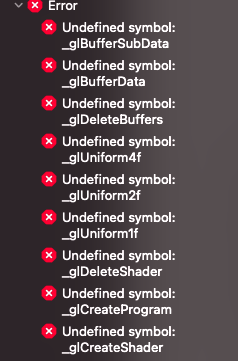
that's strange -- could be good see up close. can you zip up a project that gives these errors, I'd like to take a look?
Here ya go! Project was generated into apps->myApps folder within the oF source.
arkitWithFrameworks.zip
oddly, that built fine for me (after deleting the AirPod files, which we discussed previously on your repo and I had removed from ofxArKit when testing that issue) on of_v0.11.2_ios_release / Xcode 12.5.1. Can you try downloading a clean version of OF and/or reinstalling Xcode? I don't think it's an issue with the project file, so it may be something with OF or with Xcode. Perhaps a reset will help? additionally you could post the entire error messages into a pastebin, perhaps there's something obvious near the top...
oddly, that built fine for me (after deleting the AirPod files, which we discussed previously on your repo and I had removed from ofxArKit when testing that issue) on of_v0.11.2_ios_release / Xcode 12.5.1. Can you try downloading a clean version of OF and/or reinstalling Xcode? I don't think it's an issue with the project file, so it may be something with OF or with Xcode. Perhaps a reset will help? additionally you could post the entire error messages into a pastebin, perhaps there's something obvious near the top...
huh? Haha, this is weird. I just simply could not get things to work. Maybe something really is wrong with my installation; I will try installing everything again at some point but in the meantime I believe I found a much faster solution :
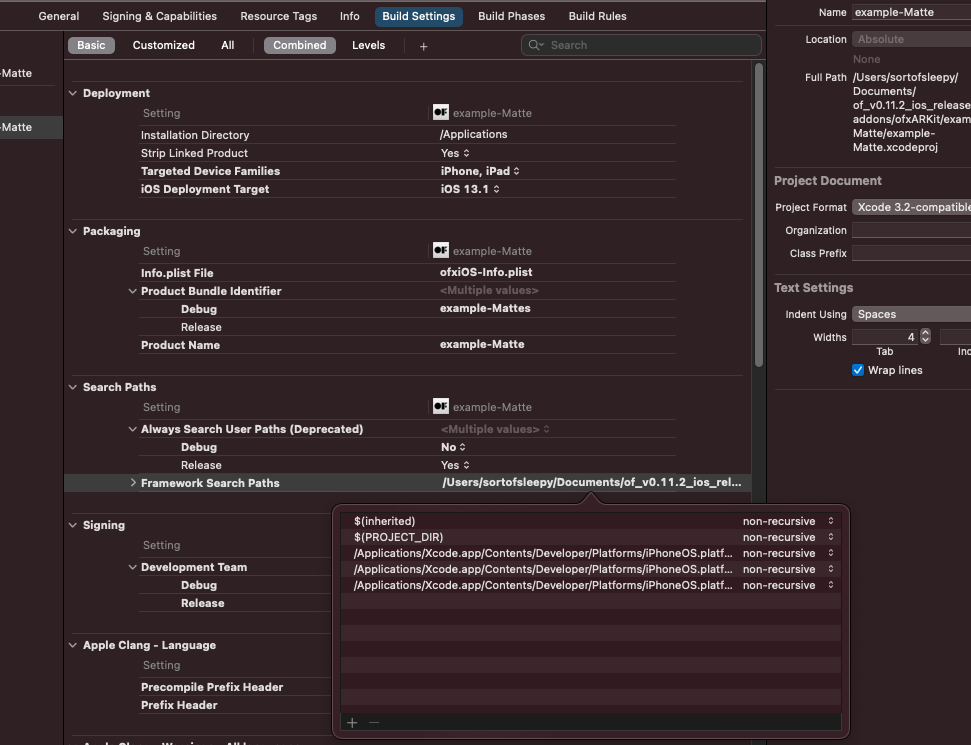
In the above screenshot, if I delete all the absolute paths, things will build fine. As far as I can tell after a cursory overview, those are absolute paths to where the framework bundles are within an XCode install.
- Weirdly enough all the absolute paths point to the same spot.
- My best guess as to why is that a new copy of the path gets added for each additional framework that's needed; I generated a test project with ofxOpenCV which needs the
AssetsLibraryframework, only one instance of the framework path was created. - I thought the issue could be that there were multiple references to the same frameworks path but the ofxOpenCV test project still built fine after adding additional lines pointing to the frameworks path.
In any case, the fix works and running one of the ARKit example projects worked so since I am the only one experiencing this issue it seems, it's probably find to just close this issue then.