
projectGenerator
 projectGenerator copied to clipboard
 openframeworks
VS2017 solution attempts to open openframeworksLib project from wrong drive
I just downloaded a fresh openframeworks build and placed it on a secondary drive at D:\openFrameworks.
My repository wason the C: drive, on the Desktop. I then used the projectGenerator to generate a VS solution. When I open it I get the following errors:
\Users\sol\Desktop\VJmidiKit\VJmidiKit.vcxproj : error  : The imported project "C:\openFrameworks\libs\openFrameworksCompiled\project\vs\openFrameworksDebug.props" was not found. Confirm that the path in the <Import> declaration is correct, and that the file exists on disk.  C:\Users\sol\Desktop\VJmidiKit\VJmidiKit.vcxproj

C:\openFrameworks\libs\openFrameworksCompiled\project\vs\openframeworksLib.vcxproj : error  : The project file could not be loaded. Could not find a part of the path 'C:\openFrameworks\libs\openFrameworksCompiled\project\vs\openframeworksLib.vcxproj'.  C:\openFrameworks\libs\openFrameworksCompiled\project\vs\openframeworksLib.vcxproj
As you can see, VS seems to confuse OF_ROOT and look in C:\openFrameworks. I went back to the projectGenerator to verify it but it is set correctly (I also tried regenerating the project):
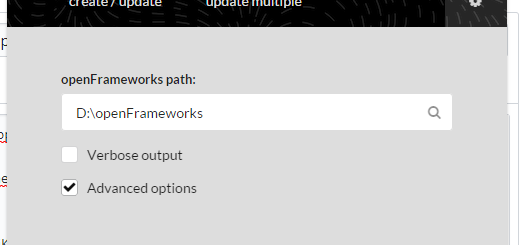
In the generated .vcxproj I see these two declarations involving paths:
<ProjectReference Include="$(OF_ROOT)\libs\openFrameworksCompiled\project\vs\openframeworksLib.vcxproj">
  <AdditionalIncludeDirectories>$(OF_ROOT)\libs\openFrameworksCompiled\project\vs</AdditionalIncludeDirectories>
However I cannot find any reference to OF_ROOT (except comments in my unix Makefile). Where is it set from?

So I tried replacing the OF_ROOT interpolations with the absolute path including drive letter and VS still looks in C:\... so I guess this is actually a Visual Studio problem?
The only thing that seems to work is moving the project to the same drive as the openframeworks library.
I cannot seem to find much information on this, the closest was this thread of people complaining about similar issues opening solutions from flashdrives; https://social.msdn.microsoft.com/Forums/en-US/b9baf415-5328-4cad-8228-222c83230aee/visual-studio-2008-project-files-wont-open-if-i-try-to-open-them-from-flash-drive-on-another?forum=csharpide The advice given there is also to just copy it -.-
Hello @s-ol I read your issue and the link you posted. I wanted to double-check, was your D:/ drive a regular disk or an attached USB disk/flashdrive?

@haschdl: sorry, your comment slipped through my notifications. D:\ was a internal HDD.