

 openethereum
Hide Fether windows by left clicking on the taskbar icon
On Linux, clicking the taskbar icon (left or right click) doesn't hide Fether right away, it shows the following:
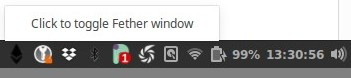
clicking on the Click to toggle.. does actually toggle Fether window.
It'd be better to:
- show/hide Fether right away on left click
- show the menu on right click

@Tbaut I think this is associated with platform limitations of Linux (see Electron API docs https://electronjs.org/docs/api/tray#event-right-click-macos-windows). I've looked into this numerous times and trawled the internet for a way around it, and I've tried different ways to get rid of the popup so it just opens the Fether window on click straight away, but I haven't had any luck.
Removing the tooltip doesn't make any difference. Uninstalling sudo apt-get remove libappindicator1 doesn't make any difference either.
Due to not being able to avoid this and the fact that right-click on the tray icon doesn't work on Linux either, I've proposed that for all OSes that we just toggle show/hide the Fether window with the tray icon (without having a right-click that shows a menu, since it won't work on Linux), and instead just show the Fether menu when the user right-clicks on the Fether window, which is what I've done in the latest changes of PR https://github.com/paritytech/fether/pull/440
