

 openethereum
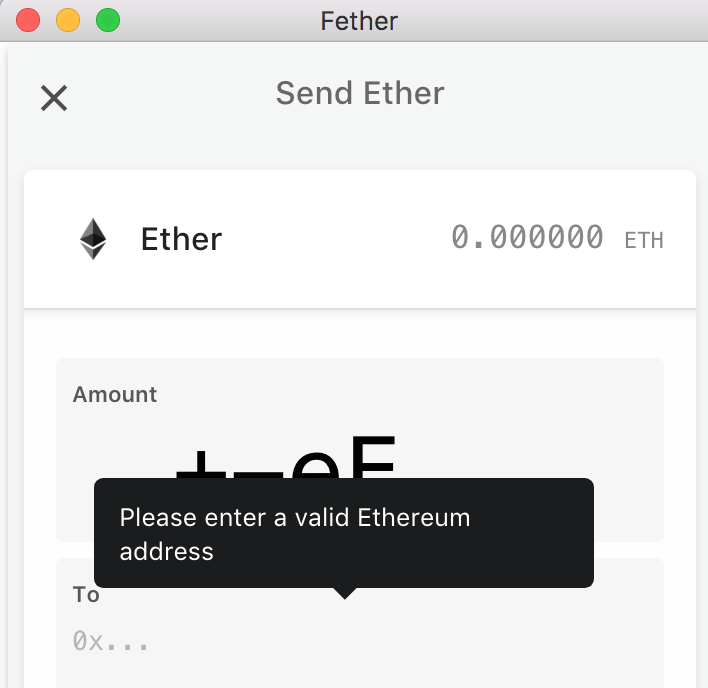
Prevent user from entering invalid "Amount" input field values on "Send Ether" page
on the "Send Ether" page, the user is not prevented from entering the following values for the "Amount" input field:
- invalid characters like "+-eE,"
- invalid use of decimal point like "0.0.0"
- negative values like "-1"
And it doesn't display any error tooltip for the "Amount" input field (like "Please enter a valid amount") until after they've entered a value for the "To" input field that the form considers to be valid.
Is there an opportunity to prevent the user from entering invalid input values similar to what we did for the Balance input field of polkadot-js/apps https://github.com/polkadot-js/apps/issues/144?


On second thoughts..
It currently allows use of +e or -e to enter values in scientific notation (i.e. entering 1e-3 for the amount on the "Send Ether" page will send 0.001 Ether).
If those characters aren't used in those combinations then the user is shown a validation error.
Optionally we could add a button similar to the 'Max' button https://github.com/paritytech/fether/pull/302 that toggles scientific notation on/off (to make it more obvious such a feature exists... for example I didn't realise it existed until today), and next to the button have an info icon that shows a popup or similar explaining how to use it. And if the toggle is turned off then we just prevent the user from entering any of the following characters at all +-eE
Negative values when entered already show a validation error, but ideally we'd prevent the user from entering a - character at all unless they're using scientific notation (if we choose to add a scientific notation toggle button).
Multiple decimal points (i.e. .. or 0.0.) already show a validation error (Please enter a valid amount). We could try and prevent them from entering it a second time, but it may end up frustrating the user (since the second one may be the one they want). So I think we should just provide a more specific validation error by detecting when more than one decimal point has been entered and show a validation error like Please enter a valid amount with only one decimal point
I cannot enter the , character in the input field anymore, so we don't have to worry about that character anymore.