

 openSUSE
Expert download page
In https://github.com/openSUSE/software-o-o/pull/663 we've created a link from the package page to the download page. This is already better than it was before, users don't have to take a detour to OBS and back to s-o-o just to obtain installation instructions.
The download page (/download) has the following goal: Show download instruction for one package from one project for all distributions that the package is published for in this project. This can also be embedded in other websites.
Our "expert download" page is not interested in all distributions, it only wants to show instructions for one distribution. This mismatch causes bad UX: Clicking on "Expert download" within one distribution (e.g. Tumbleweed) takes you to the general download page, which might additionally show other distributions (e.g. SLE). A user then has to click on openSUSE and look for Tumbleweed again. The signal-to-noise ratio is pretty bad in this case.
To keep the download page fully backwards compatible we could create a new page, that only shows the instructions for one project / one package / one distribution. This gives us more freedom with UI design, which does not have to work for displaying multiple distributions. The other option is the extent the download page to take a distribution parameter into account and only display that single distribution.
A route we could use for the expert download page could be /download/:project/:package/:distribution

Let's think about how we want this done, in the end we do not need to have a split page for installation instructions. And we don't need to display multiple distributions in the package view in general. We want to make alternative installation options easily accessible, like so:
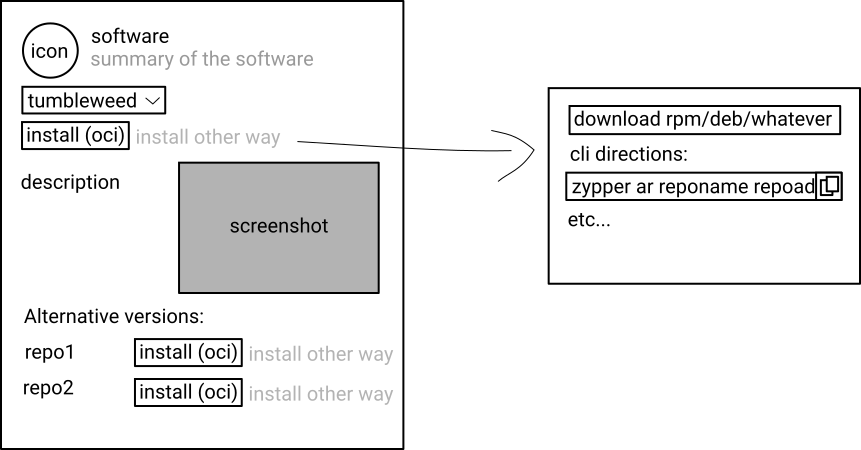
So maybe let's start with detection of the distro, port download page to that new system, because the current detection is lackluster, display data on the package view for the selected distro only, and then make use of the distro detection to display installation instructions. We can make installation instructions to be a partial view we can load for both download and package views.
Please keep in mind that distributions ship multiple arches, that was an oversight with the previous design.
