

 openMVG
DensifyPointCloud: command not found
I want to produce a dense point cloud, so I use the command of ''DensifyPointCloud scene. mvs'', I did execute it with root privileges in the openMVS_build/bin directory, but it reports '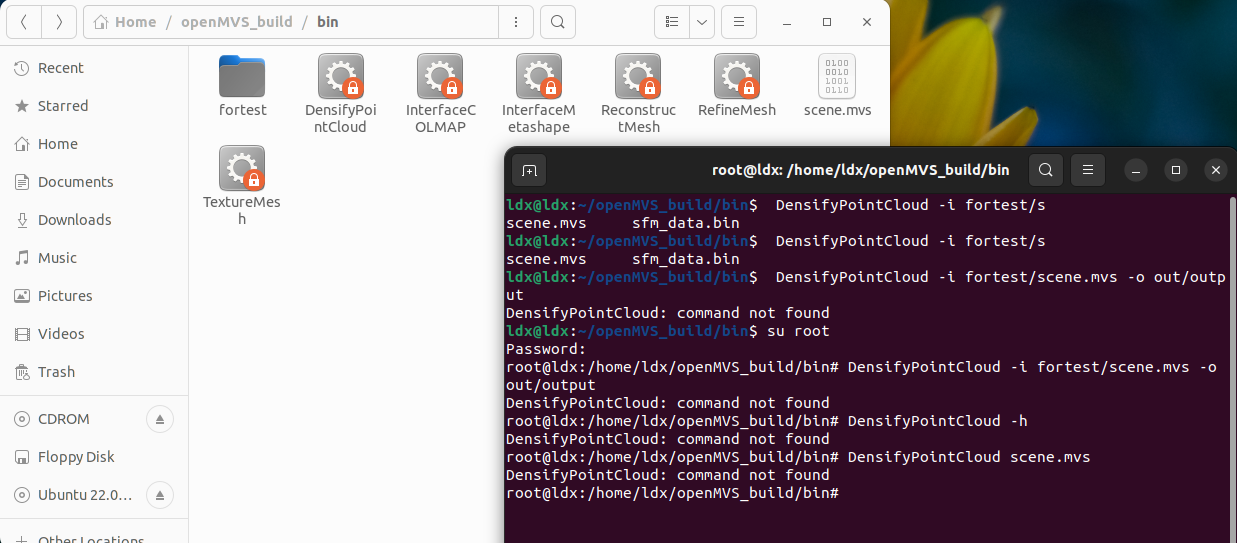 .
The picture shows what is included in the /bin directory; next is what my terminal reports.
Could you please give me some instructions to solve the problem,thanks :)
.
The picture shows what is included in the /bin directory; next is what my terminal reports.
Could you please give me some instructions to solve the problem,thanks :)


It looks like a PATH issue, did you try
./DensifyPointCloud
(ie: with ./ prefix)

It looks like a PATH issue, did you try
./DensifyPointCloud(ie: with ./ prefix)
ok ,thanks. I have tried , but another problem seems appear 'fail loading image header ...'
here is more detail:

@ldx119 What does find /home/ldx/openMVS_build | grep -F -e .JPG -e .jpg return?

@ldx119 What does
find /home/ldx/openMVS_build | grep -F -e .JPG -e .jpgreturn?There are two directories ,one is the original images ,and the other is undistorted images.
Based on your logs, it looks like DensifyPointCloud looks for images under:
/home/ldx/openMVS_build/bin/undistorted_images/
while the relevant images are under:
/home/ldx/openMVS_build/bin/tutorial_out/undistorted_images - note the tutorial_out difference.
Check what happens if you call:
cp -r /home/ldx/openMVS_build/bin/tutorial_out/undistorted_images /home/ldx/openMVS_build/bin/undistorted_images/
And call DensifyPointCloud yet again (be alert whether the files the application complains it can't load really exist under these directories)
@ldx119 What does
find /home/ldx/openMVS_build | grep -F -e .JPG -e .jpgreturn?
ok. First I follow your instruction to execute the command 'cp -r /home/ldx/openMVS_build/bin/tutorial_out/undistorted_images /home/ldx/openMVS_build/bin/undistorted_images/' , it produces the undistorted_images in the current directory ,and then I use the './DensifyPointCloud tutorial_out/scene.mvs' , it works very well , in the current directory , it produces a series of depth####.dmap , and in the tutorial_out subdirectory it produces the both scene_dense.mvs and scene_dense.ply which looks very well in the meshlab. Thanks very much for your help. But I'm still confused about what cause the problem? And is it possible to use the similaily command of ''cp -r /home/ldx/openMVS_build/bin/tutorial_out/undistorted_images /home/ldx/openMVS_build/bin/undistorted_images/'' every time to produce the dense cloud? Thanks :)
Based on your logs, it looks like
DensifyPointCloudlooks for images under:/home/ldx/openMVS_build/bin/undistorted_images/while the relevant images are under:/home/ldx/openMVS_build/bin/tutorial_out/undistorted_images- note thetutorial_outdifference.Check what happens if you call:
cp -r /home/ldx/openMVS_build/bin/tutorial_out/undistorted_images /home/ldx/openMVS_build/bin/undistorted_images/And call
DensifyPointCloudyet again (be alert whether the files the application complains it can't load really exist under these directories)
ok. First I follow your instruction to execute the command 'cp -r /home/ldx/openMVS_build/bin/tutorial_out/undistorted_images /home/ldx/openMVS_build/bin/undistorted_images/' , it produces the undistorted_images in the current directory ,and then I use the './DensifyPointCloud tutorial_out/scene.mvs' , it works very well , in the current directory , it produces a series of depth####.dmap , and in the tutorial_out subdirectory it produces the both scene_dense.mvs and scene_dense.ply which looks very well in the meshlab. Thanks very much for your help. But I'm still confused about what cause the problem? And is it possible to use the similaily command of ''cp -r /home/ldx/openMVS_build/bin/tutorial_out/undistorted_images /home/ldx/openMVS_build/bin/undistorted_images/'' every time to produce the dense cloud? Thanks :)
It's a question of path.
You have to execute the DensifiPointCloud from the folder that produced the mvs file.
It's a question of path.
You have to execute the DensifiPointCloud from the folder that produced the mvs file.
OK, thanks. I think I've got it
Note. You can also specify the working folder to densify point cloud to be the folder of your mvs file.
