

 opa334
[iPhone 11, iOS 15.0.1] TrollStore installed with TrollHelperOTA cannot install apps, ldid error 175
No Duplicates Issue
- [X] I'm sure I've searched on the issue tracker before creating one.
Expected Behavior?
I expected TrollHelperOTA to be able to install a fully working TrollStore.
Current Behavior?
Trying to install any app (tested with latest TrollNonce and uYou+) results in install error 175
Possible Solution?
Installing TrollStore via TrollInstaller then updating TrollStore works.
Steps to Reproduce
- Install TrollHelperOTA (only Link 2 has been tested)
TrollStore Version
TrollStore 1.2.1
iOS/iPadOS version
15.0.1
iDevice Model
iPhone 11
Other info of your environment
No response

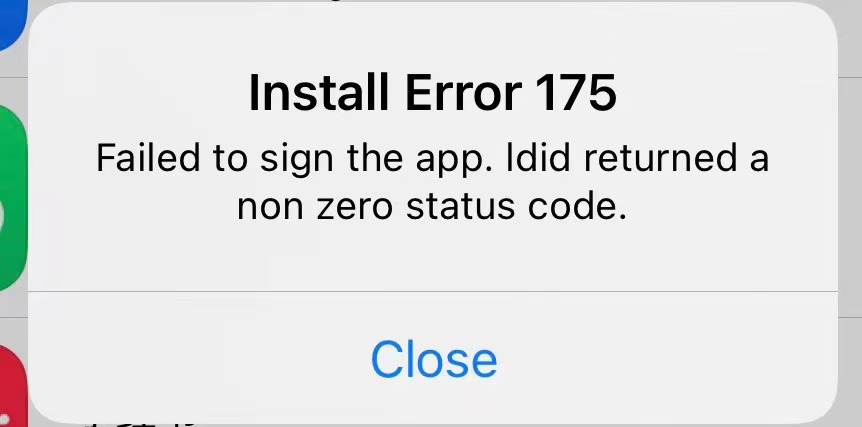 same problem!
Please attach the logs from "TrollStore" and "trollstorehelper" while this happens.

Uhh. Bad news. Due to a failed FutureRestore, my iPhone 11 is now stuck on 15.7, so I can no longer help 😬
@JasmineYong can you post your logs? I believe you can use Console.app on macOS, with your device connected via USB, to stream logs to a macOS device. Or idevicesyslog on Windows or Linux?
There might be a better method to get logs that I'm not aware of.
Edit: Wait, I have an iPad I could FR to 15.0.1 to try this. Brb. It's A10 tho, so if this is an arm64e/OTA2-exclusive issue, then I won't be able to help.
Just confirmed, issue is not present on an A10 device, using OTA 1 on iOS 15.0.1.
That narrows down the issue being either OTA 2 or arm64e (or one of those things in combination with iOS 15.0.1)
Just confirmed, issue is not present on an A10 device, using OTA 1 on iOS 15.0.1.
That narrows down the issue being either OTA 2 or arm64e (or one of those things in combination with iOS 15.0.1)
It's definitely not that. The method you used to install TrollStore shouldn't matter, I think ldid is just getting corrupted for some people, I may need to start checking the hash.

I'm getting the same error when installing kodi
yeah that's known and an issue with the Kodi IPA and not with TrollStore
@opa334 Here's what I see from the log.
info	21:44:51.262542+0700	ldid	ExtensionLoader 1f6762f: startup
debug	21:44:51.264149+0700	ldid	ExtensionLoader 1f6762f: completed in 5 ms
default	21:44:51.277968+0700	trollstorehelper	ldid exited with status 1
default	21:44:51.278091+0700	trollstorehelper	- ldid error output start -
default	21:44:51.278296+0700	trollstorehelper	ldid: operator(): Operation not permitted
default	21:44:51.278388+0700	trollstorehelper	- ldid error output end -
default	21:44:53.443173+0700	TrollStore	installed app! ret:175, error: Error Domain=TrollStoreErrorDomain Code=175 "Failed to sign the app. ldid returned a non zero status code." UserInfo={NSLocalizedDescription=Failed to sign the app. ldid returned a non zero status code.}

@opa334 Filza. Other IPAs also get me ldid error 175.
Weird, it also doesn't help that ldids output sucks. I see you're jailbroken, does it work when not jailbroken? Also maybe try running the ldid binary in the TrollStore app bundle manually via ssh and check if it works correctly there.
I can probably try the latter because my device is tethered jailbroken.. there's no way it can be unjailbroken unless I restored rootfs or sth.
@opa334 Via ssh or Terminal, I can execute ldid binary just fine as it shows usage and stuffs normally.
I can probably try the latter because my device is tethered jailbroken.. there's no way it can be unjailbroken unless I restored rootfs or sth.
Ah yeah that's a known palera1n issue then. I have no idea why but Substitute breaks ldid when it's spawned by trollstorehelper. I wanted to look into it but TrollStore doesn't even open on palera1n for me.
@opa334 While still being jailbroken, I tried installing an IPA when:
- Safe mode is enabled
- Substitute's Tweak Injection is disabled (substitute-loader.dylib won't load into ldid process)
- Safe mode is enabled and Tweak Injection is disabled
All failed with the same error 175 and the same logs in Console, but I'd guess you could try disabling Tweak Injection to debug your way?
But there's a good news. I tethered boot my iPhone again but without --tweaks flag. Now ldid works correctly.
default	20:13:42.053136+0700	trollstorehelper	ldid exited with status 0
default	20:13:42.053292+0700	trollstorehelper	- ldid error output start -
default	20:13:42.053565+0700	trollstorehelper	- ldid error output end -
I don't think I can do anything about this issue, it's either a Substitute or palera1n bug
The initial issue I reported wasn't using any jailbreak...
yeah, I know that, really weird. I think ldid may have just been corrupted on your device or something.
@opa334 Then would it be possible if TrollStore allows reinstallation of ldid?
@opa334 Then would it be possible if TrollStore allows reinstallation of ldid?
In that case TrollStore can just be uninstalled and installed again, then ldid will also be gone
Cannot install any apps at all, tried appstore.
Tried to delete icon cache via appstore.
iPhone 13 Pro Max, iOS 15.1.
Jailbreak with Xina15, currently not in a jailbroken state.
Restarted too, of course nothing.
Only thing I have found so far is this.
https://www.reddit.com/r/Trollstore/comments/zzoj39/unable_to_download_update_apps/?utm_source=share&utm_medium=ios_app&utm_name=iossmf
Still cannot install apps, the tweaks I have for iOS 15, are battery indicators and iOS 16 lockscreen, as well as Shadow (JB) bypass, that’s it.

Some say it’s tied to «App Manager» permissions, I did install that /update it not too long ago.
I tried to rebuild ldid, reinstalled / uninstalled trollstore, nothing. Will try purging all the apps but it seems like something had changed permissions.
I tried to rebuild ldid, reinstalled / uninstalled trollstore, nothing. Will try purging all the apps but it seems like something had changed permissions.
I have tried debugging this issue with another user but couldn't find anything particular different in file permissions. Have you used Fugu15 before?
(Also resetting all contents and settings will fix this but that's besides the point, I'm trying to find a fix that doesn't involve that)
Hello again, sorry I posted here love your work, I was just getting desperate after trying many different solutions, I talked to someone in the /r/jailbreak discord and they told me to double check my Daemons, this is where I found out that "passbook" daemon was somehow disabled through "iCleaner Pro" which somehow broke Appstore, I don't remember touching this but it was indeed disabled, thank you for replying so fast I wanted to leave the fix here incase someone else end up in the same situation and reassure you that it was not related to your software. #NotTrollstoreRelated.