
text-generation-webui
 text-generation-webui copied to clipboard
 oobabooga
Fresh install using installer won't run WebUI or load in the model.
Describe the bug
After performing fresh install using the installer WebUI and model won't load in. I updated from older commit that worked perfectly fine. Changing arguments doesn't really affect anything. There were no errors during instalattion. --chat --model llama-30b-4bit
Is there an existing issue for this?
- [X] I have searched the existing issues
Reproduction
Use the latest one-click-installers
Screenshot
No response
Logs
Gradio HTTP request redirected to localhost :)
bin C:\oobabooga_windows\installer_files\env\lib\site-packages\bitsandbytes\libbitsandbytes_cuda117.dll
Loading llama-30b-4bit...
Found the following quantized model: models\llama-30b-4bit\llama-30b-4bit.safetensors
Loading model ...

Done!
Press any key to continue . . .
System Info
GPU: 3090 RTX
CPU: Ryzen 3600
WINDOWS 10

@Trauter1 commits are pushed so often to webui that sometimes you can update in between two commits that breaks things so first I'd recommend trying to reinstall once again.
If that still doesn't work, let's see if this error still exists when using another model like https://huggingface.co/wcde/llama-7b-4bit-gr128, which I know works on my end, to narrow down if this is specific to your model or your system.

@xNul I tried running this model: and it works. Gradio HTTP request redirected to localhost :) bin C:\oobabooga_windows\installer_files\env\lib\site-packages\bitsandbytes\libbitsandbytes_cuda117.dll Loading lit-125M... Loaded the model in 1.45 seconds. Loading the extension "gallery"... Ok. Running on local URL: http://127.0.0.1:7860
To create a public link, set share=True in launch().
Output generated in 3.10 seconds (9.03 tokens/s, 28 tokens, context 78, seed 1750814459)
Tried using llama you gave me but got the same error. I think something must have gone wrong with GPTQ installation. Sadly don't know exactly how check what's wrong.
@Trauter1 if you reinstall and send the whole install log, maybe we can figure it out
@xNul The problems seems to be lying in this error.
Processing c:\oobabooga_windows\one-click-installers\text-generation-webui\repositories\gptq-for-llama
  Preparing metadata (setup.py) ... done
Building wheels for collected packages: quant-cuda
  Building wheel for quant-cuda (setup.py) ... error
  error: subprocess-exited-with-error

  × python setup.py bdist_wheel did not run successfully.
  │ exit code: 1
  ╰─> [50 lines of output]
      running bdist_wheel
      running build
      running build_ext
      C:\oobabooga_windows\one-click-installers\installer_files\env\lib\site-packages\torch\utils\cpp_extension.py:359: UserWarning: Error checking compiler version for cl: [WinError 2] The system cannot find the file specified
        warnings.warn(f'Error checking compiler version for {compiler}: {error}')
      Traceback (most recent call last):
        File "<string>", line 2, in <module>
        File "<pip-setuptools-caller>", line 34, in <module>
        File "C:\oobabooga_windows\one-click-installers\text-generation-webui\repositories\GPTQ-for-LLaMa\setup.py", line 4, in <module>
          setup(
        File "C:\oobabooga_windows\one-click-installers\installer_files\env\lib\site-packages\setuptools\__init__.py", line 107, in setup
          return distutils.core.setup(**attrs)
        File "C:\oobabooga_windows\one-click-installers\installer_files\env\lib\site-packages\setuptools\_distutils\core.py", line 185, in setup
          return run_commands(dist)
        File "C:\oobabooga_windows\one-click-installers\installer_files\env\lib\site-packages\setuptools\_distutils\core.py", line 201, in run_commands
          dist.run_commands()
        File "C:\oobabooga_windows\one-click-installers\installer_files\env\lib\site-packages\setuptools\_distutils\dist.py", line 969, in run_commands
          self.run_command(cmd)
        File "C:\oobabooga_windows\one-click-installers\installer_files\env\lib\site-packages\setuptools\dist.py", line 1244, in run_command
          super().run_command(command)
        File "C:\oobabooga_windows\one-click-installers\installer_files\env\lib\site-packages\setuptools\_distutils\dist.py", line 988, in run_command
          cmd_obj.run()
        File "C:\oobabooga_windows\one-click-installers\installer_files\env\lib\site-packages\wheel\bdist_wheel.py", line 343, in run
          self.run_command("build")
        File "C:\oobabooga_windows\one-click-installers\installer_files\env\lib\site-packages\setuptools\_distutils\cmd.py", line 318, in run_command
          self.distribution.run_command(command)
        File "C:\oobabooga_windows\one-click-installers\installer_files\env\lib\site-packages\setuptools\dist.py", line 1244, in run_command
          super().run_command(command)
        File "C:\oobabooga_windows\one-click-installers\installer_files\env\lib\site-packages\setuptools\_distutils\dist.py", line 988, in run_command
          cmd_obj.run()
        File "C:\oobabooga_windows\one-click-installers\installer_files\env\lib\site-packages\setuptools\_distutils\command\build.py", line 131, in run
          self.run_command(cmd_name)
        File "C:\oobabooga_windows\one-click-installers\installer_files\env\lib\site-packages\setuptools\_distutils\cmd.py", line 318, in run_command
          self.distribution.run_command(command)
        File "C:\oobabooga_windows\one-click-installers\installer_files\env\lib\site-packages\setuptools\dist.py", line 1244, in run_command
          super().run_command(command)
        File "C:\oobabooga_windows\one-click-installers\installer_files\env\lib\site-packages\setuptools\_distutils\dist.py", line 988, in run_command
          cmd_obj.run()
        File "C:\oobabooga_windows\one-click-installers\installer_files\env\lib\site-packages\setuptools\command\build_ext.py", line 84, in run
          _build_ext.run(self)
        File "C:\oobabooga_windows\one-click-installers\installer_files\env\lib\site-packages\setuptools\_distutils\command\build_ext.py", line 345, in run
          self.build_extensions()
        File "C:\oobabooga_windows\one-click-installers\installer_files\env\lib\site-packages\torch\utils\cpp_extension.py", line 499, in build_extensions
          _check_cuda_version(compiler_name, compiler_version)
        File "C:\oobabooga_windows\one-click-installers\installer_files\env\lib\site-packages\torch\utils\cpp_extension.py", line 387, in _check_cuda_version
          raise RuntimeError(CUDA_MISMATCH_MESSAGE.format(cuda_str_version, torch.version.cuda))
      RuntimeError:
      The detected CUDA version (12.0) mismatches the version that was used to compile
      PyTorch (11.7). Please make sure to use the same CUDA versions.

      [end of output]

  note: This error originates from a subprocess, and is likely not a problem with pip.
  ERROR: Failed building wheel for quant-cuda
  Running setup.py clean for quant-cuda
Failed to build quant-cuda
ERROR: Could not build wheels for quant-cuda, which is required to install pyproject.toml-based projects
ERROR: GPTQ CUDA kernel compilation failed.
Attempting installation with wheel.
Collecting quant-cuda==0.0.0
  Using cached https://github.com/jllllll/GPTQ-for-LLaMa-Wheels/raw/main/quant_cuda-0.0.0-cp310-cp310-win_amd64.whl (398 kB)
Installing collected packages: quant-cuda
Successfully installed quant-cuda-0.0.0
Wheel installation success!
Continuing with install..
@Trauter1 even though compilation of GPTQ failed, the wheel installation succeeded so I don't think that's the problem
@xNul
 There's something wrong with usage of page file when loading the model for the first time. At peak, it used up around 104GB of Committed memory. After increasing page file to around 110GB just for tests the model loaded in. That's around 2-3x more than I used before when it was working.
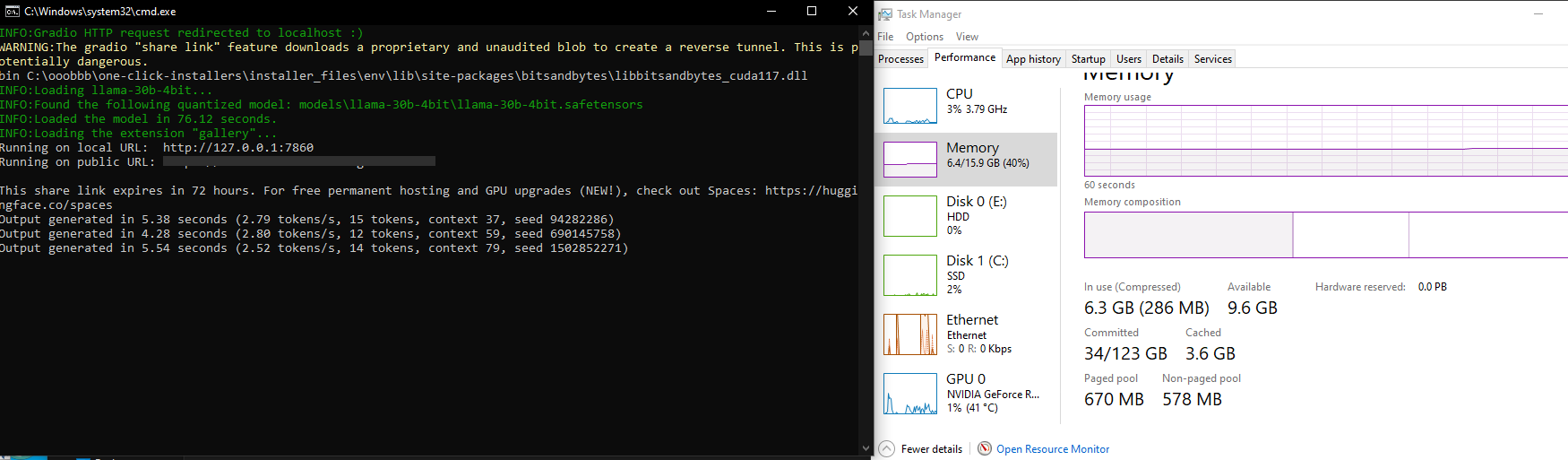

Is there a way to have a verbose error on why it fails? I had the same error, and only by closing browser and a few apps did it start properly. I'm not sure why it needs so much ram, since I have 64GB and the cmd process seems to take a lot of memory before going down...

for me it stops after trying to execute this line https://github.com/oobabooga/text-generation-webui/blob/9d5025f531a34c7ba0d44c342bff2b60834e6bc5/modules/GPTQ_loader.py#L84

This issue has been closed due to inactivity for 6 weeks. If you believe it is still relevant, please leave a comment below. You can tag a developer in your comment.
![github-actions[bot] avatar](https://avatars.githubusercontent.com/in/15368?v=4 "Published by a pub.dev verified publisher")