
text-generation-webui
 text-generation-webui copied to clipboard
 oobabooga
llama.cpp thread is not running.
Describe the bug
llama.cpp thread is not running. I don't even see threads in the command line.
And the token generation speed is also slow. It's really fast.
Also, ggerganov / llama.cpp is set to thread 4. And for some reason it works the fastest. Even thread 20 is slow.
Is there an existing issue for this?
- [X] I have searched the existing issues
Reproduction
Add thread parameter to start-webui.bat.
call python server.py --cpu --cai-chat --threads 4
Launch WebUI.
model is ggml-vicuna-13b-4 bit Choose.
Missing thread parameters in command line.
And the token generation speed is abnormally slow. So the thread is not running.
Screenshot

Logs
Starting the web UI...
Warning: --cai-chat is deprecated. Use --chat instead.

===================================BUG REPORT===================================
Welcome to bitsandbytes. For bug reports, please submit your error trace to: https://github.com/TimDettmers/bitsandbytes/issues
================================================================================
CUDA SETUP: CUDA runtime path found: I:\oobabooga-windows\installer_files\env\bin\cudart64_110.dll
CUDA SETUP: Highest compute capability among GPUs detected: 8.6
CUDA SETUP: Detected CUDA version 117
CUDA SETUP: Loading binary I:\oobabooga-windows\installer_files\env\lib\site-packages\bitsandbytes\libbitsandbytes_cuda117.dll...
The following models are available:

1. ggml-vicuna-13b-4bit
2. gpt4chan

Which one do you want to load? 1-2

1

Loading ggml-vicuna-13b-4bit...
llama.cpp weights detected: models\ggml-vicuna-13b-4bit\ggml-vicuna-13b-4bit.bin

llama.cpp: loading model from models\ggml-vicuna-13b-4bit\ggml-vicuna-13b-4bit.bin
llama_model_load_internal: format     = ggjt v1 (latest)
llama_model_load_internal: n_vocab    = 32001
llama_model_load_internal: n_ctx      = 2048
llama_model_load_internal: n_embd     = 5120
llama_model_load_internal: n_mult     = 256
llama_model_load_internal: n_head     = 40
llama_model_load_internal: n_layer    = 40
llama_model_load_internal: n_rot      = 128
llama_model_load_internal: f16        = 2
llama_model_load_internal: n_ff       = 13824
llama_model_load_internal: n_parts    = 1
llama_model_load_internal: model size = 13B
llama_model_load_internal: ggml ctx size =  73.73 KB
llama_model_load_internal: mem required  = 9807.47 MB (+ 3216.00 MB per state)
llama_init_from_file: kv self size  = 3200.00 MB
AVX = 1 | AVX2 = 1 | AVX512 = 0 | FMA = 1 | NEON = 0 | ARM_FMA = 0 | F16C = 1 | FP16_VA = 0 | WASM_SIMD = 0 | BLAS = 0 | SSE3 = 1 | VSX = 0 |
Loading the extension "gallery"... Ok.
Running on local URL:  http://127.0.0.1:7860

To create a public link, set `share=True` in `launch()`.
System Info
プロセッサ	13th Gen Intel(R) Core(TM) i5-13500   2.50 GHz
実装 RAM	32.0 GB (31.8 GB 使用可能)
システムの種類	64 ビット オペレーティング システム、x64 ベース プロセッサ
ペンとタッチ	ペンのサポート

Same I think. Test
64gb ram 3950x context size 1058 alpaca 13b lora merged 28 threads - 0.54 tokens/s 20 - 0.69 16 - 0.62 12 - 0.62 8 - 0.56
Loading alpaca-13b-ggml-q4_0-lora-merged...
llama.cpp weights detected: models\alpaca-13b-ggml-q4_0-lora-merged\ggml-model-q4_0.bin

llama.cpp: loading model from models\alpaca-13b-ggml-q4_0-lora-merged\ggml-model-q4_0.bin
llama_model_load_internal: format     = ggjt v1 (latest)
llama_model_load_internal: n_vocab    = 32000
llama_model_load_internal: n_ctx      = 2048
llama_model_load_internal: n_embd     = 5120
llama_model_load_internal: n_mult     = 256
llama_model_load_internal: n_head     = 40
llama_model_load_internal: n_layer    = 40
llama_model_load_internal: n_rot      = 128
llama_model_load_internal: f16        = 2
llama_model_load_internal: n_ff       = 13824
llama_model_load_internal: n_parts    = 1
llama_model_load_internal: model size = 13B
llama_model_load_internal: ggml ctx size =  73.73 KB
llama_model_load_internal: mem required  = 9807.47 MB (+ 3216.00 MB per state)
llama_init_from_file: kv self size  = 3200.00 MB
AVX = 1 | AVX2 = 1 | AVX512 = 0 | FMA = 1 | NEON = 0 | ARM_FMA = 0 | F16C = 1 | FP16_VA = 0 | WASM_SIMD = 0 | BLAS = 0 | SSE3 = 1 | VSX = 0 |

I think I have a related issue. I am trying to run models on a CPU only server with 64 threads available and text generation is very slow and only one core is utilised when it's busy. Thre screenshot shows the options I have set and the core utilisation. I've tried setting --threads to 4 and 64 and it makes no difference. Is there a specific implementation that I need to use for multi threaded CPU only?
python server.py --cpu --chat --model-menu --threads 64 --listen --cpu-memory 256
Output generated in 157.59 seconds (0.15 tokens/s, 24 tokens, context 39, seed 207197313)
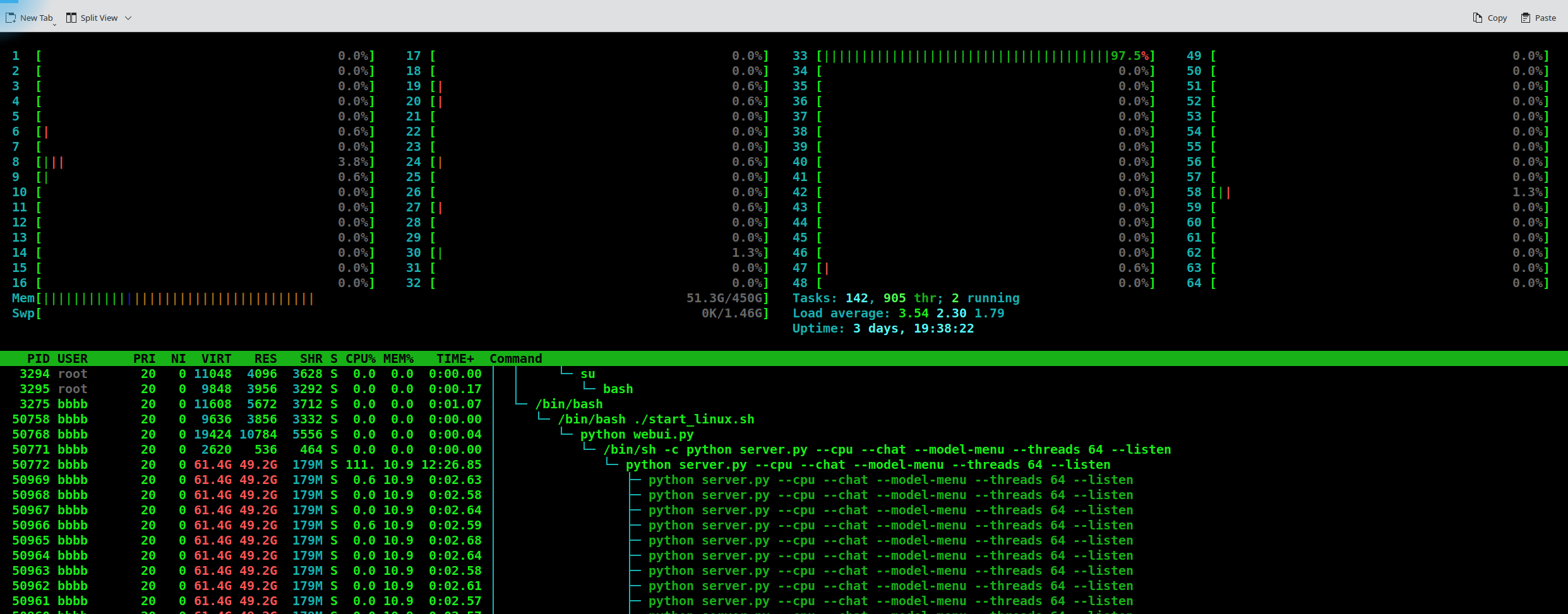

ok, my own ignorance is at fault, I found that a vicuna ggml model will fully saturate all 64 CPU cores. I will try other GGML models to see how they fair. Hope this helps someone else.
This issue has been closed due to inactivity for 6 weeks. If you believe it is still relevant, please leave a comment below. You can tag a developer in your comment.
![github-actions[bot] avatar](https://avatars.githubusercontent.com/in/15368?v=4 "Published by a pub.dev verified publisher")