

 onevcat
Won't Archive - but will run on device.
So I just updated the Kingfisher plugin and went to build for production and I got greeted with loads of errors. (see pic)
However I can run the app on my phone - just can't seem to archive.

I am using the latest Xcode and the latest KingfisherSwiftUI.

What is your version of Kingfisher? In the latest Kingfisher, there is already no KingfisherSwiftUI module. If you were upgrading across major versions, please read and follow the migration guides: https://github.com/onevcat/Kingfisher#migrating

I'm having the same issue on version 5.15.8 & 6.3.1 (need to support iOS 13) I'm happy to provide any additional information if needed
EDIT:
I was able to successfully archive after updating the dependency version to version6-xcode13
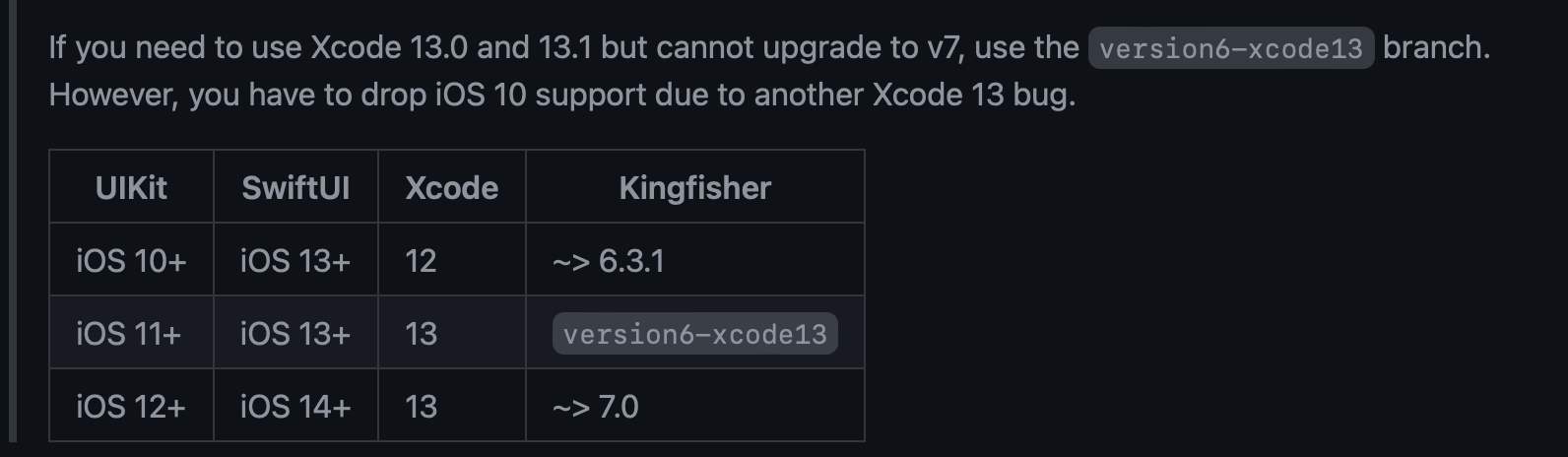

Solution is to upgrade to the latest version.
If using 5.x.x version like I was. A few things have changed and you will need to redo some image code. Very easy fix though.
I'm having the same issue, but for some reason can't seem to find the solution. If I compile using Xcode 11, with a target version of 12.0, and Kingfisher version 6.3.0, I have no issues.
As soon as I move to Kingfisher version 6.3.1, or higher I can't archive. Upgrading to Xcode 13.2.1 and adding Kingfisher via SPM didn't solve the issue either. Any suggestions would be greatly appreciated.
Thank you!


I believe I may have had a similar Archive issue, so posting my solution just in case. Apologies if it's not the same. In my case it ended up being a corrupt Derived Data file. Running the following command in terminal fixed it.
rm -rf ~/Library/Developer/Xcode/DerivedData/*
