
oneAPI-samples
 oneAPI-samples copied to clipboard
 oneapi-src
when evaluate the IntelModin_Vs_Pandas cause performance issue
Summary
When I evalue this sample IntelModin_Vs_Pandas, cause the Xeon CPU hung and CPU performance very slow.
Version
2023.0.0
Environment
ubuntu 20.04lts
Steps to reproduce
Run this sample at Jupyter Notebook
Observed behavior
Suppose can see the Pandas vs Modin performance, and cause my whole CPU performance very slow.
Expected behavior
Attached warning into .png.
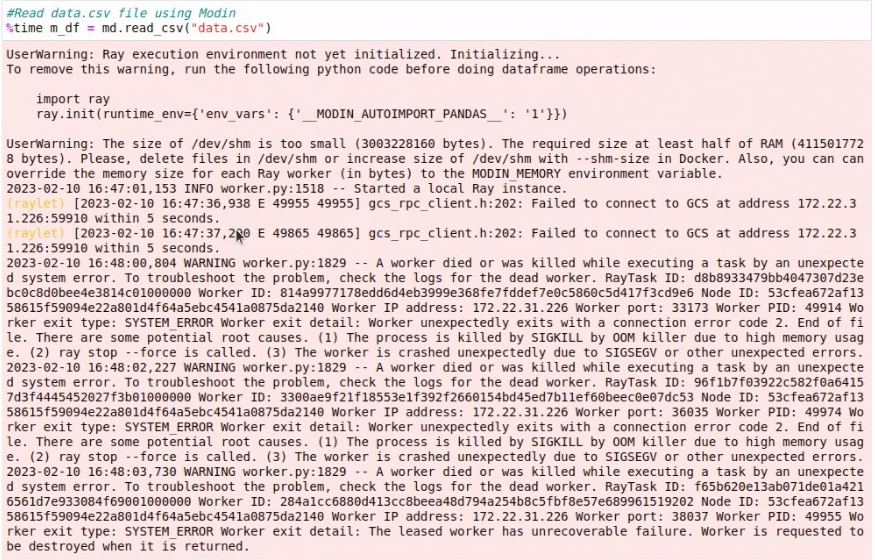

@weiseng-yeap Modin uses ray as default backend. From the log you attached, it seems that ray failed during initialization, could you increase size of /dev/shm with --shm-size in Docker as suggested in the log and try again?

docker run xxx --shm-size=5gb Reference: https://docs.docker.com/engine/reference/run/#runtime-constraints-on-resources
Intel Modin is a library that aims to accelerate the performance of Pandas, a popular data manipulation and analysis library in Python. Modin provides an API that is similar to Pandas but leverages parallel and distributed computing to process data faster.
When evaluating the performance of Intel Modin compared to Pandas, several factors come into play, including the size of the dataset, the complexity of operations, and the hardware resources available. Here are some key points to consider:
1)Data size: Intel Modin is designed to handle large datasets that cannot fit into memory. If you are working with smaller datasets that can easily fit into memory, the performance difference between Modin and Pandas might be negligible.
2)Parallel processing: Modin utilizes parallel and distributed computing techniques to accelerate data processing. It can automatically leverage all available CPU cores to speed up computations. This parallelization can significantly improve performance for computationally intensive tasks, such as applying functions across large datasets or aggregating data.
3)Data locality: Modin can take advantage of distributed computing frameworks like Dask and Ray to process data across multiple nodes or machines. This can be beneficial for distributed environments where the dataset is partitioned and processed in parallel across multiple machines, further enhancing performance.
4)Compatibility and limitations: While Intel Modin aims to be a drop-in replacement for Pandas, it may not fully support all Pandas features or operations. Some operations may not have been optimized in Modin yet, leading to either similar or slightly slower performance compared to Pandas. It's essential to review the Modin documentation and test your specific use cases to ensure compatibility and optimal performance.
5)Hardware resources: The performance of Intel Modin can be influenced by the available hardware resources, such as CPU cores, memory, and storage. Having a powerful multi-core CPU and sufficient memory can help maximize the performance gains offered by Modin.
To evaluate the performance of Intel Modin versus Pandas in your specific use case, you can benchmark both libraries using representative datasets and operations relevant to your application. Measure the execution time for specific tasks and compare the results. This empirical testing will provide insights into how Intel Modin performs in your specific environment and workload.
Keep in mind that the performance improvements achieved by Intel Modin may vary based on the factors mentioned above. It's recommended to review the Modin documentation, explore its features, and experiment with different scenarios to determine if it meets your performance requirements.
