
flaskbooks
 flaskbooks copied to clipboard
 omaralbeik
A very light social network & RESTful API for sharing books using flask!

A very light social network for sharing books built using Flask and Python 3
Main Features
Web Endpoints
/books: All books (homepage)./books/new: Create a new book./book/book_id: Book page./book/book_id/edit: Edit book./book/book_id/delete: Delete book./genres: All genres./genres/new: Create a new genre./genre/genre_id: Genre page./genre/genre_id/edit: Edit genre./genre/genre_id/delete: Delete genre./users: All users./user/user_id: User page./user/user_id/edit: Update user info./auth: Login page.
RESTful Endpoints
/books/JSON: All books JSON./book/book_id/JSON: Book JSON./genres/JSON: All genres JSON./genre/genre_id/JSON: Genre JSON./users/JSON: All users JSON./user/user_id/JSON: User JSON.
How to Run
Setup a Google+ authentication app
- go to https://console.developers.google.com/project and login with your Google account.
- Create a new project
- Select "API's and Auth -> Credentials -> Create a new OAuth client ID" from the project menu
- Select Web Application
- On the consent screen, type in a product name and save.
- In Authorized javascript origins add: http://0.0.0.0:5000 and http://localhost:5000
- Click create client ID
- Click download JSON and save it into the root director of this project.
- Rename the JSON file "client_secret.json"
- Replace the old client_secret.json file with yours
Run on a Vagrant virtual machine:
Please ensure you have Python, Vagrant and VirtualBox installed. This project uses a pre-congfigured Vagrant virtual machine which has all required packages installed.
- In the root directory, use the command
vagrant up, this will install the vagrant machine. - Once it's complete, type
vagrant sshto login to the VM. - In the vm,
cd /vagrant/flaskbooks - type
maketo install dependencies and setup the database - type
python3 application.pyto start the server.
Run on your Linux server:
- Use this tutorial from digitalocean to set up your Nginx and run the application on Ubuntu 16.04
- type
maketo install dependencies and setup the database
Open in your browser
Now you can open in a webpage by going to either: http://0.0.0.0:5000, http://localhost:5000, or your set domain
Project Structure
- static: Bootstrap, images, styles
- templates: html templates
- application.py: Flask application
- client_secrets.json: Google client secrets / replace this with yours
- dbhelpers.py: common helper functions for database objects
- helpers.py: common helper functions
- model.py: data model objects
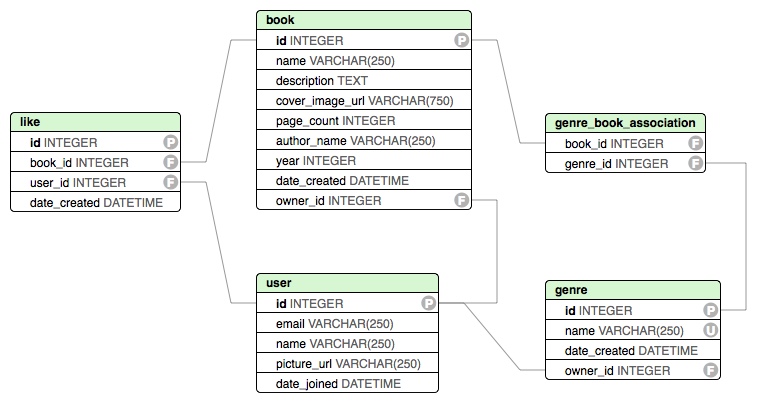
Data Model
flask-books stores data using SQLite3 and SQLAlchemy for object mapping.
Model objects:
- User
- Book
- Genre
- Like
Model Diagram
Support the project
Please star the project to let me know you liked it!
Get involved:
Your feedback is always appreciated and welcomed. Please send me an email to [email protected] if you have any questions, or fork the project and get your hand dirty with the code and submit a Pull Request :)
Metadata
Owner
 omaralbeik
Metadata
A very light social network & RESTful API for sharing books using flask!