

 olivierkes
UI/UX issues for new users
I've shared Manuskript with others in a Ukrainian community and got this report on first time usage - basically, the same what I felt when trying Manuskript first time. This is a threshold that any new user should pass, or drop Manuskript because of not knowing how to do the easiest things.
Here's shortened translation of an author's impressions - she uses Evernotes for writing and MS Word for editing.
- In Windows, cmd window opens when Manuskript is ran - looks worrying for any new user.
- In a start window, it is not clear where to click to create a new project. "Create" button is tiny and unnoticeable. Usually, choosing file name is not an immediate action when creating a project, and file is created in a hidden way in a default folder.
- While project is not created yet, most of the menu options is inactive and that is confusing for a new user.
- By default, Windows version proposes to save in its folder - is it intentional? Is syncing via One Drive an option for Windows users? The problem here is that some users may lose their project because of disk issues, or not knowing where it is on the disk; syncing via online services is common in today's software. An author can be anyone - a completely "non-computer" person, too.
- Adding a page and finding out how to put cursor into the page so it allows to add the text is a real struggle.
I propose to look through this and split into separate tasks. Was there any plan for UI/UX review?

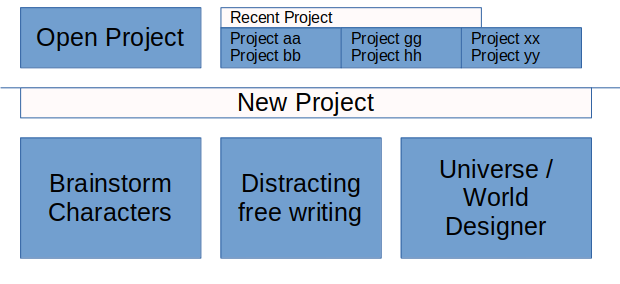
I would propose to allow people to fast start e.g. with a tool from my Mockup and after that chose a template and save as Project. I propose a behavior like Notepad++ which allow to close an application without previously save the Project. Saving the Project with a name is only required if you close the Project or the auto-load last project settings is not active.
Mockup for 2 and 3 used on first start of Manuskript or a Project got closed.

5. Adding a page and finding out how to put cursor into the page so it allows to add the text is a real struggle.
This was (and is) my greatest difficulty. I think there should be a frame, Word or Writer style, so that the user knows where to put the cursor and where the text margins are.
PS: Thank you all very much for this software, I have been a user of Linux Mint and other distros for many years. For those of you who are still stuck on Windows I would recommend starting little by little. You won't regret it.
Regards.
