

 olikraus
SSD1306 96X39
Hi!
I have some of these displays.
I did try the U8G2_SSD1306_96X40_1_HW_I2C constructor but it skips every other line. The U8G2_SSD1306_128X64_NONAME_1_HW_I2C displays correctly, but the 0,0 point is way off the corner of the screen.
Is easy to add support for this one? Or any pointers on how to create one myself?
Thanks!

How will your displays work with U8G2_SSD1306_96X40_1_HW_I2C constructor?
but the 0,0 point is way off the corner of the screen.
You could change the offset for your display in your local copy of the init sequence: https://github.com/olikraus/u8g2/blob/a6843a12e1a7388f32eac88b832c25310e99a508/csrc/u8x8_d_ssd1306_128x64_noname.c#L50
Is easy to add support for this one?
If the above 96x40 works, then I could just create a copy of that constructor...

Yes I did try the U8G2_SSD1306_96X40_1_HW_I2C since it's closest to my display size, but I get the every other line problem:
#include <Arduino.h>
#include <U8g2lib.h>

#include <Wire.h>

U8G2_SSD1306_96X40_1_HW_I2C u8g2(U8G2_R0, 5);

void setup() {
  // put your setup code here, to run once:
  u8g2.begin();
}

void loop(void) {
  u8g2.clearBuffer();          // clear the internal memory
  u8g2.setFont(u8g2_font_ncenB08_tr); // choose a suitable font
  u8g2.drawStr(0,10,"Hello World!");  // write something to the internal memory
  u8g2.sendBuffer();          // transfer internal memory to the display
  delay(1000);
}
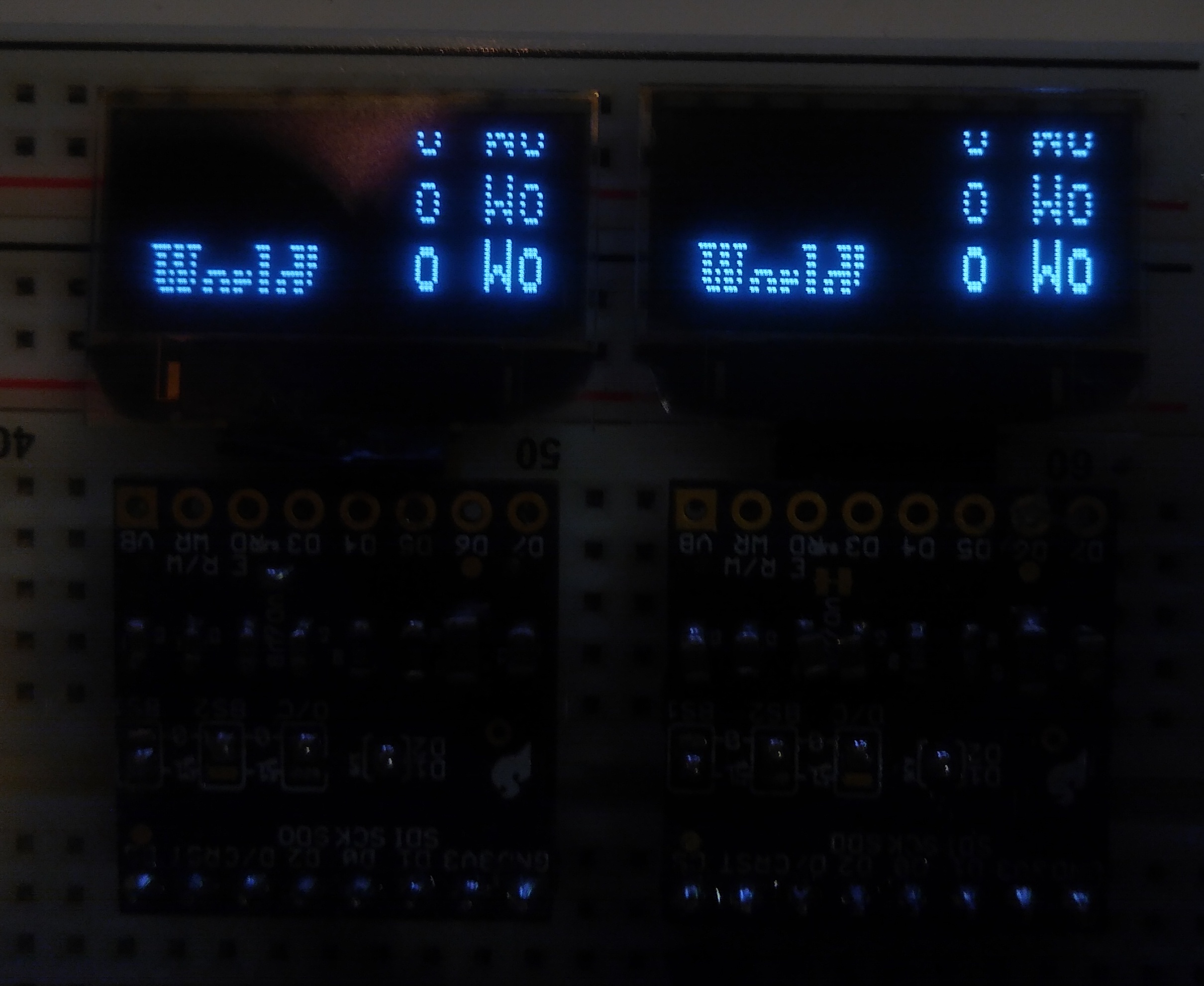
Thanks for the tip about the init sequence. I think I'll just do that for now. I was afraid I'd just be wasting memory on a bigger screen buffer, since I will be running 12 of these displays off one ESP32.
Instead of changing the original file, you could also send commands directly to the display with the "u8g2.sendF()" (https://github.com/olikraus/u8g2/wiki/u8g2reference#sendf) command. The alternating line topic is configured with the "0xda" command (see the ssd1306 datasheet). It probably should look like this after the .begin() command:
u8g2.sendF("ca", 0xda, 0x02);
Maybe you need to add a different y offset:
u8g2.sendF("ca", 0xd3, offset);
Hi. Thanks for your detailed reply. When I was searching for this "every other line" issue, there are several posts out there that claim that it's a result of a broken display controller. At least now I know my gear is working OK!
Using the U8G2_SSD1306_96X40_1_HW_I2C constructor I have tried playing around with various combinations of commands 0xC0/0xC8, and setting bits 4 and 5 of 0xDA but I can't get 0,0 to appear at the top.
I can change the Y offset so Y=0 appears at the top row of the screen, but the left column of pixels are always X=32.
I could probably deal with this but half the screens in my project need to be rotated 180, and when I do that the drawing positions are different...
I read the FAQ and thought this could be a SH1106, even though the manufacturer says SSD1306. U8G2_SH1106_128X64_NONAME_1_HW_I2C works a little better - now the columns X=0 and X=1 are off the side of the screen. X=2 is the leftmost column of visible pixels.
Is there any way of figuring out which controller I have?
At any rate, I would still like to get the rotation working properly so I don't have to draw the screen two different ways.
Thanks for your continued support!
Is there any way of figuring out which controller I have?
Difficult in general. The SH1106 has 132 columns, the SSD1306 only 128.
but the left column of pixels are always X=32.
It can be configured: https://github.com/olikraus/u8g2/blob/a6843a12e1a7388f32eac88b832c25310e99a508/csrc/u8x8_d_ssd1306_128x64_noname.c#L353
I would still like to get the rotation working properly
Let me know which additional commands are required for your display (sendF), then I will create a constructor for your display with the correct dimensions. After that we will work on the rotation.
Thanks very much!
On line 353, I changed the default_x_offset to 32
and do u8g2.sendF("ca", 0xd3, 39); in the setup().
Now I can do u8g2.drawFrame (0,0,96,39); and it fills the display. Great!
I did a couple more experiments regarding the rotation.
Using U8G2_R0 the coordinates are correct and u8g2.drawFrame (0,0,96,39); draws a box around the edge of the display.
With U8G2_R2, I get the same box with u8g2.drawFrame (32,25,96,39);
Thank you
If the rotation is setup correctly, then the drawFrame command should have the same arguments for R0 and R2.
So I will use U8G2_SSD1306_96X40 as a starting point, right?
I have created a new constructor U8G2_SSD1306_96X39...
Can you test this beta release? Especially the u8g2 FlipMode test: There should be a solid frame at the display border all the time...
You can download the latest U8g2 beta release from here: https://github.com/olikraus/U8g2_Arduino/archive/master.zip Arduino IDE:
- Remove the existing U8g2_Arduino library (https://stackoverflow.com/questions/16752806/how-do-i-remove-a-library-from-the-arduino-environment)
- Install the U8g2_Arduino Zip file via Arduino IDE, add zip library menu (https://www.arduino.cc/en/Guide/Libraries).
PlatformIO:
platformio.ini (https://docs.platformio.org/en/latest/projectconf/section_env_library.html#lib-deps) should include
lib_deps =
  u8g2=https://github.com/olikraus/U8g2_Arduino/archive/master.zip
OK! Thanks! I don't think I will be back at my bench until the weekend, but I will test it out then!
I used the 128X64 noname as a starting point. The 96X40 constructor resulted in "every other line". I tried messing with 0xDA and 0xC0/0xC8 but I couldn't ever get it to display solid.
Oh, you mean I should have better used the 128x64 init Code? Which constructor did you exactly use with which sendF command? Maybe you can post the code itself?
Yes, I was using the 128x64. I will try again with the 96X40 though. I might not get a chance to do it for a couple of days but I will certainly get back to you ASAP!
OK! Plans changed and I had a bit of time to get back here and mess around with it. I'm using the U8G2_SSD1306_96X39_F_HW_I2C constructor from your beta release. Long story short, I can get the display to work properly! but setFlipMode and setDisplayRotation have a one pixel Y offset from each other.
The X axis is OK. with no sendF I get "every other line" in the Y axis. To get a full frame I had to do the two sendF commands in the below listing. A shortened version of your FlipMode sketch.
#include <Arduino.h>
#include <U8g2lib.h>
#include <Wire.h>

U8G2_SSD1306_96X39_F_HW_I2C u8g2(U8G2_R0, 15);

void setup(void) {
  u8g2.begin();
  u8g2.sendF("ca", 0xDA, 0x10);       // cures "every other line"
  u8g2.sendF("ca", 0xD3, -1);         // cures Y offset
  u8g2.setFont(u8g2_font_6x10_tr);
}

void draw(const char *s)
{
  u8g2.firstPage();
  do {
    u8g2.drawStr(2,15,"Hello World!");
    u8g2.drawStr(2,30,s);
    u8g2.drawFrame(0,0,u8g2.getDisplayWidth(),u8g2.getDisplayHeight() );
    u8g2.drawStr(2, 45, u8x8_u16toa(u8g2.getDisplayWidth(), 5));
    u8g2.drawStr(2, 60, u8x8_u16toa(u8g2.getDisplayHeight(), 5));
  } while ( u8g2.nextPage() );
  delay(2000);
}

void loop(void) {
  u8g2.clearDisplay();
  u8g2.setDisplayRotation(U8G2_R0);
  u8g2.setFlipMode(0);
  draw("R0,F0");
//  u8g2.clearDisplay();
//  u8g2.setFlipMode(1);
//  draw("R0,F1");

  u8g2.clearDisplay();
  u8g2.setDisplayRotation(U8G2_R1);
  u8g2.setFlipMode(0);
  draw("R1,F0");
//  u8g2.clearDisplay();
//  u8g2.setFlipMode(1);
//  draw("R1,F1");

  u8g2.clearDisplay();
  u8g2.setDisplayRotation(U8G2_R2);
  u8g2.setFlipMode(0);
  draw("R2,F0");
//  u8g2.clearDisplay();
//  u8g2.setFlipMode(1);
//  draw("R2,F1");

  u8g2.clearDisplay();
  u8g2.setDisplayRotation(U8G2_R3);
  u8g2.setFlipMode(0);
  draw("R3,F0");
//  u8g2.clearDisplay();
//  u8g2.setFlipMode(1);
//  draw("R3,F1");
}
With this sketch, setDisplayRotation rotates the display perfectly:
https://user-images.githubusercontent.com/33075175/191607044-cc0fe962-9f4e-48b6-8a20-e3c4bf15bfe2.mp4
If I uncomment the setFlipMode commands from the sketch, they give me a Y offset of 1:
https://user-images.githubusercontent.com/33075175/191607664-bc14f7ee-9082-43b9-9a8d-c5f6bf6f982d.mp4
If I use that second sendF command to set the Y offset to 0 instead of -1, the setFlipMode commands rotate the display properly but the setDisplayRotation gives me an offset of 1 again.
I guess in my application, setFlipMode would be the better option, since the hardware supports it?
Also. One more question. Is it possible to have a 4-wire SPI version of this constructor? I am driving 12 displays with this project, and turns out that I2C is too slow. At least I could not get it to go above 800kHz on an ESP32.
Thanks so much for your time!
I guess in my application, setFlipMode would be the better option, since the hardware supports it?
yes, I will look into it.
Also. One more question. Is it possible to have a 4-wire SPI version of this constructor?
It should be included already. All these constructors are automatically created. It should be listed in the .h file and called 4W_HW_SPI or so. Let me know if you don't find it.
I have created a new beta 2.34.2. Thanks for the videos, however I am still a little bit lost of what all is required and whether it new works? Can you run the unmodified flipmode example with all 8 states and send me the result here if it still doesn't work?
You can download the latest U8g2 beta release from here: https://github.com/olikraus/U8g2_Arduino/archive/master.zip Arduino IDE:
- Remove the existing U8g2_Arduino library (https://stackoverflow.com/questions/16752806/how-do-i-remove-a-library-from-the-arduino-environment)
- Install the U8g2_Arduino Zip file via Arduino IDE, add zip library menu (https://www.arduino.cc/en/Guide/Libraries).
PlatformIO:
platformio.ini (https://docs.platformio.org/en/latest/projectconf/section_env_library.html#lib-deps) should include
lib_deps =
  u8g2=https://github.com/olikraus/U8g2_Arduino/archive/master.zip
I knew I could have explained that better!
The previous beta you posted is perfectly usable for me in its current state using FlipMode only.
I was just posting those to illustrate that I could get either setFlipMode OR setDisplayRotation to work, but not both at the same time without doing some sendF. For other people that might use this display.
To be honest I'm not 100% sure what the difference is between flipMode and setDisplayRotation, but I am very thankful that you did this!
I will test in the next couple of days once I am back home.
Thank you!
The previous beta you posted is perfectly usable for me in its current state using FlipMode only.
We can keep everything as it is at the moment, however it would be great if setFlipMode and setDisplayRotation would work.
To be honest I'm not 100% sure what the difference is between flipMode and setDisplayRotation, but I am very thankful that you did this!
Both are kind of redundant, but flipMode uses a hardware feature of the display (if available). Display rotation can be used if the display hardware doesn't support 180 degree flipping or if 90 degree or mirror display mode are required. (Mirror mode had been requested by some funny DIY projects which use a real physical mirror.)
Ideally both should work in parallel
Got back and had a chance to test. Here is a video of the unaltered FlipMode sketch running:
https://user-images.githubusercontent.com/33075175/192171164-fed31a72-ac8b-4560-9790-12232cb1f3f9.mp4
Looks like there is a way of getting it to display correctly in all orientations, but you need to use a combination of flipmode and rotation to get it done.
This will work great for me as-is, but I'm of course happy to do any more testing if you want to send any more beta builds to make those functions work the same as for the other constructors.
Thanks for the video. Let's do a final attempt. I have modified the y delta for F0 by 1.
I have created beta 2.34.3...
You can download the latest U8g2 beta release from here: https://github.com/olikraus/U8g2_Arduino/archive/master.zip Arduino IDE:
- Remove the existing U8g2_Arduino library (https://stackoverflow.com/questions/16752806/how-do-i-remove-a-library-from-the-arduino-environment)
- Install the U8g2_Arduino Zip file via Arduino IDE, add zip library menu (https://www.arduino.cc/en/Guide/Libraries).
PlatformIO:
platformio.ini (https://docs.platformio.org/en/latest/projectconf/section_env_library.html#lib-deps) should include
lib_deps =
  u8g2=https://github.com/olikraus/U8g2_Arduino/archive/master.zip
Hi Oli, thanks for the update. I had planned to get to this this week but my only 96X39 OLED met with an accident. I dropped a screwdriver on it and cracked it. Currently waiting for some more :(
https://user-images.githubusercontent.com/35333519/196889287-97fc34ef-df78-4559-9586-40233c9cf31e.mp4
hello! I recently came across this issue while testing by ordering the same display (different colors).
When using the flip mode example using the 2.34.4 version of the library, it works as above. I think the y-axis should go down 1 pixel..... I hope this helps.

Which constructor did you apply?
U8G2_SSD1306_96X39_1_HW_I2C u8g2(U8G2_R0, /* reset=*/ U8X8_PIN_NONE);
I didn't do any other settings. This is the result of uncommenting that line in the example and running it.
After u8g2.begin(): If you do a
u8g2.sendF("c", 0x41);
How will the same example look like?
I changed the example of u8x8 to the example of u8g2 and ran it again.
void setup(void) {
  u8g2.begin();
  u8g2.sendF("c", 0x41);
  u8g2.setFont(u8g2_font_6x10_tr);
}
https://user-images.githubusercontent.com/35333519/197373116-578cb172-7b29-4c46-be97-a801a4333e9e.mp4
Strange, somehow there seems to be no difference between the two videos. Flip mode 0 is wrong in both cases. Will there any change if you increase 0x41 to higher values? Maybe like 0x48 or even higher?
It didn't respond to values including 0x40. It's definitely weird. It was the same even if I looked at the datasheet and modified it according to the reference.
I think you have the option to either send that display or provide a simple RDP environment where the display is connected with an arduino that can be accessed remotely. Which one looks better?